
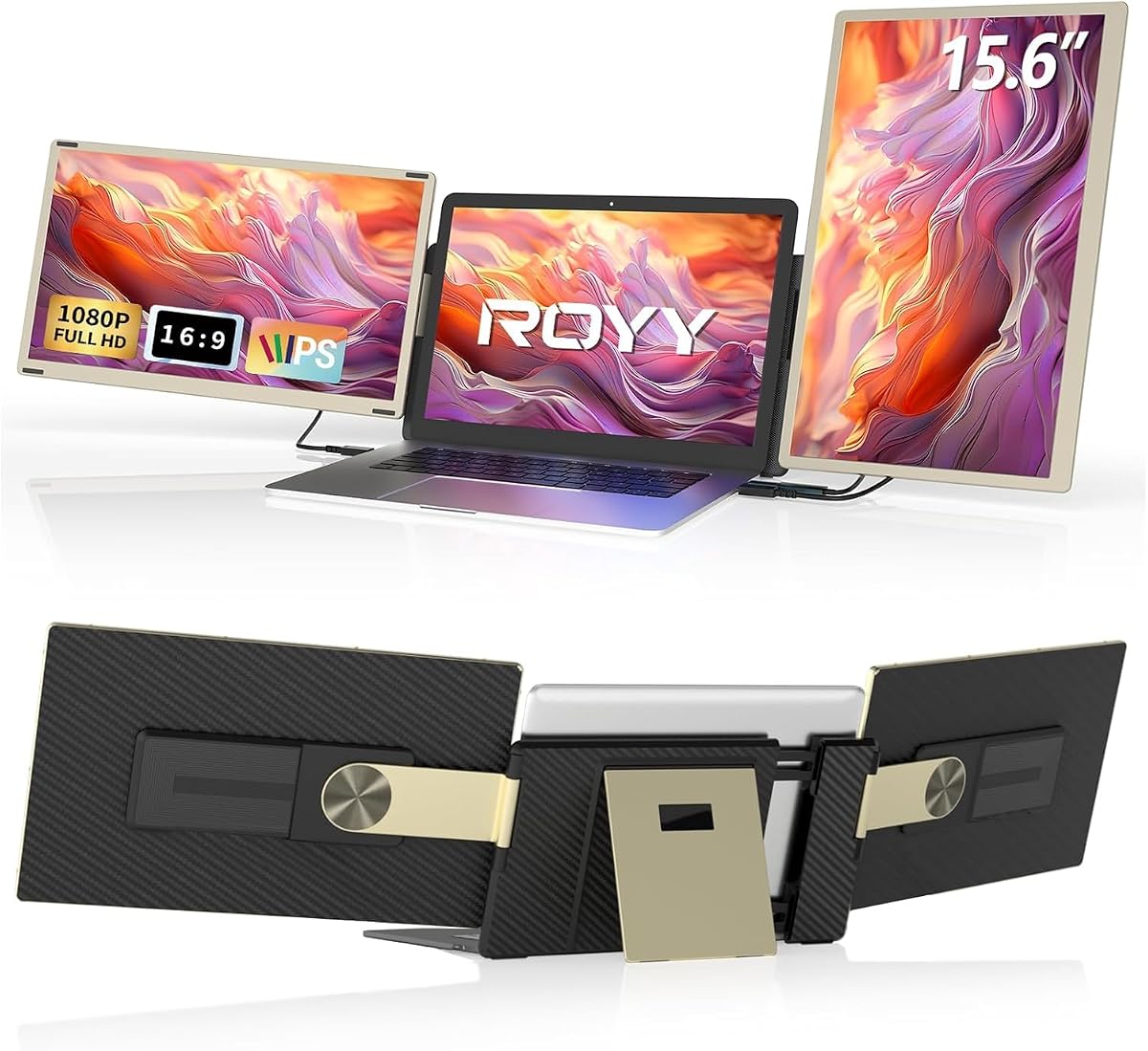
Triple-Monitor Laptop Extender: 15.6" FHD, 120% sRGB, 235° Rotation—What to Know
If you're eyeing a 15.6-inch detachable portable monitor to turn your laptop into a triple-screen workstation, this guide breaks down the key specs—120% sRGB, IPS FHD, and 235-degree rotation—and what they mean for your daily workflow, whether you're on a Mac, Windows, or Dex.
Key Considerations Before Buying
- Portability vs. screen size: A 15.6-inch panel adds significant bulk and weight—check that your laptop bag fits the extra width and that your desk supports the clamp or stand.
- Detachable design: The 'detachable' feature means you can use the screen independently, but verify the mounting mechanism is sturdy enough for your laptop's thickness (13-17 inches) and won't wobble during typing.
- Color accuracy: The 120% sRGB rating is great for photo editing or design, but ensure your laptop's GPU can drive the extra display at full resolution without lag—older models may struggle.
What Our Analysts Recommend
Look for IPS panels with a wide viewing angle (178 degrees is standard) and a brightness of at least 300 nits for outdoor or bright office use. Check the connection type—USB-C with DisplayPort Alt Mode is ideal for a single-cable setup, but HDMI compatibility is a must for older laptops. Also, verify the rotation mechanism (235 degrees) is smooth and locks into place to avoid screen flop.
Monitors Market Context
Market Overview
The portable monitor market has exploded with remote work and digital nomads, with 15.6-inch FHD panels being the sweet spot for productivity. Brands are differentiating on color gamut, refresh rate, and multi-device compatibility, but reliability varies widely—this product's 4.22-star average reflects a competitive but inconsistent segment.
Common Issues
Common complaints in this category include flimsy mounting clips that scratch laptop lids, poor color calibration out of the box, and flickering or dropped signals when using USB-C hubs. Also, many users report that 'detachable' screens lack a battery, so they drain the laptop's battery faster than expected.
Quality Indicators
Quality in this category is signaled by a solid aluminum or reinforced plastic body, a hinge with positive stops, and a panel that maintains color consistency across brightness levels. Look for certifications like TÜV Rheinland for eye comfort, and check if the manufacturer provides ICC color profiles—a sign of attention to color accuracy.
Review Authenticity Insights
Grade B Interpretation
The B grade and 15% estimated fake review rate mean that while the majority of the 947 reviews are genuine, a notable minority may be incentivized or unverified. The adjusted rating of 3.90/5 is more trustworthy, suggesting real-world performance is good but not stellar—likely due to minor issues like build quality or setup quirks.
Trust Recommendation
We recommend reading 3-star and 4-star reviews specifically, as they often highlight the most balanced pros and cons. Also, cross-reference the product on YouTube or tech forums to see if the advertised 235-degree rotation and 120% sRGB actually hold up in real tests.
Tips for Reading Reviews
When scanning reviews, ignore generic praise like 'great product' without specifics. Instead, focus on reviews that mention the mounting mechanism, cable connectivity, and color accuracy—these are the pain points for this product type. Also, look for photos or videos in reviews to verify the actual build and screen bezel size.
Expert Perspective
From an expert standpoint, this triple-monitor extender offers compelling specs—120% sRGB and 235-degree rotation—at a price point that undercuts many competitors. The 4.22 rating, adjusted to 3.90, indicates that most users are satisfied, but the 15% fake review rate is a red flag that the product may not be as flawless as the initial score suggests. The detachable design is a differentiator, but it also introduces potential weak points in the mounting mechanism.
Purchase Considerations
Weigh the convenience of a detachable screen against the risk of a less secure attachment. If you frequently move between desks, the portability is a plus, but if you plan to use it as a permanent second monitor, a fixed dual-screen setup might be more stable. Also, consider your laptop's battery life—this extender will drain it faster, so a USB-C PD passthrough is a must-have.
Comparing Alternatives
Shoppers should compare this with other 15.6-inch portable monitors from brands like ASUS ZenScreen or Lepow, which may offer better build quality or a lower price. Also, check if the 235-degree rotation is a gimmick—most users need only 90 degrees of tilt, so prioritize a sturdy hinge over a fancy rotation range.






