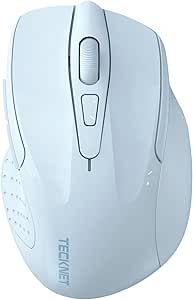
Evaluating TECKNET's triple-connectivity mouse for ergonomic comfort and silent operation
The TECKNET Wireless Mouse presents a feature-rich package with Bluetooth 5.3/5.0 and 2.4GHz connectivity options, making it particularly relevant for users switching between multiple devices. Its rechargeable design and advertised quiet clicks position it as a modern office peripheral, while the six adjustable DPI settings and side scroll functionality suggest versatility for both productivity and casual use. Canadian buyers should pay special attention to how its ergonomic shape matches their hand size and grip style.
Key Considerations Before Buying
- The triple connectivity (BT5.3/5.0 and 2.4GHz) offers flexibility but requires verifying compatibility with your specific devices, especially older computers that might not support Bluetooth 5.3.
- Rechargeable batteries in mice can be convenient but assess the battery life claims and charging method—some users prefer replaceable AA/AAA batteries for immediate swaps during long work sessions.
- The 'quiet clicks' feature may reduce office disturbance, but test whether the tactile feedback remains sufficient for your typing rhythm and gaming needs if applicable.
What Our Analysts Recommend
Examine the build quality around the scroll wheel and side buttons, as these are common failure points in budget to mid-range mice. For ergonomic models like this TECKNET, check that the thumb rest area provides adequate support without causing strain during extended use. The DPI adjustment should offer noticeable precision changes without software lag, particularly when switching between the six preset levels.
Mice Market Context
Market Overview
The Canadian wireless mouse market is saturated with options ranging from basic $20 models to premium $100+ gaming peripherals, with TECKNET positioning itself in the value-focused segment. Current trends emphasize multi-device connectivity, longer battery life through efficient sensors, and hybrid designs that balance office ergonomics with casual gaming capabilities. The inclusion of Bluetooth 5.3 places this mouse at the newer end of the connectivity spectrum.
Common Issues
Wireless mice in this price bracket often suffer from inconsistent sensor performance on different surfaces, connectivity drops when switching between Bluetooth and 2.4GHz modes, and side buttons that lose responsiveness over time. Some ergonomic designs prioritize aesthetics over actual comfort, leading to wrist strain during all-day use. Rechargeable batteries may degrade faster than advertised, especially if frequently charged via USB while in use.
Quality Indicators
Look for precise sensor tracking without acceleration artifacts, consistent wireless performance at typical desk distances (up to 10 meters), and buttons with crisp actuation rather than mushy feedback. Quality ergonomic mice should support a natural hand position where fingers rest comfortably without overextension. The finish should resist fingerprint smudges and provide adequate grip without being overly textured.
Review Authenticity Insights
Grade B Interpretation
The 'U' grade and 0.00% fake review percentage indicate this product lacks sufficient review data for authenticity assessment, not necessarily that existing reviews are untrustworthy. With zero reviews on Amazon.ca, Canadian consumers have no peer feedback to evaluate real-world performance in local usage conditions. This absence of data is particularly significant for ergonomic products where comfort is highly subjective.
Trust Recommendation
Given the complete lack of verified purchase reviews, prioritize retailers with favorable return policies in case the ergonomics don't suit your hand. Look for independent reviews on technology blogs or YouTube channels that test mice specifically, paying attention to sensor performance and build quality assessments. Consider waiting for initial user feedback to surface before purchasing if you're sensitive to mouse shape or button placement.
Tips for Reading Reviews
When reviews eventually appear, focus on comments about battery life under actual usage patterns rather than manufacturer claims, and note any mentions of connectivity issues with specific operating systems common in Canada. Look for reviews discussing long-term comfort during 8+ hour work sessions, as brief testing won't reveal ergonomic flaws. Canadian reviewers may also mention performance in colder environments which can affect battery efficiency.
Expert Perspective
The TECKNET mouse's specifications suggest a competent multi-mode peripheral targeting users who value connectivity options over specialized performance. The inclusion of both newer Bluetooth 5.3 and legacy 2.4GHz connectivity is strategically smart for the Canadian market where users often have mixed-device environments. However, without any user reviews, the actual performance of its optical sensor, battery efficiency in real-world use, and true ergonomic benefit remain unverified. The seven-button layout with side scroll offers productivity potential, but implementation quality varies significantly in this price segment.
Purchase Considerations
Weigh the convenience of triple connectivity against potential reliability concerns with mode switching, and consider whether you truly need Bluetooth 5.3 or if 5.0 would suffice. The rechargeable feature eliminates battery purchases but ties you to charging intervals—assess whether your usage patterns support occasional wired use during charging. Since comfort is personal, verify the retailer's return policy allows testing the ergonomic shape adequately before committing.
Comparing Alternatives
Compare this model against similarly priced mice from Logitech, Microsoft, and Anker that have established review histories in Canada, particularly noting differences in warranty support and software customization options.
![Bluetooth Mouse,[Upgraded] Wireless Mouse Rechargeable,Tri-Mode (BT 5.0/4.0+2.4G Hz),Computer Mouse with Visible Battery Level, 4 Adjustable DPI, Portable PC Mouse for MacBook Chromebook,Black](https://m.media-amazon.com/images/I/61Yguek3pdL._AC_SY300_SX300_QL70_ML2_.jpg)