Choosing a 0.5M USB-A to USB-C Cable: Speed, Compatibility, and Build Quality
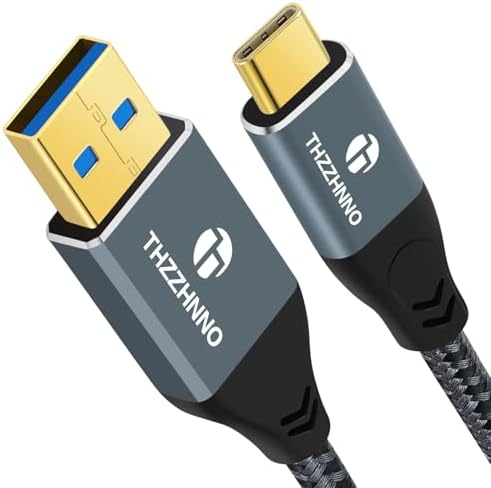
This 0.5-meter USB 3.2 Gen2 cable promises 10 Gbit/s data transfer speeds, bridging older USB-A ports with modern USB-C devices like the iPhone 15 and MacBook Pro. Buyers should understand that achieving these speeds depends on both the cable's specifications and the ports on your devices. The short length makes it ideal for desk use with power banks, laptops, or docking stations, but less suitable for charging from distant outlets.
Key Considerations Before Buying
- Verify your device's USB port version: This cable's 10 Gbit/s speed requires both a USB 3.2 Gen2 (or later) USB-A port on your computer/hub and a compatible USB-C device to reach its maximum potential.
- Assess the connector build: Look for a snug fit without being overly tight, as loose connections can interrupt data transfer and slow charging, especially with frequent plug/unplug cycles.
- Consider the 0.5M length practically: This half-meter cable is perfect for connecting a phone to a laptop on a desk or a power bank in a bag, but is too short for charging from a wall outlet across a room.
What Our Analysts Recommend
Quality indicators for this specific cable type include clear labeling of USB 3.2 Gen2 and 10 Gbit/s specifications, not just 'fast charging'. The connectors should have a robust, molded strain relief where the cable meets the plug to prevent the internal wires from breaking. For data transfer, reviews mentioning consistent speeds near 1 GB/s (the theoretical max for 10 Gbit/s) are a strong signal of proper construction.
USB Cables Market Context
Market Overview
The market for USB-A to USB-C cables is saturated, with vast differences in quality between basic charging cables and certified high-speed data cables like this 10 Gbit/s model. Many cables advertise high speeds but use cheaper internal wiring that cannot sustain the promised data rates, making verified performance reviews crucial.
Common Issues
Common problems include cables that only support slow USB 2.0 data speeds (480 Mbit/s) despite USB-C connectors, poor strain relief leading to fraying near the plugs, and incompatibility with certain device protocols that can trigger 'accessory not supported' warnings on iPhones or Samsung devices.
Quality Indicators
Beyond specifications, genuine quality is shown in consistent performance across multiple devices and over time. Cables that maintain fast data transfers and stable connections after months of use, as noted in long-term customer reviews, indicate superior materials and assembly compared to those that fail quickly.
Review Authenticity Insights
Grade B Interpretation
A Grade B authenticity rating with an estimated 11% fake review rate suggests the overall review sentiment is reliable, but requires careful reading. The adjusted rating of 4.60/5 (down from 4.89) is still excellent and likely reflects a core of genuine positive experiences, with some inflated praise filtered out.
Trust Recommendation
Focus on reviews that detail specific use cases, like transferring large video files between a camera and laptop or connecting a specific model of iPad Pro to a USB-A hub. Be slightly more skeptical of overly vague 5-star reviews that lack technical or experiential details, as these may constitute part of the estimated 11% questionable feedback.
Tips for Reading Reviews
For this technical cable, prioritize reviews that mention actual measured transfer speeds, compatibility with specific devices like the MacBook Pro M-series or Galaxy S23, and comments on physical durability over time. Reviews noting a snug, secure fit in the USB-A port are particularly valuable, as a loose connection is a common failure point.
Expert Perspective
The analysis data paints a picture of a genuinely high-performing cable. The high adjusted rating of 4.60/5 from a large sample of 1,459 reviews, even after accounting for authenticity concerns, is a strong positive signal in a category rife with low-quality options. The specific mentions of 10 Gbit/s performance in reviews align with the product's claimed USB 3.2 Gen2 specification, suggesting it delivers on its core promise for users with compatible hardware. The short 0.5m length is a deliberate design choice for data syncing and portable power, not a drawback.
Purchase Considerations
This cable is an excellent choice if you need a short, high-bandwidth bridge between a modern USB-C device and a computer or hub with a fast USB-A port. However, if your host USB-A port is only USB 2.0 or 3.0 (5 Gbit/s), you won't utilize the cable's full 10 Gbit/s potential, making a cheaper USB 3.0 cable a more cost-effective option. Also, consider if you need longer reach for wall charging.
Comparing Alternatives
Shoppers should compare this cable's performance claims and price against other certified USB 3.2 Gen2 cables, as well as longer-length options if the 0.5m form factor doesn't suit their primary use case.