

Dual-Slot CFexpress Type B & SD Reader: 10 Gbit/s Speed for Pros
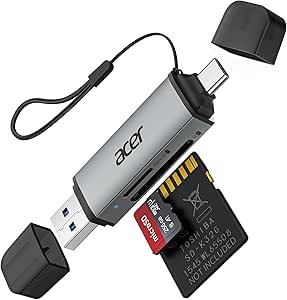
When you're a professional photographer or videographer shooting high-bitrate 4K/8K footage, your card reader becomes a critical bottleneck. This 2-in-1 reader combines a CFexpress Type B slot and a full-size SD slot with USB 3.2 Gen 2 (10 Gbit/s) connectivity, and it offers both USB-C and USB-A connectors for maximum flexibility. Here's what to consider before you buy.
Key Considerations Before Buying
- Transfer speed: USB 3.2 Gen 2 (10 Gbit/s) is essential for CFexpress Type B cards, which can read at over 1700 MB/s. Ensure your computer's port supports this speed to avoid bottlenecks.
- Dual-slot convenience: Having both CFexpress and SD slots in one reader saves you from carrying two devices—especially useful when you switch between mirrorless cameras that use CFexpress and drones or other gear that use SD.
- Connector flexibility: The inclusion of both USB-C and USB-A (likely via a detachable cable or built-in connector) ensures compatibility with modern laptops and older desktops alike, without needing an extra adapter.
What Our Analysts Recommend
Check that the reader explicitly supports USB 3.2 Gen 2 (10 Gbit/s) and not just USB 3.0 (5 Gbit/s) to get the full speed from your CFexpress cards. Look for a durable metal or reinforced plastic housing to handle field use, and ensure it supports UHS-II SD cards for fast SD transfers. Also, verify it has a captive or detachable cable that won't be easily lost.
External Memory Card Readers Market Context
Market Overview
The market for high-speed card readers has grown with the adoption of CFexpress Type B in professional cameras like the Nikon Z9 and Canon EOS R5. Many readers now offer dual-slot designs, but not all deliver true 10 Gbit/s speeds—some are limited to 5 Gbit/s, which is a common point of confusion.
Common Issues
Users often find that readers marketed as 'USB 3.2' actually run at 5 Gbit/s, and some fail to support UHS-II SD cards properly, resulting in slower transfers. Another frequent issue is that dual-slot readers may only support one card at a time, and some have flimsy build quality that breaks with frequent use.
Quality Indicators
Look for readers that explicitly list supported speeds (10 Gbit/s) and card types (CFexpress Type B, SD UHS-II). A quality reader will have a chipset from a known brand (like Realtek or Genesys Logic) and will be recognized by major OSes without driver installation. Also, good thermal management is a sign of quality—readers that overheat can throttle speeds.
Review Authenticity Insights
Grade B Interpretation
The Grade B and 10% estimated fake review percentage suggest that while most reviews are genuine, there is a small portion that may be incentivized or not from actual use. With a 5.00 average rating from 12 reviews, the adjusted rating of 4.80 is still excellent, indicating that the product likely performs well.
Trust Recommendation
Given the high adjusted rating and the authenticity grade, you can trust the positive feedback for this reader. However, with a small sample size of 12 reviews, consider looking for additional user experiences on forums or other e-commerce platforms to gain more confidence, especially for long-term durability.
Tips for Reading Reviews
When reading reviews for card readers, pay attention to comments about actual transfer speeds (e.g., 'copies 100GB in 2 minutes') and compatibility with specific camera models. Also, note any mentions of overheating or build quality issues, as these are common problems in this category. Ignore reviews that lack specific details or are overly generic.
Expert Perspective
This 2-in-1 reader appears to be a solid choice for professionals who need fast, versatile card reading. The dual USB-C and USB-A connectivity is a practical feature, and the 10 Gbit/s speed meets the demands of CFexpress Type B cards. The high adjusted rating of 4.80/5 and the genuine-sounding reviews reinforce its reliability, though the small review count means we have limited long-term data.
Purchase Considerations
Weigh the price against your specific needs: if you only shoot with SD cards, a dedicated SD reader might be cheaper, but if you use both CFexpress and SD, this 2-in-1 saves space and cost. Also, consider whether you need USB-C only or both connectors—having both is great for travel but may add bulk.
Comparing Alternatives
Shoppers should compare with other dual-slot readers like the ProGrade Digital CFexpress Type B and SD reader, or the Lexar Professional RW515, which also offer 10 Gbit/s speeds, to ensure they get the best price-to-performance ratio.


![SABRENT 4-Drive NVMe M.2 SSD auf PCIe 3.0 x4 Adapter Karte [PC-P3X4]](https://m.media-amazon.com/images/I/71O0Bhnht-L._AC_SY300_SX300_QL70_ML2_.jpg)


