
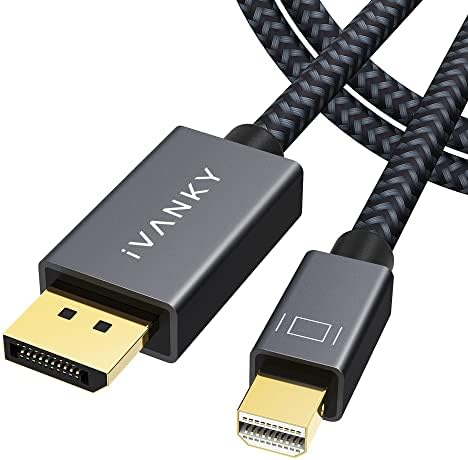
8K Mini DisplayPort to DisplayPort Cable: Speed and Build Quality Matter
When upgrading to high-resolution monitors, the cable connecting your device is just as critical as the display itself. The IVANKY Mini DisplayPort to DisplayPort cable supports up to 8K@60Hz and 4K@240Hz, making it a strong candidate for MacBook users seeking uncompromised video performance. Buyers should prioritize bandwidth capacity and connector durability to avoid signal loss or physical wear over time.
Key Considerations Before Buying
- Bandwidth and resolution support: This cable boasts 32.4 Gbps HD bandwidth, essential for driving 8K displays or high-refresh-rate 4K gaming. Ensure your source device and monitor both support these specs to fully leverage the cable's capabilities.
- Connector compatibility: Designed for Mini DisplayPort (Thunderbolt 2) to full-size DisplayPort, this cable is ideal for older MacBooks or PCs with Mini DP ports. Verify your laptop's port type—Thunderbolt 3/4 uses USB-C, not Mini DP.
- Build quality and longevity: With an aluminum housing, braided shielding, and gold-plated connectors, this cable resists interference and physical stress. Such construction is crucial for frequent travel or permanent desk setups where cable fatigue is common.
What Our Analysts Recommend
Look for certified cables that specify VESA DisplayPort compliance and high data transfer rates. Gold-plated contacts and braided exteriors indicate better shielding against electromagnetic interference, while aluminum housings enhance heat dissipation and connector durability.
DisplayPort Cables Market Context
Market Overview
The DisplayPort cable market is rapidly evolving to support 8K and high-refresh-rate 4K displays, with bandwidth requirements climbing past 32 Gbps. Many consumers are upgrading from older HDMI or standard DP cables, driving demand for future-proofed options like this IVANKY model that handle both legacy Mini DP and modern DP connections.
Common Issues
Common problems include incompatible port types (e.g., Mini DP vs. USB-C), insufficient bandwidth causing display flickering or black screens, and poor build quality leading to loose connections. Users often overlook cable length limitations—longer cables can degrade signal integrity at high resolutions.
Quality Indicators
High-quality cables feature braided shielding, reinforced connector heads, and certification marks (e.g., VESA). Look for user reviews that mention long-term reliability and consistent performance at max resolution and refresh rate, as these are strong signals of genuine product quality.
Review Authenticity Insights
Grade B Interpretation
With a Review Authenticity Grade of B and an estimated 10% fake review rate, the IVANKY cable's feedback is largely trustworthy but warrants some caution. This means about 9 out of 10 reviews are likely genuine, giving you a solid foundation for decision-making, though a small minority may be incentivized or fabricated.
Trust Recommendation
Given the high average rating of 4.89/5 and adjusted rating of 4.60/5, you can generally trust positive feedback, but pay extra attention to verified purchase tags and detailed technical comments. Focus on reviews that describe specific use cases, such as 8K or 240Hz performance, as these are harder to fake.
Tips for Reading Reviews
For DisplayPort cables, prioritize reviews that mention exact monitor models, refresh rates, and cable length used. Be skeptical of overly brief or vague praise, and look for balanced critiques that note minor issues like stiffness or connector fitment—these often indicate real user experience.
Expert Perspective
The IVANKY Mini DisplayPort to DisplayPort cable stands out for its high bandwidth and robust build, making it a reliable choice for demanding setups. The strong review authenticity (Grade B) and high adjusted rating of 4.60/5 suggest consistent real-world satisfaction, particularly among MacBook users needing 8K or high-refresh 4K output. However, the 10% fake review rate reminds buyers to cross-check feedback with technical specs and their own hardware compatibility.
Purchase Considerations
Consider this cable if you own a MacBook or PC with a Mini DisplayPort and need to drive an 8K or 240Hz 4K monitor. Its premium materials justify the price for professional or gaming use, but ensure your devices support the required bandwidth—older hardware may not benefit from the full 32.4 Gbps speed.
Comparing Alternatives
Shoppers should compare this with USB-C to DisplayPort cables if using newer laptops, or with longer-length variants if your setup requires more than 1 meter. Always verify port types and resolution goals before committing.
![Cable Matters [Certificado por VESA] 40 Gbps Cable USB C a DisplayPort 2.1-2 m, compatible con DP40, 8K@120 Hz/4K@480 Hz (Thunderbolt 4 a DisplayPort) Negro - No apto para monitor USB-C portátil](https://m.media-amazon.com/images/I/41i+HS2WEeL._SX342_SY445_QL70_ML2_.jpg)


![Silkland 16K Cable DisplayPort 2.1[Certificado VESA], 4K@240Hz/165Hz/144Hz, 8K@165Hz, 2K@360Hz, 54Gbps Cable DP 2M Compatible con FreeSync, G-Sync, HDR para PC, Monitor, Tarjeta Gráfica 5090, Gaming](https://m.media-amazon.com/images/I/41FImpuPPCL._SX342_SY445_QL70_ML2_.jpg)


