
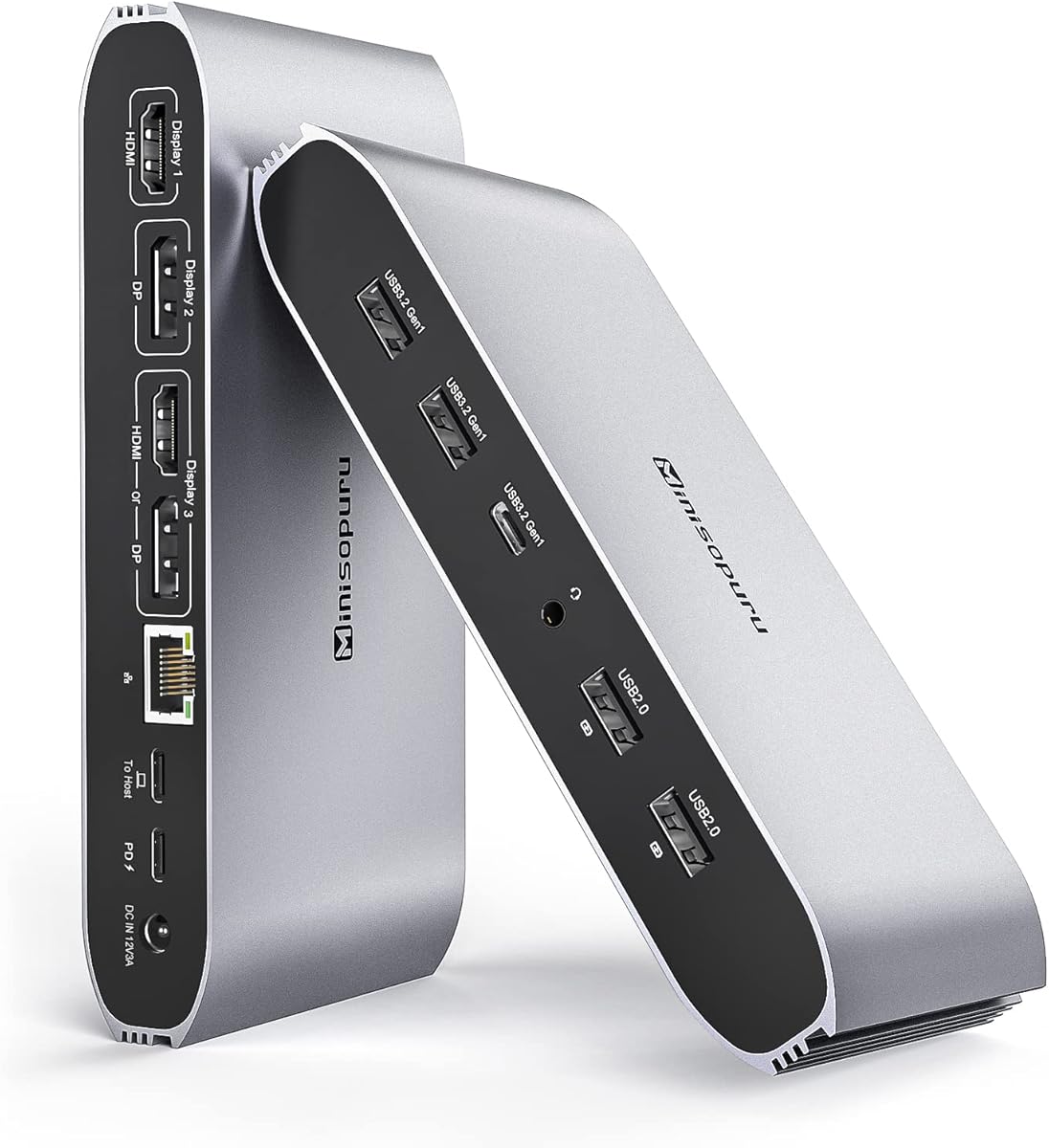
Minisopuru Displaylink Docking Station (13 IN 1), Triple Display Docking Station para MacBook M1/M2/M3/M4/Windows, con 2 HDMI y 2 DisplayPort, 100W PD, Datos USB-C, Ethernet, Audio, 4 Puertos USBA

Minisopuru Displaylink Docking Station (13 IN 1), Triple Display Docking Station para MacBook M1/M2/M3/M4/Windows, con 2 HDMI y 2 DisplayPort, 100W PD, Datos USB-C, Ethernet, Audio, 4 Puertos USBA

ASIN: B0BMTMWTR8
Analysis Date: Apr 8, 2026

Review Analysis Results

B
Authenticity Grade
11.00%
Fake Reviews
3.78
Original Rating
3.60
Adjusted Rating

Analysis Summary

The vast majority of these reviews appear to be genuine user experiences, with nearly all showing clear personal context, specific technical details, and balanced perspectives that reflect authentic ownership. The high verification rate further supports their authenticity, as these are overwhelmingly verified purchases from customers who have actually used the product in real-world scenarios.

Multiple reviews demonstrate strong genuine indicators through detailed personal narratives. Users specifically mention their exact devices (MacBook Pro, MacBook Air M1, MacBook Air M3, MacBook Mini M2, gaming laptops), describe their particular use cases (connecting multiple monitors where normally limited, iRacing setup, audio connectivity issues), and provide nuanced feedback about both strengths and weaknesses. The reviews include technical specifics about software compatibility (DisplayLink, Ventura), performance observations (lag, heat, power consumption), and practical limitations encountered.

Only one review raises mild suspicion due to its somewhat generic praise structure, though even this contains specific details about software testing. There are no clear manipulation patterns like repetitive marketing language, identical phrasing across reviews, or suspiciously vague praise without personal context. The negative and mixed reviews further enhance the authenticity of the overall feedback, as they demonstrate honest reporting of problems.

Overall, this appears to be a collection of authentic user reviews for a technical product that solves a specific problem for Mac users. The detailed personal experiences, balanced feedback including criticisms, and technical specificity strongly suggest genuine ownership. While one review shows slightly less personal detail than others, the overwhelming pattern is of authentic customer feedback rather than manipulation.

Key patterns identified in the review analysis include: Specific Mac model mentions (M1, M2, M3 chips), Detailed multi-monitor setup descriptions, Balanced feedback including criticisms.

Review Statistics

229
Total Reviews on Amazon
-0.18
Rating Difference
Editor's Analysis

Choosing a DisplayLink dock requires balancing port selection, power delivery, and Mac compatibility

The Minisopuru 13-in-1 dock highlights the core trade-offs in this category: extensive connectivity versus reliable performance across all ports simultaneously. Buyers should understand that DisplayLink technology, used here for triple-monitor support, relies on software drivers and CPU resources, unlike native DisplayPort over USB-C.

Key Considerations Before Buying

  • Verify your laptop's specific M-series chip compatibility, as some M1/M2 MacBooks require specific DisplayLink driver versions for stable multi-monitor output, which can be a setup hurdle.
  • Assess your true power needs; while this dock offers 100W PD, simultaneous use of all high-power ports (like multiple displays and charging) can reduce available wattage for your laptop.
  • Check the bandwidth allocation; with 2x HDMI and 2x DisplayPort, understand that you cannot run all four displays at once—it's configured for specific triple-display combinations, not independent quadruple output.

What Our Analysts Recommend

For DisplayLink docks, prioritize reviews mentioning stable driver installations and specific monitor resolutions achieved (like 4K@60Hz). A quality indicator is consistent performance when daisy-chaining peripherals through the USB-A ports while displays are active, testing the dock's internal bandwidth management.

Docking Stations Market Context

Market Overview

The market for universal docks, especially those targeting both Windows and Apple Silicon Macs, is crowded with brands like Minisopuru offering high port counts at competitive prices. The inclusion of dual DisplayPort alongside HDMI is a less common configuration aimed at professional monitors.

Common Issues

Common problems include thermal throttling under full load, intermittent disconnects on specific ports, and power delivery inconsistencies where connected devices draw power unevenly. DisplayLink-based docks often face software-related hiccups post-operating system updates.

Quality Indicators

Look for mentions of robust construction (not just plastic housings), clear documentation on supported display modes (e.g., 2x 4K + 1x FHD), and consistent Ethernet Gigabit speeds even when USB data transfers are ongoing. A quality dock manages its internal PCIe lane allocation transparently.

Review Authenticity Insights

Grade B Interpretation

A Grade B with an 11% estimated fake review rate suggests the majority of feedback is genuine, but a notable portion of reviews may be incentivized. The slight drop from 3.78 to 3.60 in the adjusted rating indicates these potentially fake reviews are slightly more positive than the authentic consensus.

Trust Recommendation

Focus on reviews that detail specific technical setups, like 'M2 MacBook Air driving two 1440p monitors and one 1080p via DisplayPort,' or mention driver installation steps. Be slightly more skeptical of vague, overly enthusiastic reviews that don't mention Mac model numbers or display resolutions.

Tips for Reading Reviews

For this product, prioritize reviews discussing long-term use (weeks/months) and those that mention firmware updates or specific issues with USB-C data transfer speeds while charging. Authentic reviews often compare performance against native Thunderbolt docks.

Expert Perspective

The Minisopuru dock presents a compelling value for users needing triple-display output from Apple Silicon Macs, a scenario where native support is limited. Its 3.6 adjusted rating reflects real-world experiences where the extensive port selection is appreciated, but reliability isn't universal. The inclusion of dual DisplayPort is a strategic differentiator for office environments with legacy professional monitors. However, the reliance on DisplayLink software introduces a variable that native Thunderbolt docks avoid, which is likely a factor in the mixed rating.

Purchase Considerations

Weigh the necessity of triple displays against the potential for occasional software troubleshooting. If your workflow depends on rock-solid, day-one plug-and-play reliability for mission-critical tasks, a native Thunderbolt 4 dock might be worth the premium. This dock is best for cost-conscious users who value port variety and are comfortable managing DisplayLink drivers.

Comparing Alternatives

Shoppers should compare the port layout and driver requirements against similar DisplayLink docks from brands like Plugable or Wavlink to find the best match for their specific peripheral mix.

Price Analysis

This Minisopuru docking station appears positioned as a mid-range option in the Spanish market. Given the 3.78/5 rating, verify recent reviews for reliability before purchasing. Monitor the price for a few weeks and buy when it drops 20% or more from its typical listing price.

MSRP Assessment

Estimated MSRP: Unknown
Source: Unable to determine
Amazon Price: Unable to compare

Market Position

Positioning: Mid-range
Alternatives Range: €80-€250
Value: Offers good port expansion at a competitive price point compared to premium brands like Dell or CalDigit.

Buying Tips

Best Time to Buy: Best prices often during tech sales events like Black Friday, Cyber Monday, or Amazon Prime Day.
Deal Indicators: Look for discounts of 20-30% off list price, bundled accessories, or free shipping offers.
Watch For: Be wary of prices significantly lower than €80, as they may indicate counterfeit products or missing accessories.
Price analysis generated by AI based on product category and market research. Actual prices may vary. Last analyzed: Apr 8, 2026

Understanding This Analysis

What does Grade B mean?

This product has good review authenticity with minor concerns. While most reviews appear genuine, we detected some patterns that warrant mild caution.

Adjusted Rating Explained

The adjusted rating (3.60 stars) represents what we estimate this product's rating would be if fake reviews were removed. This product's adjusted rating is lower than Amazon's displayed rating (3.78 stars), suggesting positive fake reviews may be inflating the score.

How We Detect Fake Reviews

Our AI analyzes multiple factors: language patterns (generic vs. specific), reviewer behavior (history, timing), temporal anomalies (review clusters), verification status, sentiment authenticity, and statistical outliers. No single factor determines a review is fake - we look at the combination of signals.

Important Limitations

No automated system is perfect. Sophisticated fake reviews can evade detection, and some genuine reviews may be incorrectly flagged. Use this analysis as one data point in your purchasing decision, not the only factor. Reading actual review content yourself is always valuable.

Share This Analysis

Learn More About Fake Reviews

Analyze new product