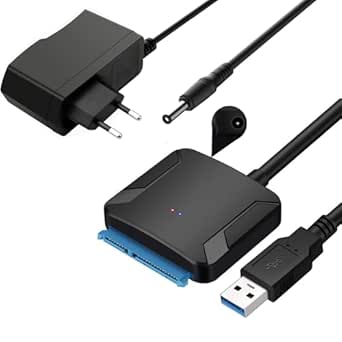
SATA-USB 3.0 Adapter: Power Your 3.5" HDDs with 12V/2A UASP Support
If you're looking to connect a 2.5-inch SSD or a 3.5-inch mechanical hard drive to your laptop via USB, this adapter is a practical solution. The key differentiator here is the included 12V/2A power adapter, which is essential for 3.5-inch HDDs that require more power than USB can deliver. Understanding this distinction is crucial before buying any SATA-to-USB cable.
Key Considerations Before Buying
- Determine if you need external power: 2.5-inch drives (both HDD and SSD) can usually run on USB power alone, but 3.5-inch HDDs require the included 12V/2A adapter. This product includes it, so it's versatile for both sizes.
- Check UASP support: UASP (USB Attached SCSI Protocol) can significantly speed up data transfer on SATA III drives. This adapter supports UASP, but your computer and operating system must also support it for the benefit to kick in.
- Verify your drive's SATA interface: This cable is designed for SATA III (6 Gbps) drives, which are backward compatible with SATA I and II. Ensure your drive uses the standard 7-pin SATA data and 15-pin power connectors.
What Our Analysts Recommend
In a quality SATA-to-USB adapter, look for a chipset that reliably supports UASP and stable data transfer. Also, check that the power adapter provides the correct voltage and amperage (12V/2A for 3.5-inch drives) and that the cable is shielded to prevent data corruption.
SATA Cables Market Context
Market Overview
The market for SATA-to-USB adapters is crowded, with many cheap cables that lack power adapters or UASP support. This product stands out by including a 12V/2A adapter, which is a must-have for anyone working with 3.5-inch drives. Prices range from a few euros for basic cables to over 30 euros for high-end models with multiple connectors and power supplies.
Common Issues
The most common problems with this category are insufficient power for 3.5-inch drives, leading to drive not being recognized or data corruption. Another frequent issue is the lack of UASP support, which results in slower transfer speeds. Some cables also have flimsy connectors that break after repeated use.
Quality Indicators
A quality SATA-to-USB adapter typically has a robust build, a chipset from a reputable manufacturer (like JMicron or ASMedia), and a power adapter with proper certifications. Look for cables with thick gauge wiring and connectors that fit snugly. Reviews that mention specific transfer speeds or successful use with large drives are good signs.
Review Authenticity Insights
Grade B Interpretation
The Grade B rating and 10% estimated fake review percentage indicate that while the majority of reviews are genuine, there is a small but notable portion that may be incentivized or non-verified. This is typical for popular products in this category, but it's wise to focus on detailed, verified purchase reviews.
Trust Recommendation
Given the high genuine rating of 4.89 and the adjusted 4.60 after removing suspicious reviews, you can trust this product's performance. However, be cautious of any reviews that seem overly generic or lack specifics about drive types or transfer speeds. Stick to the detailed reviews for reliable insights.
Tips for Reading Reviews
When reading reviews for SATA-to-USB adapters, pay attention to comments about specific drive models and operating systems. Look for examples of transfer speeds, as they indicate real-world performance. Also, note any issues with power delivery or drive recognition, as these are common pitfalls.
Expert Perspective
This SATA-to-USB 3.0 adapter is a solid choice for both 2.5-inch SSDs and 3.5-inch HDDs, thanks to its included 12V/2A power adapter and UASP support. The high genuine rating (4.89) and the relatively low fake review percentage (10%) suggest that actual users are satisfied with its performance. The adapter is likely to deliver reliable data transfer speeds, especially when used with a UASP-enabled host.
Purchase Considerations
Consider your drive's power requirements and whether you need UASP for faster transfers. If you're only using 2.5-inch SSDs, a simpler cable without power might suffice, but this product offers flexibility for future use with 3.5-inch drives. Also, check that your computer's USB 3.0 port can provide sufficient power if you plan to use the adapter without the external power supply for smaller drives.
Comparing Alternatives
While this adapter is highly rated, it's worth comparing it with other models that offer dual connectors (e.g., USB-C) or additional features like a built-in SATA port for cloning. However, for a straightforward, reliable SATA-to-USB solution with power, this is a strong contender.