
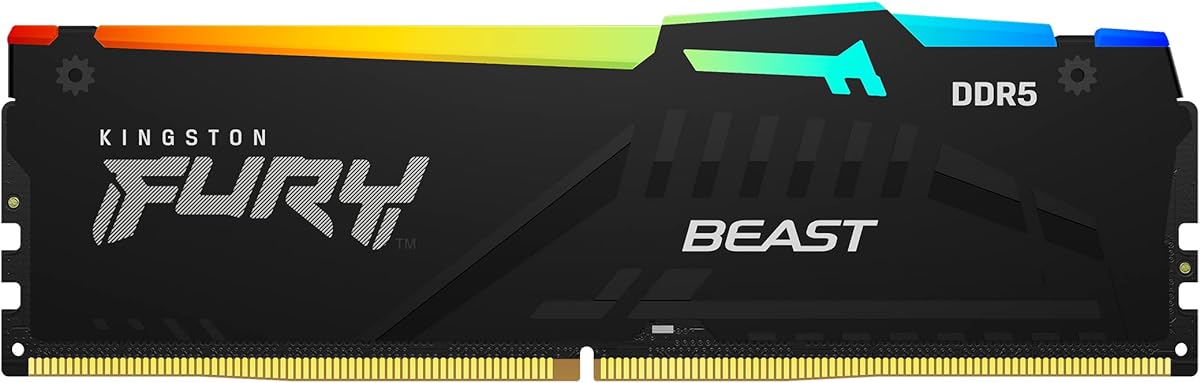
DDR5 RAM Buying Guide: Speed, Latency, and RGB for Gaming
When upgrading your desktop PC's memory, the Kingston FURY Beast DDR5 module offers a compelling blend of high-speed 6000MT/s performance and low CL30 latency, specifically optimized for AMD EXPO platforms. This guide focuses on what to look for in a single-module DDR5 kit, especially for gamers seeking a balance between raw speed and system stability.
Key Considerations Before Buying
- Single vs. Dual Channel: This is a single module (16GB), which means you won't benefit from dual-channel memory bandwidth. For optimal gaming performance, consider buying two identical modules to enable dual-channel mode.
- EXPO vs. XMP: This RAM uses AMD EXPO (Extended Profiles for Overclocking) for automatic overclocking. Ensure your motherboard supports EXPO to take full advantage of the 6000MT/s speed and CL30 timings without manual tuning.
- Latency Matters: The CL30 latency is excellent for DDR5, offering lower response times than typical CL36 or CL40 kits. This can improve frame pacing in games and reduce input lag.
What Our Analysts Recommend
For a gaming DDR5 module, prioritize speed (6000MT/s is a sweet spot for Ryzen CPUs), latency (CL30 or lower), and compatibility with your motherboard's memory overclocking profile. Also, check for heat spreader design and RGB implementation if aesthetics matter.
Memory Market Context
Market Overview
The DDR5 memory market is maturing rapidly, with speeds now commonly reaching 6000-7200MT/s. AMD's EXPO and Intel's XMP 3.0 profiles simplify overclocking, making high-performance RAM more accessible to mainstream gamers. Single-module kits like this are often entry points for budget builds or incremental upgrades.
Common Issues
A frequent issue with high-speed DDR5 is system instability when running at rated speeds, especially with four modules. Also, many users overlook the importance of matching modules for dual-channel operation, leading to suboptimal performance. Heat management can also be a concern with aggressive overclocking profiles.
Quality Indicators
Look for modules with verified compatibility lists (QVL) from motherboard manufacturers, robust heat spreaders, and low CAS latency (CL). Brand reputation, like Kingston's, often indicates consistent quality control and reliable customer support.
Review Authenticity Insights
Grade B Interpretation
The B grade with a 15% estimated fake review rate suggests that while most feedback is genuine, a small but notable portion may be unreliable. This is typical for popular products where sellers might incentivize reviews. The 4.00 average rating (adjusted to 3.70) indicates generally positive real-world experiences, but with some skepticism warranted.
Trust Recommendation
Given the moderate fake review rate, focus on verified purchase reviews that detail specific performance metrics, like boot times or game FPS improvements. Be cautious of reviews that are overly generic or lack technical details. Cross-reference with professional reviews for latency and overclocking headroom.
Tips for Reading Reviews
For memory products, look for reviews that mention motherboard model and CPU used, as compatibility varies. Pay attention to comments about stability at EXPO/XMP settings and any mention of dual-channel performance. Avoid reviews that only praise aesthetics without discussing functionality.
Expert Perspective
The Kingston FURY Beast DDR5 16GB single module offers solid performance for its class, especially with the low CL30 latency. However, as a single stick, it's best suited for users planning to add a second module later or those on a tight budget. The 6000MT/s speed is well-matched with current AMD Ryzen CPUs, but the lack of dual-channel out of the box is a notable drawback for gaming. The RGB lighting adds aesthetic value, but performance should be the primary focus.
Purchase Considerations
Weigh the convenience of a single-module upgrade against the performance gains of a dual-channel kit. If you can afford two modules now, that's the better path for gaming. Also, verify your motherboard's EXPO support to ensure you can hit the rated 6000MT/s speed without manual tweaking.
Comparing Alternatives
Consider comparing this with dual-channel kits from brands like Corsair Vengeance or G.Skill Trident Z5, which often offer similar speeds and latency at competitive prices. For pure gaming, a 32GB dual-channel kit (2x16GB) at 6000MT/s CL30 is the current sweet spot.


