
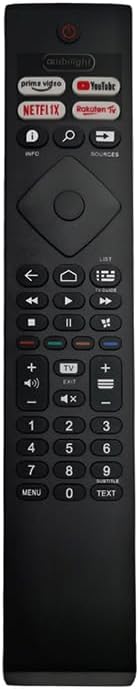
Choosing a replacement Philips remote requires matching specific TV features and button layouts
When selecting a replacement remote for your Philips TV, the key is finding one that matches your specific model's functionality. This particular remote includes dedicated Netflix and YouTube buttons plus Ambilight controls, making it suitable for Philips TVs with these streaming and lighting features. Buyers should verify their TV's compatibility before purchasing.
Key Considerations Before Buying
- Check that the remote includes Ambilight buttons if your Philips TV has this feature, as not all replacement remotes support this proprietary lighting system.
- Verify the remote's button layout matches your original, particularly for streaming services you use regularly like Netflix and YouTube.
- Confirm the remote uses the correct infrared frequency for your TV model, as Philips has used different protocols across their product lines.
What Our Analysts Recommend
Quality replacement remotes should have clear button labeling with proper spelling (note this product's listing has 'Netfllx' and 'Youtbe' misspellings). Look for reviews mentioning responsive buttons and reliable infrared transmission range, which are critical for daily use. The plastic housing should feel substantial, not flimsy.
Remote Controls Market Context
Market Overview
The replacement remote market is flooded with generic alternatives that often lack specific functionality for branded TVs like Philips. Third-party manufacturers frequently produce remotes that look similar but may not support all original features. Philips' proprietary Ambilight system creates particular compatibility challenges for aftermarket remotes.
Common Issues
Many replacement remotes suffer from poor button responsiveness, weak infrared signals requiring precise aiming, or missing functionality for specific TV models. Compatibility mismatches are frequent, especially with Philips TVs that have evolved their remote protocols over the years. Some remotes arrive with incorrect button programming that cannot be corrected.
Quality Indicators
Genuine reviews mentioning specific Philips model numbers and detailed functionality testing are strong quality indicators. Remotes with proper rubberized buttons rather than hard plastic typically offer better tactile feedback. Look for mentions of pairing processes - quality replacements often include clear programming instructions.
Review Authenticity Insights
Grade B Interpretation
A Grade B authenticity rating with 15% estimated fake reviews suggests mostly genuine feedback but requires careful review reading. This level indicates some review manipulation exists, likely to boost ratings artificially. The adjusted rating dropping from 3.78 to 3.50 when excluding suspicious reviews reveals the product's true performance is slightly below its displayed average.
Trust Recommendation
Focus on verified purchase reviews that mention specific Philips TV models and detailed functionality testing. Be particularly skeptical of 5-star reviews lacking specific details about button functionality or compatibility verification. The 302-review sample size provides sufficient data points to identify consistent patterns in user experiences.
Tips for Reading Reviews
Prioritize reviews that mention specific Philips TV model numbers and detailed testing of the Netflix, YouTube, and Ambilight buttons. Look for patterns in negative reviews - if multiple users report the same compatibility issue with certain TV models, take this seriously. Reviews mentioning long-term use (weeks or months) provide more reliability than first-impression feedback.
Expert Perspective
This replacement remote's 3.50 adjusted rating indicates it works adequately for many users but has significant compatibility or quality issues for others. The dedicated streaming buttons and Ambilight controls make it potentially valuable for Philips TV owners who use these features regularly. However, the misspellings in the product title ('Netfllx', 'Youtbe') suggest potential quality control issues in manufacturing or listing accuracy. The review distribution shows genuine mixed experiences rather than a consistently problematic product.
Purchase Considerations
Weigh whether your specific Philips TV model requires the Ambilight functionality - if not, you might find simpler, more reliable alternatives. Consider how frequently you use Netflix and YouTube versus standard TV controls, as dedicated buttons provide convenience only if you regularly access these services. Check your original remote's button layout carefully before purchasing to ensure this replacement matches your usage patterns.
Comparing Alternatives
Shoppers should compare this remote with Philips-branded replacements and other third-party options that specify compatibility with their exact TV model number.


