Choosing a USB 3.0 A-to-B Cable: Length, Build, and Compatibility
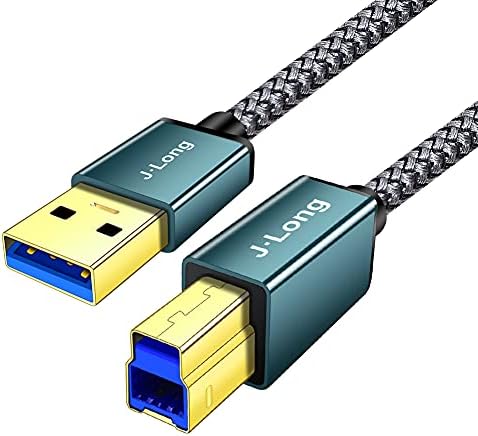
A USB 3.0 Type-A to Type-B cable like this J·LONG 0.5M model is the unsung hero connecting printers, scanners, docking stations, and external hard drives to your computer. Unlike the older USB 2.0 version, USB 3.0 cables have extra pins for Superspeed data transfer, so you'll want to confirm your devices actually support it.
Key Considerations Before Buying
- Length matters: at 0.5 meters, this cable is ideal for close-proximity connections like a desktop printer or a docking station on the same desk, but it may be too short for floor-standing towers or across-room setups.
- Build quality: the braided nylon jacket on this J·LONG cable resists tangling and wear, which is a step up from standard PVC—especially important if the cable is frequently plugged and unplugged.
- Compatibility: USB 3.0 Type-B ports are square and distinct from USB 2.0 Type-B; ensure your device has the blue-colored USB 3.0 B port (common on newer printers and external drives) for full speed.
What Our Analysts Recommend
Check for explicit USB 3.0 certification (often marked 'Superspeed' or '5Gbps') and gold-plated connectors to prevent corrosion. A braided jacket is a good sign of durability, but also verify the cable gauge—thicker wires handle power delivery better for bus-powered drives.
USB Cables Market Context
Market Overview
The USB cable market is flooded with generically branded options, many of which cut corners on shielding or copper quality. USB 3.0 A-to-B cables are less common than USB-C or Lightning, but demand remains steady for legacy peripherals like printers and audio interfaces.
Common Issues
A frequent complaint is that USB 3.0 cables fail to deliver advertised speeds due to poor shielding or thin wires, causing data errors or slow transfers. Another issue is connector fit—some cables have loose plugs that disconnect easily, especially in vertical ports.
Quality Indicators
Look for cables that specify 28/24 AWG (or similar) wire gauges, which balance data and power. Braided jackets and molded strain reliefs are positive signs. Avoid cables that only say 'USB 3.0 compatible' without mentioning Superspeed or 5Gbps.
Review Authenticity Insights
Grade B Interpretation
A Grade B authenticity rating with an estimated 15% fake reviews means most reviews are genuine, but you should still approach with mild caution. The adjusted rating of 4.50/5 (down from 4.88) suggests that after removing suspicious reviews, the product still performs well, but not flawlessly.
Trust Recommendation
Focus on reviews that mention specific use cases (e.g., 'works with my Epson printer') and long-term durability. The high volume of short, positive reviews is typical for simple cables, but be wary of overly enthusiastic five-star ratings that lack detail.
Tips for Reading Reviews
Sort reviews by 'Recent' to see if quality has changed over time, and look for mentions of data transfer speeds or connection reliability. Ignore reviews that only say 'great cable' without context—they add little value.
Expert Perspective
This J·LONG cable appears to be a solid, no-frills option for connecting USB 3.0 Type-B devices at short distances. The braided jacket and 0.5M length make it well-suited for desktop peripherals, and the adjusted rating indicates most buyers are satisfied. However, the 15% fake review estimate means you should cross-check specifications and consider whether a longer cable might be more versatile.
Purchase Considerations
Weigh the short length against your setup—if your printer or drive sits more than a foot from your computer, you'll need an extension or a longer cable. Also, confirm your device supports USB 3.0; otherwise, a cheaper USB 2.0 cable will suffice.
Comparing Alternatives
Compare with cables from established brands like AmazonBasics or Cable Matters, which may offer similar specs with more transparent quality control.