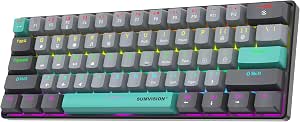
Find Your Perfect Compact Companion: 60% Mechanical Keyboards Under £50
If you're seeking a space-saving gaming keyboard that doesn't compromise on tactile feedback, the KOORUI 60% mechanical keyboard with brown switches is a strong contender. This UK-layout, 61-key board offers a compact footprint ideal for cluttered desks or LAN parties, while its brown switches promise a balance of typing comfort and gaming responsiveness. Before you buy, consider how its smaller form factor and specific switch type align with your daily use.
Key Considerations Before Buying
- Switch feel is paramount: The KOORUI uses brown switches, which provide a tactile bump without a loud click—perfect for shared spaces or late-night gaming sessions. If you prefer a linear or clicky feel, you'll want to test a similar switch first.
- Layout adaptability: With only 61 keys, this 60% board omits the function row, navigation cluster, and numpad. Ensure you're comfortable using key combinations (e.g., FN + number for F-keys) for everyday tasks like adjusting volume or brightness.
- RGB customization: The 26 RGB backlighting modes offer visual flair, but check if the preset patterns suit your aesthetic or if you can customize colors per key. Some users prefer simpler static lighting over cycling effects.
What Our Analysts Recommend
When evaluating a 60% keyboard, examine build quality—look for a metal or reinforced plastic chassis to prevent flex. Keycaps should be doubleshot ABS or PBT for durability, and the USB cable should be detachable for easy transport. Also, verify that the brown switches are from a reputable brand like Outemu or Gateron, as knockoffs can feel inconsistent.
Gaming Keyboards Market Context
Market Overview
The 60% mechanical keyboard market has exploded in the UK, driven by gamers and remote workers seeking minimal desk clutter. Brands like KOORUI compete with established names like Anne Pro and Ducky, offering affordable alternatives that often sacrifice some build quality for lower prices. With brown switches becoming a popular middle-ground, buyers have more options than ever under £40.
Common Issues
A frequent complaint in this category is inconsistent switch quality—some units may have scratchy or uneven keypresses. Additionally, software support for RGB customization can be basic or non-existent on budget models, leaving users stuck with pre-set animations. Lastly, the compact layout can be frustrating for those who rely on dedicated arrow keys or a numpad.
Quality Indicators
Look for keyboards with hot-swappable switches, which allow you to replace faulty or undesirable switches without soldering. A braided USB cable and rubberized feet also indicate better build. Check reviews for mentions of keycap legends fading or stabilizer rattle—both are red flags for long-term durability.
Review Authenticity Insights
Grade B Interpretation
With a B grade and an estimated 10% fake review rate, the KOORUI keyboard's review pool is largely trustworthy but not flawless. The adjusted rating of 4.20/5 (down from 4.44) suggests that a handful of overly glowing or vague reviews may inflate the average. Still, the majority of verified purchasers share specific, balanced feedback, making the overall rating reliable.
Trust Recommendation
You can generally trust the positive and negative reviews for this keyboard, but focus on those with detailed usage descriptions—e.g., comments on switch feel after weeks of use or comparisons to other budget boards. Ignore one-line raves that lack specifics, as these are more likely to be incentivized or fake.
Tips for Reading Reviews
For gaming keyboards, prioritize reviews that mention typing experience, RGB brightness, and build quality over time. Look for photos of the actual product on a desk to gauge size and lighting. Also, cross-reference complaints about key chatter or dead LEDs—if multiple users report the same issue, it's likely a genuine flaw.
Expert Perspective
The KOORUI 60% mechanical keyboard delivers on its core promise: an affordable, compact board with satisfying brown switches and decent RGB lighting. While it won't rival premium brands in build or customization, its 4.20/5 adjusted rating reflects solid value for the price. The 10% fake review rate is manageable, and the authentic reviews highlight consistent performance for casual gaming and typing. However, serious gamers may miss dedicated arrow keys or macro support.
Purchase Considerations
Weigh your need for portability against the learning curve of a 60% layout. If you're a student or traveler who values desk space, this keyboard is a smart budget pick. But if you require a numpad or programmable keys, consider spending more on a 75% or TKL model from brands like Redragon or Keychron.
Comparing Alternatives
Shoppers should compare the KOORUI with similarly priced options like the Redragon K552 (a 60% with blue switches) or the Royal Kludge RK61 (which offers Bluetooth connectivity). Each has trade-offs in switch type, wireless capability, and software support.