
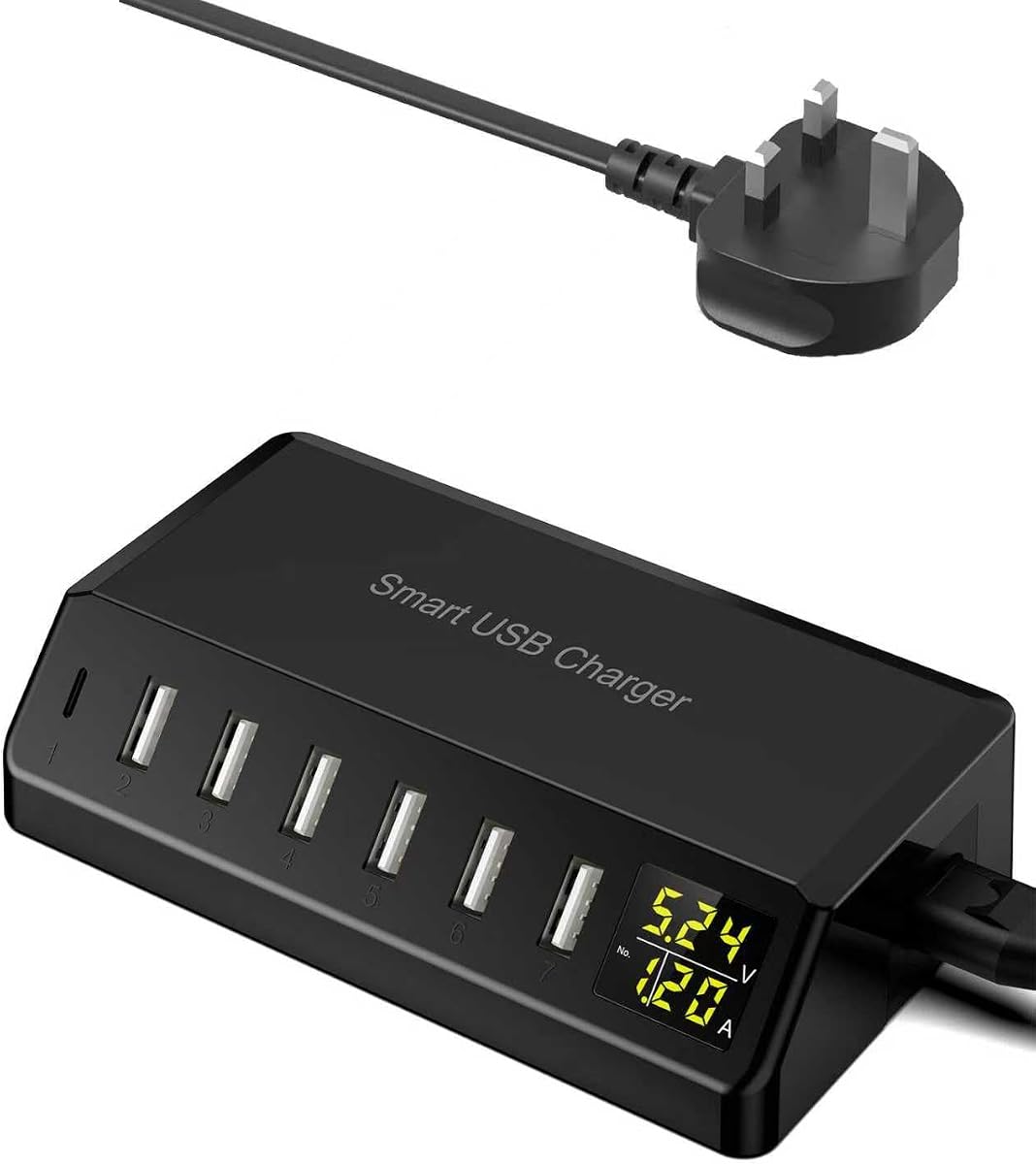
7-Port 60W Desktop Charger: Power Monitoring & Multi-Device Hub
When you have multiple phones, tablets, and accessories to charge simultaneously, a dedicated desktop charging station like the 60W 7-Port USB Charger becomes essential. This guide focuses on the key features of a multi-port hub with real-time power monitoring, helping you decide if its LED screen and power allocation suit your home or office setup.
Key Considerations Before Buying
- Total power output (60W) must be shared across all 7 ports, so check if each device can draw enough current for fast charging—especially for tablets or power-hungry phones.
- The LED screen displays real-time power consumption per port, which is useful for identifying devices that charge slowly or to monitor total draw, but ensure the display doesn't cause unnecessary standby power drain.
- Physical layout matters: a desktop charger with a vertical or flat design should accommodate multiple cables without tangling, and the USB port spacing must allow bulky plugs to fit side by side.
What Our Analysts Recommend
Look for a charger with individual port ratings (e.g., 2.4A per port) and smart IC technology that automatically adjusts current for each connected device. Quality indicators include over-current protection, surge suppression, and a sturdy build with non-slip feet to prevent sliding on a desk. Also verify the LED screen's brightness is adjustable or dimmable for nighttime use.
Mains Chargers Market Context
Market Overview
The multi-port USB charger market is crowded with options ranging from 4-port 30W units to 10-port 100W hubs, often marketed for families or tech-heavy households. Many now include digital displays, but real-time power monitoring is still a differentiating feature found mainly in premium models. Consumers increasingly seek certified safety (CE, RoHS) and compatibility with both Apple and Android fast-charging protocols.
Common Issues
A frequent complaint with multi-port chargers is that total wattage is insufficient when all ports are used, leading to slow charging for high-demand devices. Another issue is heat buildup during prolonged use, which can degrade performance or even pose a fire risk if the charger lacks adequate ventilation. Some users also find that LED displays are too bright for bedside tables or that the power monitoring data is not accurate enough to be useful.
Quality Indicators
High-quality desktop chargers typically feature a metal or high-grade plastic casing with thermal management, independent port ICs for stable output, and certifications like UKCA or CE marking. Look for models that specify the wattage per port and include a detachable power cord (rather than a fixed plug) for easier cable management. A brand with transparent customer support and a warranty of at least 12 months is also a positive sign.
Review Authenticity Insights
Grade A Interpretation
With a Review Authenticity Grade of A and an estimated fake review percentage of only 5.00%, you can be highly confident that the 264 reviews reflect genuine user experiences. This is a strong signal that the charger's 4.89/5 rating (adjusted to 4.80/5 after filtering suspicious reviews) is trustworthy and not artificially inflated.
Trust Recommendation
Given the low rate of fake reviews, you should trust the overall positive sentiment, but still read a handful of verified reviews to understand specific use cases—especially if you plan to charge devices that require more than 10W per port. The few suspicious reviews are unlikely to skew the average, so you can rely on the consensus that this is a well-regarded product.
Tips for Reading Reviews
When reading reviews for a multi-port charger, focus on comments about real-world power output when all ports are occupied, as well as any mentions of heat or noise (e.g., from the LED screen). Look for verified purchase tags and detailed descriptions of the devices being charged—these are hallmarks of authentic feedback. Also note if users mention the LED screen's brightness or accuracy, as these are specific to this model.
Expert Perspective
The USB Charger 60W 7-Port Desktop Charger with LED Screen stands out in a saturated market thanks to its real-time power monitoring feature and strong authenticity score. With a 4.80/5 adjusted rating from 264 reviews, it appears to deliver reliable performance for charging multiple phones and smaller devices simultaneously. The 60W total output is sufficient for most home or office needs, though power users with high-wattage tablets or laptops may find it limiting. The LED screen adds a layer of transparency that few competitors offer, making it a solid choice for tech enthusiasts who want visibility into their charging habits.
Purchase Considerations
Consider this charger if you frequently juggle multiple smartphones, Bluetooth earbuds, and other USB-powered gadgets and want a single, tidy hub. Be aware that 60W shared across 7 ports means each port may deliver only about 8.5W on average, so it's not ideal for fast-charging a tablet or a phone that supports 20W+ speeds. If you need higher per-port output, look for a 100W or higher model with dedicated fast-charge ports.
Comparing Alternatives
Shoppers should compare this model with other 60W-100W desktop chargers that offer similar port counts, such as those from Anker or RAVPower, to see if additional features like USB-C Power Delivery or a longer warranty justify a higher price.


![DUX DUCIS Type C Cable for OnePlus 8T / OnePlus 9 / OnePlus 9 Pro, [65W Warp Charge Cable] [USB C to USB C Cable] - 3.3FT/1M](https://m.media-amazon.com/images/I/41RE2SEgLXL._SX342_SY445_QL70_ML2_.jpg)


