
Choosing a High-Refresh KVM: 8K@60Hz and 4K@240Hz Demands
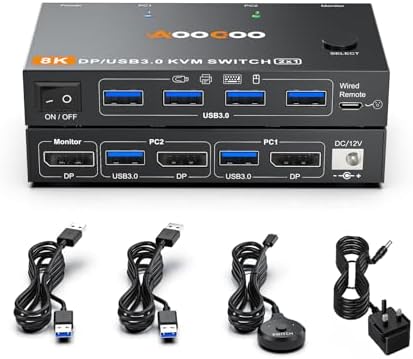
If you're managing a high-performance setup with a single monitor and two computers, a KVM switch that supports 8K@60Hz or 4K@240Hz is essential for maintaining fluid visuals. This specific model offers DisplayPort connectivity and includes a power adapter and USB 3.0 cables, but you must verify it can handle your exact hardware and refresh rate requirements without signal degradation.
Key Considerations Before Buying
- Bandwidth and cable quality: Ensure your DisplayPort cables are certified for the 8K@60Hz or 4K@240Hz bandwidth, as substandard cables can cause flickering or loss of signal. The included USB 3.0 cables should also support high-speed data transfer for peripherals.
- Compatibility with your computers: Check that both your source devices support the required DisplayPort version (e.g., DP 1.4 for 8K) and that the KVM's EDID emulation works with your monitor to avoid resolution or refresh rate drops.
- Power adapter reliability: This KVM comes with a power adapter, which is critical for stable operation at high refresh rates. Confirm the adapter's voltage matches your region (UK) and that it provides consistent power to prevent signal interruptions.
What Our Analysts Recommend
Quality indicators include robust metal housing for heat dissipation, clear labeling of ports, and positive feedback on EDID handling. Look for switches that explicitly state support for HDR and HDCP 2.2, as these are common with high-refresh displays.
KVM Switches Market Context
Market Overview
The KVM switch market is evolving rapidly to support ultra-high resolutions and refresh rates, driven by gamers and creative professionals using multi-monitor setups. Products claiming 8K@60Hz or 4K@240Hz are still niche, often requiring careful hardware matching to avoid compatibility issues.
Common Issues
Common problems include signal dropouts when switching between computers, EDID miscommunication leading to wrong resolutions, and USB peripheral disconnects. Many users report that even minor cable differences can cause instability at these high bandwidths.
Quality Indicators
Look for switches with active EDID management, separate power supplies (not bus-powered), and support for DisplayPort 1.4 or higher. Verified purchaser reviews that mention specific hardware combinations are more trustworthy than general praise.
Review Authenticity Insights
Grade B Interpretation
A Grade B with 10% estimated fake reviews suggests the majority of feedback is genuine, but you should still approach glowing reviews cautiously. The 3.00/5 rating (adjusted to 2.90/5) indicates mixed real-world performance, likely due to compatibility issues.
Trust Recommendation
Focus on verified purchase reviews that detail specific setups and problems, as these are most reliable. The 10% fake rate is low enough that the overall rating reflects authentic user sentiment, but be wary of overly positive 5-star reviews lacking technical details.
Tips for Reading Reviews
For KVM switches, prioritize reviews that mention the exact monitor, computer models, and cables used. Look for patterns in negative feedback, such as repeated mentions of signal loss or USB issues, which are more telling than isolated complaints.
Expert Perspective
This KVM switch targets a high-demand niche with its 8K@60Hz and 4K@240Hz support, but the 2.90/5 adjusted rating suggests it may struggle with reliability. The inclusion of a power adapter and USB 3.0 cables is a plus, but user reports of setup challenges and cable-specific issues indicate that it's not plug-and-play for all configurations. Given the 10% estimated fake reviews, the negative feedback likely reflects genuine problems.
Purchase Considerations
Weigh the need for ultra-high refresh rates against potential compatibility headaches. If you have specific hardware that matches the KVM's capabilities, it could work, but be prepared for trial and error with cables and settings. The low rating suggests it's best for enthusiasts willing to troubleshoot.
Comparing Alternatives
Shoppers should compare this model with dedicated gaming KVMs or professional-grade switches that offer similar specs with better EDID support and user documentation.


