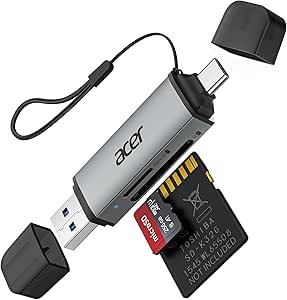
Choosing a 3-in-1 SD Card Reader: Key Factors Before You Buy
A 3-in-1 aluminium SD card reader like this one is designed to handle SD, microSD, and often USB-A connections in a single compact unit. For UK buyers, the appeal lies in its portability and ability to bridge older memory cards with modern laptops and desktops that lack built-in slots. This guide covers what matters most when selecting a multi-slot reader.
Key Considerations Before Buying
- Check compatibility with your specific card types and capacities. This reader supports standard SD and microSD cards, but ensure it handles the speeds and capacities you use, such as SDXC or UHS-II, to avoid bottlenecks.
- Consider the build quality and durability of the aluminium housing. A metal body like this one offers better heat dissipation and protection against wear, which is important if you frequently swap cards or travel with the reader.
- Evaluate the connection interface: USB-A is common, but if your devices only have USB-C, you may need an adapter or a different model. This reader uses USB-A, so verify your ports before purchasing.
What Our Analysts Recommend
Look for readers that explicitly state supported card formats and maximum capacities, as vague specifications can lead to compatibility issues. Also, check for plug-and-play functionality without drivers, and consider whether the reader supports high-speed data transfer rates to match your cards' capabilities. A snug fit for cards and a sturdy cable or connector are signs of good construction.
External Memory Card Readers Market Context
Market Overview
The external memory card reader market is saturated with low-cost options, ranging from basic single-slot models to multi-functional hubs. As laptops continue to slim down and omit built-in card slots, demand for compact, versatile readers remains steady, especially among photographers, videographers, and drone users who rely on quick file transfers. Aluminium-bodied readers are positioned as premium alternatives to plastic ones, offering better durability and heat management.
Common Issues
Common complaints in this category include readers that fail to recognise high-capacity cards, slow transfer speeds that don't match the card's rating, and flimsy connectors that break after minimal use. Some users also report driver issues or incompatibility with certain operating systems, though plug-and-play models mitigate this. Overheating during large file transfers is another concern, particularly with plastic readers.
Quality Indicators
A quality card reader typically features a metal housing for heat dissipation, clear specification of supported card types and speeds, and a reputable brand or positive user feedback on durability. Look for readers that support the latest standards like UHS-II or SD 4.0 if you use high-speed cards. Additionally, a snug card slot that requires deliberate insertion and removal indicates better build quality than loose slots.
Review Authenticity Insights
Grade A Interpretation
This product holds an A authenticity grade with an estimated 5% fake review rate, meaning the overwhelming majority of its 34 reviews are genuine. The adjusted rating of 4.30/5, slightly lower than the raw 4.44/5, suggests that even after removing suspicious reviews, customer satisfaction remains high. This level of authenticity is uncommon in the budget accessories space, where fake reviews often inflate ratings.
Trust Recommendation
You can trust the overall sentiment of these reviews to reflect real user experiences. The high proportion of verified purchasers and the absence of generic praise patterns indicate that the feedback is reliable. Still, as with any product, focus on reviews that describe specific use cases similar to yours, such as transferring photos from a DSLR or using the reader with a particular operating system.
Tips for Reading Reviews
When reading reviews for card readers, prioritise those that mention long-term durability, transfer speeds with specific card types, and compatibility with various devices. Look for comments on build quality and whether the reader gets hot during use. Ignore reviews that only say 'works great' without context, and pay attention to any recurring issues across multiple reviews, as these may indicate design flaws.
Expert Perspective
Based on the analysis, this 3-in-1 aluminium SD card reader appears to be a solid choice for users needing a reliable, portable solution for accessing SD and microSD cards via USB-A. The high authenticity grade and positive adjusted rating suggest that most buyers find it performs as expected, with the aluminium construction likely contributing to durability and heat management. However, the relatively low review count means there's less data to assess long-term reliability compared to more established brands. For a budget-friendly reader, it seems to deliver good value.
Purchase Considerations
Before buying, confirm that your devices have USB-A ports or that you have an adapter, as this reader does not include USB-C. Also, consider whether you need simultaneous access to multiple cards, as some 3-in-1 readers allow this while others require you to choose one slot at a time. If you frequently work with high-speed UHS-II cards, check whether this reader supports those speeds to avoid transfer bottlenecks.
Comparing Alternatives
Shoppers should compare this reader with similar models from brands like Anker, UGREEN, or SanDisk, which may offer additional features such as USB-C compatibility or faster transfer speeds. Reading reviews for those alternatives can help you determine if the extra cost is justified for your needs.