
Unlock Windows 11 with a Fingerprint: Smart Buyer's Guide
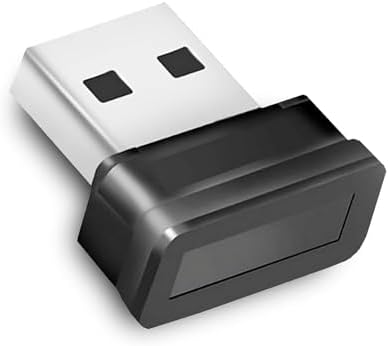
If you're eyeing the amiciSmart USB Biometric Fingerprint Reader, you're likely seeking a convenient, secure way to log into Windows 10 or 11 without typing passwords. This compact device brings Windows Hello's biometric authentication to desktop PCs that lack built-in fingerprint sensors, promising both security and ease. Before you click 'buy', understanding the nuances of USB fingerprint readers can save you from compatibility headaches and performance disappointments.
Key Considerations Before Buying
- Check your Windows version and ensure it's fully updated, as Windows Hello requires specific updates and may behave differently on older builds.
- Verify that your PC has a USB port that provides sufficient power; some readers are sensitive to power fluctuations, leading to intermittent recognition failures.
- Consider the physical placement: the reader should be in a stable, accessible position for consistent finger placement, as misalignment is a common cause of false rejections.
What Our Analysts Recommend
Look for readers that explicitly support Windows Hello and have clear driver installation instructions. Quality indicators include a solid build, a non-slip base, and a sensor that reads quickly without requiring multiple attempts. Also, check if the manufacturer provides firmware updates, which can address Windows update compatibility issues.
Biometrics Market Context
Market Overview
The market for USB biometric readers has expanded as more users adopt Windows Hello for passwordless login, especially on custom-built or older desktops. These devices range from simple capacitive sensors to more advanced optical ones, with prices varying widely. The amiciSmart reader sits in the budget-to-midrange segment, competing with brands like Kensington and Eikon.
Common Issues
A frequent complaint across this category is driver conflicts after Windows updates, which can temporarily disable the reader. Another issue is sensor reliability—some units fail to recognize a finger if it's too dry, wet, or positioned at a slight angle. Users also report that some readers are not truly plug-and-play, requiring manual driver downloads, which can be a hurdle for less tech-savvy individuals.
Quality Indicators
High-quality readers typically feature a capacitive sensor (which is more accurate than optical), a durable cable, and a compact design that doesn't clutter the desk. Look for products with a high number of verified reviews and a low rate of 'DOA' (dead on arrival) reports. Additionally, a manufacturer that offers a warranty or responsive customer support is a positive sign.
Review Authenticity Insights
Grade B Interpretation
The Grade B and 10% estimated fake review rate suggest that while the majority of reviews are genuine, a small fraction may be manipulated. This is not alarming—many popular products have a similar percentage—but it means you should read reviews with a critical eye, focusing on recent, detailed ones. The adjusted rating of 4.10 out of 5 is still solid, indicating overall user satisfaction.
Trust Recommendation
Given the grade, you can trust the overall rating trend, but pay extra attention to negative reviews that mention specific issues like driver problems or sensor inaccuracy. If such issues are recurrent, they are likely real. Also, cross-check reviews on other platforms (like the manufacturer's site or tech forums) to validate experiences.
Tips for Reading Reviews
When reading reviews for this product, filter for 'Verified Purchase' and look for those that describe the setup process, including any driver installation steps. Note the percentage of reviews mentioning 'works on first try' versus 'took multiple attempts'—this can give you a realistic expectation of the sensor's reliability. Also, check if reviews are from users with similar PC specs to yours.
Expert Perspective
The amiciSmart USB Biometric Fingerprint Reader appears to be a reliable, budget-friendly solution for adding Windows Hello to a desktop. With a genuine rating of 4.10/5, it likely performs well for most users, though the 10% fake review rate suggests some marketing hype. The primary strengths are its ease of setup and integration with Windows Hello, while potential weaknesses may include occasional sensor sensitivity issues, as hinted by some negative reviews.
Purchase Considerations
Weigh the cost against the convenience of not typing passwords—if you value quick, secure login, this reader is a good buy. However, if your PC is older or you're not comfortable with manual driver installation, be prepared for a slightly more involved setup. Also, consider that you'll need to re-enroll your fingerprint after major Windows updates, a known quirk with many such devices.
Comparing Alternatives
Before finalizing, compare with similar products like the Kensington VeriMark or the Eikon Mini, which have established reputations. These may cost more, but they could offer better long-term support and reliability. Check recent reviews on tech forums to see if any compatibility issues with Windows 11 have been reported for the amiciSmart model.


