
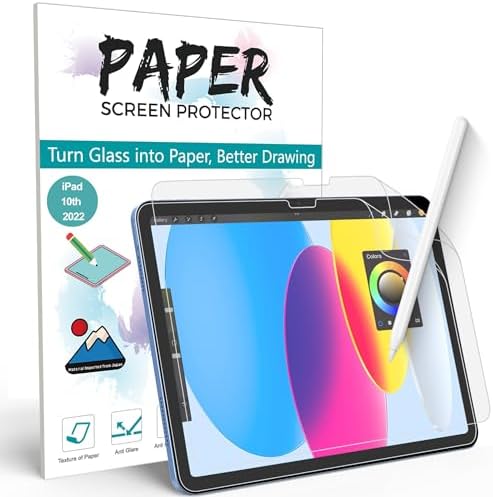
Choosing the Right Paperfeel Screen Protector for iPad Writing and Drawing
For iPad users who prioritize a tactile writing experience, matte PET paperfeel protectors like the XIRON 2-pack represent a distinct category focused on friction and texture rather than maximum clarity. These protectors specifically target artists, note-takers, and students who use Apple Pencil or similar styluses, trading some screen sharpness for reduced glare and pencil-on-paper resistance. The installation method—often involving a hinge system for this model—is particularly crucial given the precision required for iPad displays.
Key Considerations Before Buying
- Texture vs. Clarity: Paperfeel protectors intentionally add a slight graininess to reduce glare and provide pencil drag; this is a feature, not a defect, but it does diminish screen vibrancy compared to glass protectors.
- Pencil Tip Wear: The textured surface increases friction, which can accelerate wear on standard Apple Pencil tips, making replacement tips a potential ongoing cost for heavy users.
- Installation Precision: For iPad models like the A16/11th/10th Gen, edge-to-edge alignment is critical to avoid interference with cases or the front camera; the included installation frame is a key component of the product.
What Our Analysts Recommend
Genuine user reviews for paperfeel protectors should specifically mention the writing feel, pencil noise level (a soft 'scratch' is typical), and how the texture affects video watching. Look for mentions of the hinge installation system's effectiveness and whether bubbles were easily expelled. Avoid reviews that only praise 'clarity'—this indicates they may not understand the product's purpose.
Screen Protectors Market Context
Market Overview
The matte paperfeel screen protector market has expanded significantly alongside the adoption of iPads for digital art and note-taking, creating a niche between standard glossy protectors and dedicated drawing tablets. Products are predominantly PET film-based, with quality varying in the consistency of the micro-textured coating and the sophistication of the installation toolkit. The '2-pack' offering is now standard, acknowledging that installation is a skill and a first attempt may fail.
Common Issues
The most frequent complaints involve installation difficulties leading to dust bubbles, inconsistent texture across the film surface, and premature scratching of the protector itself from stylus use. Some users also report that the texture wears down in high-use areas over months, altering the drawing feel. Compatibility with specific iPad case designs is another recurring pain point.
Quality Indicators
High-quality paperfeel protectors will have a uniformly applied etching, a installation frame that securely holds the iPad, and include detailed dust-removal stickers. The packaging should protect the film from pre-installation scratches. Reviews should note a reduction in fingerprint smudges compared to glossy screens—a key benefit of the matte finish.
Review Authenticity Insights
Grade B Interpretation
A 'B' grade and 11% estimated fake reviews suggest a generally trustworthy review pool with a moderate level of potentially incentivized or biased feedback. For this product, the high volume of reviews (over 21,800) means the genuine experiences significantly outweigh the suspicious ones, providing a reliable dataset. The adjusted rating of 3.90, down from 4.11, indicates the suspicious reviews were slightly more positive.
Trust Recommendation
Focus on reviews that detail long-term use (2+ months), specifically discuss Apple Pencil performance, or mention re-installation using the second protector. Be slightly more skeptical of brief, 5-star reviews that only mention 'easy installation' without context, as these may be part of the estimated 11%. The consistency in mentioning the distinct paper-like drag across hundreds of reviews is a strong authenticity signal.
Tips for Reading Reviews
Prioritize reviews with photos or videos showing the installed protector, especially those demonstrating pencil strokes or glare reduction. Look for balanced critiques that acknowledge both the improved drawing experience and the inevitable screen dimming. Reviews mentioning specific iPad models (e.g., '10th gen 2022') tend to be more genuine than generic ones.
Expert Perspective
The XIRON protector's strong review volume and solid adjusted rating of 3.90 indicate it successfully delivers on the core promise of a paper-like drawing experience for most users. The high rating, even after adjusting for suspicious reviews, suggests genuine satisfaction with its texture and anti-glare properties. The primary trade-off—reduced screen clarity for enhanced tactile feedback—is well-documented in the reviews, meaning buyers are generally informed. The 2-pack is a pragmatic inclusion that addresses the category's steep learning curve for bubble-free installation.
Purchase Considerations
This product is a deliberate choice for users whose primary iPad use involves a stylus. If your usage is more media consumption or general touch navigation, a standard glass protector would be more suitable. Consider your tolerance for a slightly 'grainy' display and your willingness to potentially replace Apple Pencil tips more frequently. The value is clear for artists and students seeking to minimize glare and slippery pencil feel.
Comparing Alternatives
Shoppers should compare the texture description and installation kit of similar protectors from brands like Elecom or Bellemond, as the 'paperfeel' experience can vary noticeably in grain size and pencil sound.

![[2 Pack] OMOTON Screen Protector for Amazon Fire HD 10 Tablet (13th/11th Generation, 2023/2021 Released)/Fire HD 10 Plus/Fire HD 10 Kids/Fire HD 10 Kids Pro All-New 10.1 Inch Tablet, Tempered Glass/9H Hardness](https://m.media-amazon.com/images/I/71Xeq96IEgL.__AC_SX300_SY300_QL70_FMwebp_.jpg)
![AACL 2-Pack Tempered Glass for All-New W10Y Fire HD 10 Screen Protector 10.1Inch (2023/2021,13th/11th Gen), 9H Glass for W10Y Fire HD 10 Tablet Screen Protector [Easy Installation][Anti-Scratch]](https://m.media-amazon.com/images/I/71gQxr7VL3L.__AC_SX300_SY300_QL70_FMwebp_.jpg)
![Spigen Tempered Glass Screen Protector [GlasTR EZ Fit] Designed for iPad Mini (2024 7th Generation A17 Pro / 2021 6th Generation) [Case-Friendly]](https://m.media-amazon.com/images/I/61vmPRoXNmL.__AC_SX300_SY300_QL70_FMwebp_.jpg)


