
Choosing a 21.5-inch FHD monitor: balancing refresh rate, panel type, and eye comfort
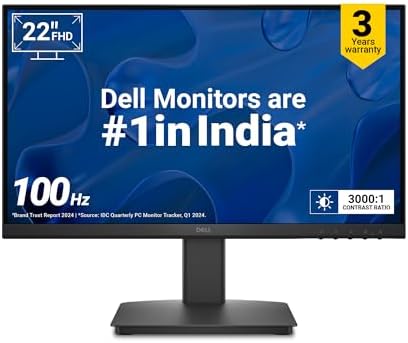
The Dell SE2225HM represents a specific segment of the monitor market: the compact 21.5-inch FHD display with enhanced refresh rates. Buyers should understand that this model's 100Hz refresh rate and VA panel create a distinct visual experience compared to standard 60Hz IPS or TN panels. Its combination of TÜV-certified eye comfort and legacy VGA connectivity makes it particularly relevant for mixed-use office and light entertainment setups.
Key Considerations Before Buying
- The 100Hz refresh rate offers a noticeable 66% increase in motion smoothness over standard 60Hz monitors, beneficial for general desktop use and casual gaming, but falls short of dedicated 144Hz+ gaming displays.
- The VA panel's 3000:1 contrast ratio delivers deeper blacks than typical IPS panels, making it better for media consumption in darker rooms, though viewing angles may be more limited than IPS alternatives.
- With a brightness of 250 cd/m², this monitor is adequate for typical indoor lighting but may struggle with glare in very bright environments or against direct sunlight.
What Our Analysts Recommend
For monitors in this class, examine the balance between response time and refresh rate—the 5ms response time should handle the 100Hz refresh adequately without excessive ghosting. The inclusion of both modern DisplayPort 1.2 and legacy VGA ports indicates Dell's understanding of varied connectivity needs in the Indian market, where older systems remain prevalent.
Monitors Market Context
Market Overview
The 21.5-inch FHD monitor segment in India is highly competitive, with models typically positioned as secondary displays or space-constrained primary monitors. The market has shifted toward higher refresh rates even in budget segments, with 75Hz-100Hz becoming common differentiators. Dell's strength in this space comes from brand reliability and business-oriented features like TÜV certifications.
Common Issues
Common compromises in this price bracket include lower brightness levels (often 200-250 cd/m²), limited adjustability beyond basic tilt, and panel uniformity issues, particularly with VA technology where color shifts can occur at extreme viewing angles. Some manufacturers also omit DisplayPort in favor of HDMI-only connectivity.
Quality Indicators
Look for specific certifications like TÜV Rheinland Eye Comfort, which indicates tested low blue light and flicker reduction. A three-year warranty is standard for Dell and suggests confidence in panel longevity. The inclusion of both HDMI and DisplayPort 1.2 provides future-proofing, as DisplayPort supports higher bandwidth for the 100Hz refresh rate at native resolution.
Review Authenticity Insights
Grade B Interpretation
A Grade B authenticity rating with a 15% estimated fake review percentage indicates generally reliable feedback with some noise. The adjusted rating of 4.00/5 (down from 4.33/5) suggests the authentic consensus is slightly more critical than the raw average shows. The high percentage of verified purchases (all reviews) significantly boosts credibility.
Trust Recommendation
Focus on reviews that mention specific use cases like office work, coding, or casual gaming, as these align with the monitor's intended strengths. Be slightly skeptical of reviews that only praise the 'ultra-thin bezels' without addressing actual performance, as this is a common marketing point that may be overemphasized.
Tips for Reading Reviews
Pay particular attention to reviews discussing the 100Hz experience versus 60Hz monitors, as this is a key selling point. Look for comments about the VA panel's contrast performance in dark scenes and any mentions of motion clarity during scrolling or video playback, which reveals real-world performance.
Expert Perspective
The Dell SE2225HM occupies a thoughtful niche, offering a meaningful refresh rate bump to 100Hz while maintaining professional features like eye comfort certification. Its 3000:1 VA contrast ratio is a legitimate advantage for media consumption, though the 250 cd/m² brightness ceiling is a deliberate compromise to hit this price point. The port selection is notably complete for this segment, with VGA ensuring compatibility with older office systems while DisplayPort 1.2 supports the full 100Hz capability. The 4.00 adjusted rating from verified purchasers suggests it delivers on core promises without major quality surprises.
Purchase Considerations
This monitor makes the most sense for users seeking smoother desktop motion and better contrast than standard office IPS panels, particularly in light-controlled environments. Consider your primary use: the 100Hz refresh benefits general computing and casual gaming, while the TÜV certification matters for prolonged work sessions. The 21.5-inch size is ideal for space-constrained desks or as a vertical secondary display.
Comparing Alternatives
Shoppers should compare similarly priced 24-inch IPS panels with 75Hz refresh rates, which may offer better viewing angles and color consistency, albeit with lower contrast ratios.






