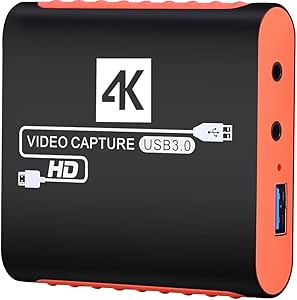
4K USB-C Capture Card: Essential Guide for Streamers and Gamers
When you're looking to capture gameplay from your Switch, Xbox, or PS4, a 4K USB3.0 HDMI to USB-C capture card is a compact yet powerful tool. This guide will help you understand what to look for in a device that promises 1080P60FPS recording and streaming, especially for use with OBS and Zoom on Windows and Mac OS.
Key Considerations Before Buying
- Check the actual capture resolution and frame rate: This card specifies 1080P60FPS capture, which is ideal for most streaming platforms, but ensure your source device outputs a compatible signal to avoid dropped frames or black screens.
- Consider the USB-C connectivity: While USB-C is convenient for modern laptops and MacBooks, verify that your computer has a USB 3.0 or higher port (or a compatible adapter) to achieve the advertised 1080P60 without latency.
- Evaluate the build quality and compatibility: Look for a card that is plug-and-play with OBS and major OS without requiring proprietary drivers. For consoles like Switch and PS4, check that it supports HDCP bypass or includes instructions for disabling HDCP in console settings.
What Our Analysts Recommend
Quality indicators include a stable metal or reinforced plastic housing, a chipset known for reliability (like MS2130 or similar), and positive user feedback on latency and color accuracy. Also, confirm that the card supports the specific HDMI version on your console to avoid compatibility issues.
External TV Tuners Market Context
Market Overview
The market for HDMI capture cards has expanded rapidly with the rise of game streaming and remote work. Products like this 4K USB-C card are popular for their affordability and plug-and-play nature, bridging the gap between professional capture hardware and consumer-friendly devices.
Common Issues
Common issues in this category include overheating during extended use, audio-video sync problems, and compatibility quirks with certain consoles or software. Additionally, some budget cards may not truly deliver 4K passthrough at 60Hz despite marketing claims, so checking specifications is crucial.
Quality Indicators
Quality is often indicated by the chipset used (e.g., MS2130, RTMV310), the presence of a 3.5mm mic input for audio mixing, and firmware updates. A reputable brand or clear warranty policy also signals higher reliability.
Review Authenticity Insights
Grade B Interpretation
The Grade B authenticity rating suggests that the majority of the 222 reviews are genuine, with only an estimated 10% potentially fake. This means you can trust the overall 4.17/5 rating, but it's wise to read a mix of positive and negative reviews to get a balanced view.
Trust Recommendation
Given the 10% estimated fake review rate, focus on verified purchases and detailed reviews that mention specific use cases. The one negative review about performance and resolution is a valuable signal—consider it as a real-world counterpoint to the mostly positive feedback.
Tips for Reading Reviews
For this type of product, look for reviews that mention the exact console or software they used (e.g., 'Switch in docked mode' or 'OBS on Mac'). Also, pay attention to reviews that discuss latency and audio sync, as these are common pain points. Ignore overly generic reviews that lack specifics.
Expert Perspective
This 4K USB-C capture card appears to be a solid budget-friendly option for streamers and gamers, with a genuine user base that rates it highly. The adjusted rating of 4.00/5 is still respectable, and the low fake review percentage indicates that the feedback is largely trustworthy. The product's compatibility with major consoles and OBS makes it a versatile choice, though potential buyers should verify their setup's USB-C capabilities.
Purchase Considerations
Weigh the 1080P60FPS capture capability against your needs—if you're just starting out, this is sufficient. However, if you plan to record in 4K, this card only offers 4K passthrough, not capture. Also, consider the lack of a dedicated microphone input on some models, which might require an external audio interface.
Comparing Alternatives
While this card offers good value, compare it with other USB-C capture cards from brands like Elgato or Razer if you need advanced features like 4K capture or lower latency. Prices vary, so check for current deals.