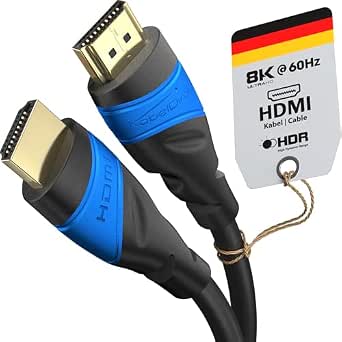
Fiber Optic HDMI 2.1: Long Runs, Real Bandwidth, Real Trade-offs
The FIBBR 8K HDMI 2.1 Fiber Optic Cable 7.5M is an active optical cable (AOC) designed to carry 48Gbps signals over longer distances than copper HDMI can reliably manage. If you're routing a cable behind a wall or across a room to a projector or TV, this category of cable solves problems that standard passive HDMI cables cannot.
Key Considerations Before Buying
- Active optical cables are directional: the source and display ends are not interchangeable. Plugging the wrong end into your TV or receiver will result in no signal, not just a degraded picture, so check the connector labeling before you install it in a wall or conduit.
- Fiber HDMI cables draw a small amount of power from the HDMI source device, typically the receiver or console. Some low-power sources or certain HDMI switches may not supply enough current, which is worth verifying if your chain includes splitters or older AV equipment.
- The 7.5M length is the sweet spot for this product: short enough that the fiber optics remain cost-effective, long enough to beat the practical limits of passive copper HDMI 2.1 cables, which often struggle beyond 3 to 5 meters at full 48Gbps bandwidth.
What Our Analysts Recommend
Check for HDMI 2.1 certification and explicit support for 48Gbps, 8K@60Hz, and 4K@120Hz, since these are the bandwidth claims that separate genuine AOC cables from rebranded copper. Also confirm eARC and HDCP 2.2/2.3 support if you plan to use a soundbar or streaming service with copy protection. Build quality at the connector and strain relief matters more on fiber cables because internal fiber strands are more fragile than copper conductors.
HDMI Cables Market Context
Market Overview
Fiber optic HDMI cables occupy a growing niche as 8K displays, 120Hz gaming, and eARC soundbars push bandwidth demands beyond what copper can handle over distance. The category is still young enough that certification and quality control vary widely between brands, and prices range from budget no-name cables to premium options from established AV manufacturers.
Common Issues
The most frequent complaints in this category involve cables that work at lower resolutions but fail at 8K or 4K/120Hz, which usually points to insufficient bandwidth or a faulty chipset in the active electronics. Directional installation errors are another common source of frustration, as are compatibility issues with certain receivers and HDMI 2.1 switches. Fiber cables are also less tolerant of tight bends and physical stress than copper.
Quality Indicators
A legitimate fiber HDMI 2.1 cable should carry certification from an authorized testing program and list exact bandwidth and resolution support rather than vague '8K ready' language. Look for detailed specifications on chipset, power draw, and operating temperature range, and prefer brands that provide clear installation guidance. Reviews that mention specific source devices and resolutions are more useful than generic praise.
Review Authenticity Insights
Grade B Interpretation
A Grade B authenticity rating with an estimated 15% fake review rate means the review pool is mostly trustworthy but not clean. That 15% could inflate the 3.86 rating slightly, and the adjusted 3.60 score is probably closer to the real customer experience. The multi-language reviews with technical detail are a positive sign that genuine buyers are represented.
Trust Recommendation
Treat the 3.60 adjusted rating as your working number and read the critical reviews first, especially ones that mention specific hardware setups. If a reviewer describes their exact receiver, console, or display and reports whether 4K/120Hz or 8K actually worked, that carries far more weight than a five-star review with no details. Be cautious of reviews that only praise the packaging or shipping speed.
Tips for Reading Reviews
For fiber HDMI cables, the most valuable reviews describe the full signal chain: source device, cable length, display, and resolution or refresh rate tested. Pay attention to reports of intermittent signal dropouts, handshake failures, or cables that worked initially and failed after weeks, since these indicate active electronics problems. Reviews mentioning eARC behavior with specific soundbars are especially useful because eARC is a common failure point.
Expert Perspective
The FIBBR 7.5M fiber optic HDMI 2.1 cable is a specialized tool for a specific job: sending full 48Gbps 8K or 4K/120Hz signals over a distance where copper cables typically fail. Its adjusted rating of 3.60 suggests a mixed but generally positive reception, with enough satisfied technical users to indicate the cable performs when matched to compatible equipment. The 15% estimated fake review rate is a mild caution but not a red flag, and the presence of detailed multi-language reviews supports the idea that real enthusiasts have tested it. This is not a cable for everyone, but for the right setup it solves a real problem.
Purchase Considerations
Before buying, confirm that your source device can supply the power the active cable needs and that your run actually requires fiber; if your cable is under 3 meters, a certified passive copper HDMI 2.1 cable is cheaper and simpler. Also verify that your display and receiver support the resolutions and features you intend to use, since the cable can only pass what your equipment provides. If you need to pull the cable through a wall, plan the directional ends carefully before installation.
Comparing Alternatives
Shoppers should compare this FIBBR cable against other certified fiber HDMI 2.1 options at similar lengths, as well as high-quality passive copper cables if their run is short enough. Checking return policies is also wise, since active cables can have compatibility quirks that only appear in your specific setup.