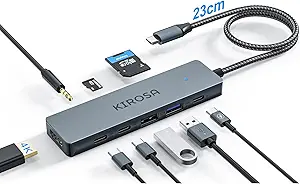
Satechi 8-in-1 USB-C Hub V2 Review: 115W Power and 4K HDMI for MacBooks
When you're expanding a MacBook Air or Pro with a USB-C hub, power delivery and video output are the two specs that matter most. The Satechi 8-in-1 USB-C Hub V2 promises 115W PD charging and 4K HDMI, but you need to know how it handles simultaneous loads and whether it suits your specific workflow.
Key Considerations Before Buying
- Check your MacBook's power requirements: The hub's 115W PD passthrough is generous, but it must supply at least the wattage your laptop draws under load, especially if you're also powering peripherals.
- Verify your display's HDMI version: 4K HDMI output is only as good as the cable and monitor you pair it with—make sure both support HDMI 2.0 for smooth 60Hz operation; otherwise, you might be stuck at 30Hz.
- Consider your port mix: With 3 USB-A ports, Ethernet, and SD/microSD readers, this hub covers legacy devices, but if you need more than one USB-C data port, this model won't fit your needs.
What Our Analysts Recommend
In a hub like this, look for robust build quality (aluminum casing helps with heat dissipation), a stable connection to your laptop (a short, sturdy cable reduces strain), and clear specs on data transfer speeds (USB 3.0 means up to 5Gbps). Also, check if the hub supports your specific MacBook model's firmware for reliable sleep/wake behavior.
USB Hubs Market Context
Market Overview
The USB-C hub market has exploded with options ranging from $20 no-name dongles to $100+ premium units. The Satechi 8-in-1 sits in the upper tier, competing with brands like Anker and CalDigit, where build quality and power delivery reliability are the main differentiators.
Common Issues
Frequent complaints across USB-C hubs include overheating under heavy load, flaky Ethernet connections, and power delivery that drops when multiple ports are active. Some users also report that hubs with a fixed cable can develop connection issues over time due to strain.
Quality Indicators
High-quality hubs typically feature an aluminum body, a braided cable, and a chipset that manages power and data efficiently. Look for certifications like USB-IF, and check if the manufacturer provides firmware updates for compatibility fixes.
Review Authenticity Insights
Grade B Interpretation
A Grade B with an estimated 10% fake review rate means the majority of feedback is authentic, but you should be aware that roughly 1 in 10 reviews might be incentivized or non-genuine. This is actually better than many electronics categories, where fake rates can exceed 25%.
Trust Recommendation
Given the 4.44/5 rating (adjusted to 4.20), you can trust the overall positive sentiment, but pay extra attention to reviews with 3-4 stars—they often highlight real-world limitations. Also, look for Verified Purchase badges and detailed usage scenarios.
Tips for Reading Reviews
For USB hubs, focus on reviews that mention specific MacBook models and how the hub performs under sustained load (e.g., video editing, multiple drives). Skim for mentions of heat, connection drops, and whether the Ethernet port holds a stable link.
Expert Perspective
The Satechi 8-in-1 USB-C Hub V2 is a solid performer that delivers on its core promises: 115W PD charging and 4K HDMI output. The 4.44/5 rating, even after adjusting for a 10% fake rate, indicates strong user satisfaction. However, the adjusted rating of 4.20 suggests some may experience issues—likely related to power distribution or occasional connection quirks.
Purchase Considerations
If you own a recent MacBook Pro or Air and need a reliable hub for daily desk use, this is a compelling choice. Weigh the price against your need for Ethernet and SD card slots—if you don't use those, a simpler hub might save you money. Also, consider whether the fixed cable length suits your setup.
Comparing Alternatives
Shoppers should compare this hub with the CalDigit TS4 or Anker 8-in-1 to see which port layout and power delivery profile better matches their specific laptop and peripherals.