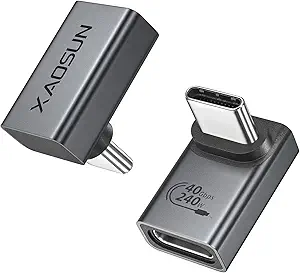
USB-C Extender Adapters: 40Gbps Speed Meets 240W Power—What to Know
When you need to extend a USB-C connection without sacrificing data transfer rates or charging wattage, a low-profile male-to-female adapter like this 2-pack is a simple, compact solution. However, not all extenders are created equal—specs like 40Gbps and 240W demand high-quality materials and proper shielding to maintain signal integrity and power delivery.
Key Considerations Before Buying
- Check the supported data transfer speed (e.g., 40Gbps for Thunderbolt 3/4 and USB4) to ensure it matches your devices' capabilities; lower-rated adapters can bottleneck performance.
- Verify the power delivery rating (here, 240W) to ensure it can handle high-wattage laptops or monitors; inadequate adapters may overheat or fail to charge.
- Consider the physical design: a low-profile, male-to-female form factor is ideal for tight spaces or to add a short extension to existing cables, but ensure it doesn't strain the port with excessive weight.
- Confirm compatibility with your specific devices—while USB-C is universal, Thunderbolt and QC features can vary; this adapter supports both, but check your device's specs.
What Our Analysts Recommend
Look for adapters with robust metal housings for durability and better heat dissipation, and gold-plated connectors for corrosion resistance and reliable contact. Also, check for certifications like USB-IF or Thunderbolt compliance, and read user reviews that mention real-world performance with high-speed SSDs or 240W laptop chargers.
USB-to-USB Adapters Market Context
Market Overview
The market for USB-C accessories is booming, driven by the proliferation of USB-C ports in laptops, phones, and peripherals. However, the category is flooded with cheap, low-quality adapters that fail to meet their claimed specs, making it crucial for consumers to choose products with verified performance.
Common Issues
Common problems include adapters that support only USB 2.0 speeds (480Mbps) despite being marketed as 'high-speed,' insufficient power delivery causing slow charging, and flimsy connectors that break after minimal use. Additionally, some adapters may not support alternate modes like video output, which is essential for monitors.
Quality Indicators
Quality indicators include clear specification labeling (e.g., 40Gbps, 240W), certifications from USB-IF or Intel (for Thunderbolt), positive reviews from verified purchasers with detailed use cases, and a brand reputation for producing reliable cables and adapters. Also, look for a warranty or satisfaction guarantee.
Review Authenticity Insights
Grade A Interpretation
The Grade A rating and estimated 5% fake review rate indicate that the overwhelming majority of the 5,477 reviews are genuine, making the 4.89-star rating highly trustworthy. This means you can rely on the feedback from other buyers to gauge real-world performance and compatibility.
Trust Recommendation
Given the high authenticity, you can confidently use these reviews to inform your purchase decision. Pay special attention to reviews that mention specific devices and use cases (e.g., 'works with my MacBook Pro 16-inch and 140W charger') as they provide the most actionable insights.
Tips for Reading Reviews
When reading reviews, look for those that mention testing with high-speed data transfer (e.g., external NVMe SSDs) or high-wattage charging to validate the 40Gbps and 240W claims. Also, note any reviews mentioning physical durability or fit issues, as these are common pain points for adapters.
Expert Perspective
Based on the analysis, this USB-C extender adapter appears to be a reliable, high-performance solution for extending USB-C connections without compromising speed or power. The high rating and genuine reviews suggest it delivers on its promises, making it a safe choice for users needing a robust extension. The 2-pack adds convenience and value, especially for those with multiple devices or workspaces.
Purchase Considerations
Before purchasing, consider your specific needs: if you only need USB 2.0 speeds or 60W charging, a cheaper adapter might suffice, but for future-proofing with Thunderbolt 4 or high-wattage laptops, this adapter is a solid investment. Also, think about the physical space—ensure the adapter's low-profile design fits your setup without blocking adjacent ports.
Comparing Alternatives
While this adapter is well-regarded, you may also want to compare it with other top-rated extenders or even USB-C extension cables, which offer more flexibility in length but may be less convenient for adding a few inches. Always compare specs and reviews to ensure the best fit for your unique setup.