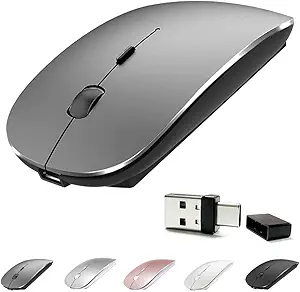
Keep Your PC Awake: Vaydeer M4 Mouse Jiggler Buyer's Guide
If you're shopping for a mouse jiggler, the Vaydeer M4 stands out with its undetectable design and driver-free operation. This guide will help you understand what to consider before buying, especially regarding its switch feature and compatibility with your specific mouse and operating system.
Key Considerations Before Buying
- Consider the 'undetectable' feature: The Vaydeer M4 is designed to simulate mouse movement at the hardware level, which is crucial if you need to bypass software-based inactivity monitors that detect virtual inputs.
- Check the switch feature: Unlike basic jigglers, the M4 includes a physical switch to toggle between jiggling and normal mouse operation. This is essential for users who need to quickly disable the jiggler when returning to their desk without unplugging.
- Verify driver-free compatibility: The M4 requires no driver installation, making it a plug-and-play solution. However, ensure it works with your operating system (Windows, macOS, Linux) and that your computer's USB ports are functional.
- Assess if the 'mouse mover' function is sufficient: Some users need the jiggler to also move the cursor in a pattern that appears human. The M4's undetectable nature suggests it uses a random or varied movement, but check reviews to confirm it meets your specific needs.
What Our Analysts Recommend
When evaluating mouse jigglers like the Vaydeer M4, look for build quality (solid casing, reliable USB connector), a responsive toggle switch, and clear indicators (LED lights) that show when the jiggler is active. Also, consider if the device is truly 'undetectable' by testing it with your own remote access software or monitoring tools, and verify that it doesn't interfere with other USB devices.
Mice Market Context
Market Overview
The market for mouse jigglers has expanded with the rise of remote work and the need to keep computers active during virtual meetings or while away from the desk. Products range from simple software-based solutions to hardware devices like the Vaydeer M4, which offer more reliable and undetectable operation.
Common Issues
Common issues with mouse jigglers include detection by advanced monitoring software, inconsistent movement patterns that trigger alarms, and poor build quality leading to connection failures. Additionally, some jigglers require drivers that can conflict with corporate security policies, making driver-free options like the M4 more attractive.
Quality Indicators
High-quality mouse jigglers are characterized by their plug-and-play nature, robust construction, and the ability to simulate natural, varied mouse movements. Look for products with high user ratings and verified reviews, as well as those that explicitly mention compatibility with major operating systems and remote desktop tools.
Review Authenticity Insights
Grade B Interpretation
The Vaydeer M4's 'B' grade indicates that while the vast majority of its 9,779 reviews appear genuine, an estimated 10% may be fake. This means the true rating is likely around 4.60/5, which still reflects high user satisfaction, but you should be aware that some positive reviews might be incentivized or fabricated.
Trust Recommendation
Given the high volume of verified reviews and the specific, personal use cases described, you can generally trust this product's positive reception. However, to be safe, focus on reviews that detail long-term usage and specific scenarios, and cross-reference any critical comments with your own needs.
Tips for Reading Reviews
When reading reviews, look for those that mention the switch's durability, the jiggler's effectiveness over extended periods, and compatibility with your specific mouse and OS. Be wary of overly generic praise or repetitive language that might indicate fake reviews, and prioritize verified purchase reviews that include photos or videos.
Expert Perspective
The Vaydeer M4 is a well-regarded mouse jiggler with a strong feature set, including undetectable operation and a convenient switch. The high adjusted rating of 4.60/5 suggests that it delivers on its promises, though the 10% fake review rate is a minor concern. Its driver-free nature and broad compatibility make it a versatile choice for remote workers and IT professionals.
Purchase Considerations
Before purchasing, consider whether you need the undetectable feature or if a simpler jiggler would suffice. Also, evaluate the switch's build quality, as it's a moving part that could wear out over time. If you're using a corporate laptop, verify that USB devices are allowed and that the jiggler doesn't violate your company's IT policy.
Comparing Alternatives
While the Vaydeer M4 is a strong contender, it's wise to compare it with other top-rated mouse jigglers on the market, such as those with adjustable movement intervals or different form factors, to ensure you get the best fit for your specific workflow.