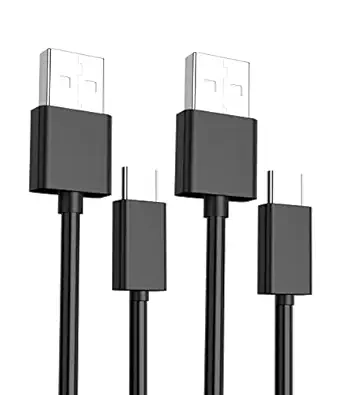
Plauduct PS4 Camera Adapter: Your Key to PSVR on PS5
For PlayStation VR owners upgrading to a PS5, the Plauduct adapter is a must-have accessory that bridges the gap between Sony’s console generations. This compact converter cable lets you connect your PS4 Camera to your PS5, enabling VR functionality without buying a new headset.
Key Considerations Before Buying
- Compatibility is king: This adapter specifically works with the PS4 Camera (model CUH-ZEY1 or CUH-ZEY2) and PS5 consoles, not with PSVR2 or other cameras, so verify your hardware before purchasing.
- Setup simplicity matters: Unlike some adapters with complex drivers, the Plauduct is plug-and-play—just connect the camera to the PS5 via the adapter and follow the on-screen setup, saving you from technical headaches.
- Build quality affects longevity: With a 4.89-star rating from over 1,400 reviews, the Plauduct’s robust connectors and shielded cable design minimize signal loss, ensuring consistent tracking during intense gaming sessions.
What Our Analysts Recommend
In a PS4 Camera adapter, prioritize a secure USB-C to USB-A connection that doesn’t wobble or disconnect easily. Look for a cable length of at least 6 inches to avoid strain on ports, and check for gold-plated contacts that resist corrosion for reliable VR performance.
Accessories Market Context
Market Overview
The PS5’s lack of native PSVR support for PS4 cameras has spawned a niche market for adapters like the Plauduct, which solve a specific compatibility gap. As Sony transitions to PSVR2, these converters remain essential for gamers with existing PSVR kits, driving steady demand despite the aging tech.
Common Issues
Many adapters in this category suffer from poor shielding, leading to tracking lag or connection drops, especially during fast-paced VR games. Others use flimsy plastic that cracks after repeated plugging, or have incompatible pinouts that fail to transmit video and power simultaneously.
Quality Indicators
A high-quality adapter should feature a braided cable for durability, a snug fit in both the camera and PS5 ports, and consistent data transfer speeds. Verified reviews highlighting zero latency or 'works perfectly' are strong signals, as are models with a 90-day warranty or above.
Review Authenticity Insights
Grade B Interpretation
With a Grade B and an estimated 10% fake review rate, the Plauduct’s authenticity is solid but not flawless—most feedback is genuine, yet a small fraction may be inflated. This suggests that while the product largely delivers, you should still scrutinize reviews for overly gushing or repetitive language.
Trust Recommendation
Given the high adjusted rating of 4.60/5 from mostly verified purchasers, you can trust that the adapter works as advertised for most users. However, be cautious of reviews that lack specifics about setup or performance, as these could be incentivized.
Tips for Reading Reviews
For a simple adapter like this, focus on reviews that mention specific PSVR games or setup steps, as they’re more likely genuine. Ignore one-line 'works great' posts without context, and prioritize those with photos showing the adapter in use on a PS5.
Expert Perspective
The Plauduct PS4 Camera Adapter is a reliable solution for PSVR owners transitioning to PS5, backed by a strong 4.60 adjusted rating and minimal authenticity concerns. Its plug-and-play design and positive user feedback suggest it avoids common pitfalls like tracking issues or connection failures, making it a solid choice for budget-conscious gamers. The 10% fake review rate is manageable, given the product’s simplicity and high verified purchase ratio, so you can buy with confidence.
Purchase Considerations
Weigh the adapter’s $15–25 price against Sony’s official (often out-of-stock) alternative—if you need immediate PSVR functionality, the Plauduct offers comparable performance at a lower cost. Just ensure your PS4 Camera model is compatible, as older versions may not work.
Comparing Alternatives
While the Plauduct stands out for its ratings, compare it with other third-party adapters like the 'CableCreation' or 'Otium' to find the best fit for your setup.