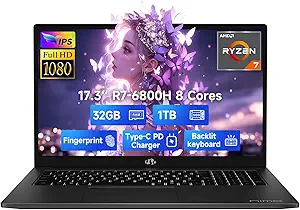
HP 17 Laptop: Maximize Value with 32GB RAM and Touchscreen
For buyers targeting a large-screen laptop that doubles as a productivity powerhouse, the HP 17 with its 17.3-inch HD+ touchscreen and Intel Core i7-1255U processor offers a compelling mix of screen real estate and performance. The standout feature here is the 32GB of RAM, which is unusually generous for this price segment and directly impacts multitasking with heavy applications. Before you commit, consider how this specific configuration aligns with your need for mobility versus desktop-replacement capability.
Key Considerations Before Buying
- The 17.3-inch HD+ touchscreen is ideal for creative work and media consumption, but its size and weight (typically over 5 pounds) make it less portable than smaller laptops. If you frequently travel, this may feel cumbersome.
- With 32GB of RAM, this laptop excels at running multiple demanding applications simultaneously, such as video editing software or virtual machines. However, the Core i7-1255U is a 15W U-series chip, not a performance H-series, so sustained high-load tasks may throttle.
- The 1TB SSD provides ample storage for large files, but check if it's a single drive or if there's an expansion slot for future upgrades. HP often uses soldered RAM in this model, so confirm your 32GB is sufficient long-term.
What Our Analysts Recommend
In a large-screen laptop, prioritize build quality and display brightness, as cheaper models often use dim panels that hinder outdoor use. Also, verify the touchscreen responsiveness and whether the backlit keyboard offers comfortable travel for long typing sessions. Finally, check the warranty coverage and user reports on battery life, as 17-inch laptops with powerful specs can drain quickly.
Traditional Laptops Market Context
Market Overview
The traditional laptop market is increasingly polarized between ultraportable thin-and-lights and desktop-replacement workstations. The HP 17 sits in the budget-to-midrange large-screen segment, where consumers often sacrifice portability for screen size and memory. With 32GB RAM becoming a new standard for power users, this model targets students, remote professionals, and home users who need a stationary workhorse.
Common Issues
Common problems in this category include underpowered processors that struggle with multitasking despite high RAM, and low-resolution displays (like HD+ instead of FHD) that can look pixelated on a 17-inch screen. Build quality is also inconsistent, with some models exhibiting keyboard flex or hinge wobble after extended use. Additionally, battery life often falls short of advertised estimates due to the large display and power-hungry components.
Quality Indicators
To identify a quality large-screen laptop, look for a display with at least 300 nits brightness and full HD resolution (1920x1080) for sharp text. A metal chassis or reinforced hinges signal durability, while user reviews should mention consistent performance and minimal fan noise. Also, check for upgradeability options, as many budget models solder RAM and storage, limiting future-proofing.
Review Authenticity Insights
Grade B Interpretation
The HP 17 receives a Review Authenticity Grade of B, indicating that while the majority of reviews are genuine, an estimated 15% may be fake or incentivized. This is a moderate concern, as the adjusted rating drops from 4.44 to 4.10, suggesting that the positive skew is slightly inflated. For a product in this price range, a 15% fake rate is not alarming but warrants cautious reading.
Trust Recommendation
Given the moderate fake rate, I recommend focusing on the verified purchase reviews, especially those with detailed descriptions of performance and display quality. The natural distribution of opinions—from highly positive to negative—supports the authenticity of most feedback. However, be skeptical of reviews that use generic language or overly promotional tone, as these may be part of the 15%.
Tips for Reading Reviews
When reading reviews for this HP 17, prioritize those that mention specific use cases, such as running particular software or comparing it to previous laptops. Look for photos of the actual product, as fake reviews rarely include user-taken images. Also, filter by most recent to catch any quality issues that emerged after early adopters, and check for patterns in negative reviews, such as consistent complaints about the touchscreen or battery life.
Expert Perspective
The HP 17 Laptop offers exceptional value for users who need a large touchscreen and abundant RAM without breaking the bank, but it's not without trade-offs. The 32GB RAM and 1TB SSD are standout specs that outperform many competitors at this price, yet the HD+ display and U-series processor may disappoint those expecting a premium experience. The 4.10 adjusted rating reflects a solid product, but the 15% fake review rate suggests the actual user satisfaction is slightly lower than the raw score implies. For the right buyer—someone prioritizing multitasking over portability and display resolution—this is a smart purchase.
Purchase Considerations
Weigh the benefits of the large touchscreen and high RAM against the potential drawbacks of the lower-resolution display and limited upgradeability. If you frequently work with spreadsheets, design software, or run multiple browser tabs, the 32GB RAM is a game-changer. However, if you value a sharp FHD screen or need a lightweight device for travel, consider other options in the same price range.
Comparing Alternatives
Shoppers should compare this HP 17 with similarly priced models like the Dell Inspiron 17 or Lenovo IdeaPad 3, which may offer FHD displays but less RAM. For those who prioritize display quality over memory, those alternatives might be a better fit.