
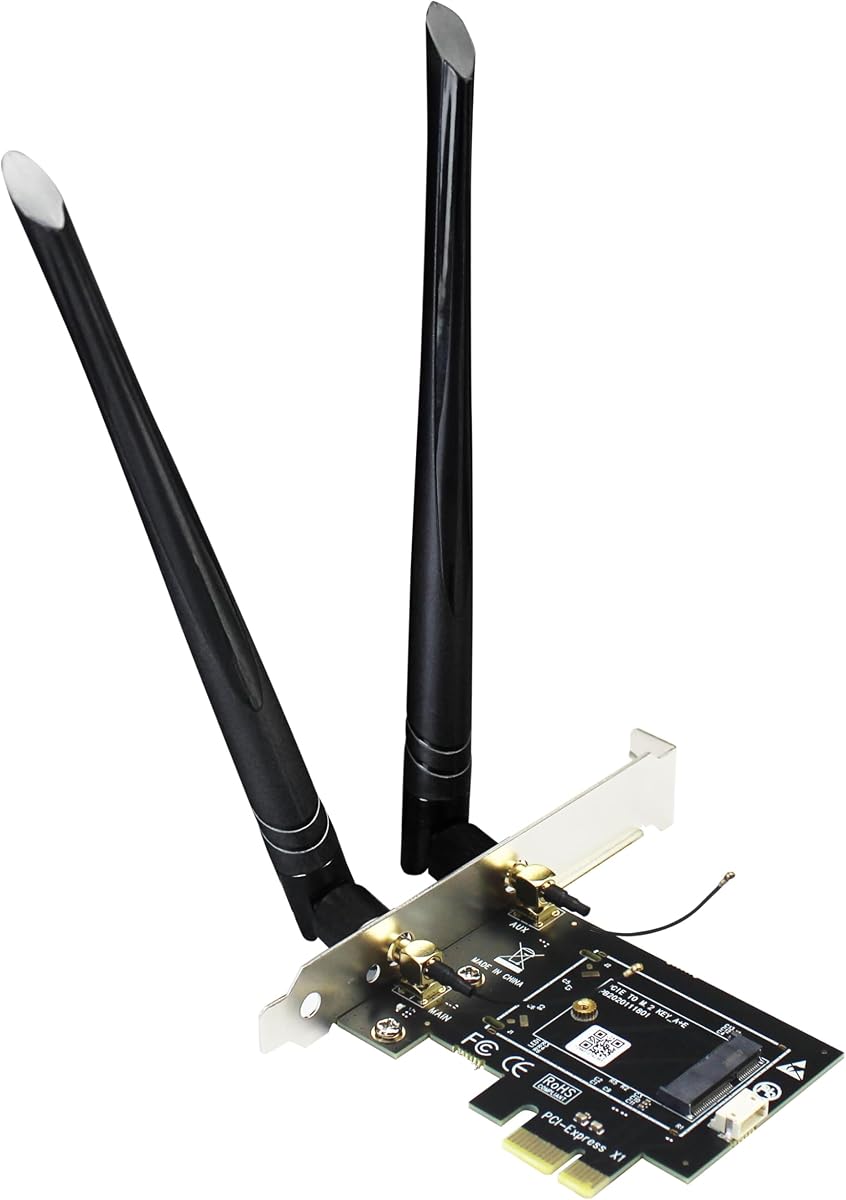
M.2 to PCIe Adapter: Unlock Hidden WiFi 6E Potential
If you've got a spare M.2 WiFi card (from a laptop or a previous build) or want to upgrade to WiFi 6E without replacing your motherboard, the GLOTRENDS WA01 is a bridge worth considering. This adapter converts an M.2 E-key slot into a standard PCIe x1 slot, letting you use M.2 WiFi/Bluetooth modules (including 6E and even 7) on any desktop with an open PCIe slot. It's a niche but practical solution for DIY enthusiasts and those looking to repurpose components.
Key Considerations Before Buying
- Compatibility: Check that your M.2 card is E-key or A+E key, and that your motherboard has an available PCIe x1 (or larger) slot. The WA01 does not support NVMe or SATA M.2 drives—it's strictly for WiFi/BT modules.
- Antenna Needs: The included 6-dBi SMA antennas are a bonus, but ensure your M.2 card's connectors match (most use IPEX/U.FL). If your card has a different connector, you'll need an adapter cable.
- Driver & OS Support: While the adapter is plug-and-play, your M.2 WiFi card's drivers must be compatible with your operating system. Windows 10/11 and Linux typically work, but check for specific card support.
What Our Analysts Recommend
When buying an M.2 to PCIe adapter, look for a well-designed PCB with proper power regulation (3.3V) to avoid instability. Also, verify that the bracket fits your case's slot height (standard low-profile or full-height), and that the antenna holes align. Quality adapters often include a mounting screw and a bracket for the M.2 card itself.
Network Cards Market Context
Market Overview
The market for M.2 to PCIe adapters is growing as more users seek to upgrade to newer WiFi standards (like WiFi 6E) without investing in a new motherboard. These adapters are also popular for adding Coral TPU modules for AI acceleration, as the WA01 explicitly supports. This niche bridges the gap between laptop components and desktop flexibility.
Common Issues
Common issues include physical fit problems (card length, bracket size), antenna connector mismatches, and lack of Bluetooth functionality if the card's USB pins aren't properly routed. Some users report difficulty with cards that have a 'key' not matching the adapter's E-key slot, or with cards that are too long for the adapter's PCB.
Quality Indicators
High-quality adapters feature a solid PCB with plated through-holes, a secure M.2 slot, and a metal bracket that fits standard cases. Look for user reviews that mention successful installation and stable connectivity over time. Also, check if the adapter supports multiple card lengths (2230, 2242, 2260, 2280) to ensure compatibility.
Review Authenticity Insights
Grade B Interpretation
The Grade B rating and 10% estimated fake reviews indicate that while the majority of reviews are authentic, a small but notable portion may be incentivized or unverified. This aligns with the 4.33-star rating (adjusted to 4.10), suggesting that the product is generally well-received but not flawless. Buyers should be cautious of overly positive reviews that lack specific details.
Trust Recommendation
Trust the verified purchase reviews that mention specific use cases, such as reusing a spare M.2 WiFi card or setting up a custom network with an AR94-based card. These provide real-world insights. Discount reviews that are vague or use generic praise like 'works great' without explaining the setup.
Tips for Reading Reviews
For this type of product, focus on reviews that describe the installation process, any compatibility challenges, and the performance they achieved. Look for photos of the installed adapter to gauge fit and build quality. Also, check for recent reviews to see if any issues have been fixed or worsened over time.
Expert Perspective
The GLOTRENDS WA01 is a well-regarded adapter that fulfills a specific need: enabling the use of M.2 WiFi cards in desktop PCs. With a 4.10 adjusted rating, it performs reliably for most users, especially those repurposing existing cards. The inclusion of antennas is a plus, but the adapter's success hinges on the user's card compatibility and installation care. It's a solid choice for DIY builders and tinkerers, but not for those expecting plug-and-play perfection with every card.
Purchase Considerations
Before purchasing, confirm that your M.2 card is E-key and that your motherboard has a free PCIe x1 slot. If you're buying a new card, factor in the cost of the adapter and card versus a dedicated PCIe WiFi card. Also, consider your technical comfort level—if you're not comfortable with installing expansion cards and fiddling with antennas, a standard USB or PCIe WiFi adapter might be simpler.
Comparing Alternatives
Shoppers should compare the WA01 with other M.2 to PCIe adapters from brands like MZHOU or NGFF, which may offer different bracket designs or support for other key types. Also, consider all-in-one PCIe WiFi cards (e.g., Intel AX210-based) that come with antennas and are pre-tested for compatibility.


