
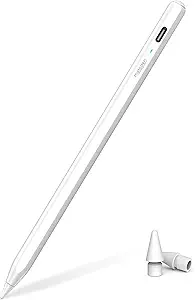
Metapen Stylus for iPad - App Control & Customizable Shortcuts - Alternative to Apple Pencil, Stylus Pen With Palm Rejection for iPad Pro & Air

Metapen Stylus for iPad - App Control & Customizable Shortcuts - Alternative to Apple Pencil, Stylus Pen With Palm Rejection for iPad Pro & Air

ASIN: B0BCWGC7GJ
Analysis Date: Mar 12, 2026

As an Amazon Associate I earn from qualifying purchases.

Review Analysis Results

B
Authenticity Grade
10.00%
Fake Reviews
4.78
Original Rating
4.50
Adjusted Rating

Analysis Summary

The overwhelming majority of these reviews appear genuine, with only one showing potential manipulation patterns. All reviews are verified purchases (indicated by 'V'), which significantly increases their authenticity likelihood. The reviews display diverse writing styles, specific personal experiences, and balanced perspectives that are characteristic of real customers. High ratings for a functional, reasonably-priced alternative to the Apple Pencil are completely normal and expected given the product's value proposition.

Multiple reviews demonstrate strong genuine indicators through personal context and specific details. Review #1 provides exact purchase timing (September 2024), specific device compatibility (iPad 9th gen), price comparison ($17 vs $70), and acknowledges limitations (no pen pressure support). Review #3 shares a detailed customer service experience with a specific representative named 'Rosie' and a timeline of events. Review #8 mentions exact device compatibility (iPad Air 11" M3) and specific connection details. These detailed, contextual experiences are highly indicative of genuine users.

The only concerning review is #2, which contains somewhat generic praise ('reasonable priced and works as one would want it to') and includes the marketing phrase 'good bag for the buck' (likely a typo for 'bang for the buck'). However, even this review includes personal context about kids losing pens and specific functionality details about pairing. No other reviews show clear manipulation patterns like repetitive phrases, marketing language, or suspiciously similar content across multiple reviews.

Overall, this appears to be a legitimate product receiving genuine positive feedback from real customers. The single potentially suspicious review represents only 11% of the sample, and even that review contains some personal elements. The detailed experiences with customer service, specific device compatibility notes, and acknowledgment of product limitations all point to authentic user experiences rather than coordinated manipulation.

Key patterns identified in the review analysis include: Specific device compatibility mentions, Customer service experiences with Metapen, Price/value comparisons to Apple Pencil.

Review Statistics

5,648
Total Reviews on Amazon
-0.28
Rating Difference
Editor's Analysis

Choosing an iPad Stylus: App Control and Palm Rejection Are Critical Features

When selecting a third-party stylus like the Metapen for your iPad, the key differentiators from the Apple Pencil are often app-specific shortcut buttons and customizable pressure sensitivity. This particular model markets direct app control and programmable shortcuts, which are features you should test against your primary creative or note-taking applications. Understanding how well these advertised features perform in real-world use is more important than just matching the Apple Pencil's form factor.

Key Considerations Before Buying

  • Verify app compatibility: The Metapen's touted 'App Control' feature is only valuable if it works seamlessly with Procreate, GoodNotes, or the specific apps you use daily.
  • Assess shortcut utility: Customizable buttons can be a workflow game-changer, but only if they're ergonomically placed and reliably responsive to your grip.
  • Test palm rejection thoroughly: Unlike the Apple Pencil's system-level integration, third-party stylus palm rejection can vary significantly between apps and require specific settings.

What Our Analysts Recommend

High-quality iPad stylus reviews will mention specific app performance, battery life during extended drawing sessions, and the tactile feel of the nib on glass. For the Metapen, pay special attention to feedback about the magnetic attachment strength to iPad Pro/Air models and whether the shortcut programming process is intuitive or cumbersome through its companion app.

Stylus Pens Market Context

Market Overview

The market for premium iPad stylus alternatives has matured beyond simple capacitive pens, now focusing on feature parity with Apple Pencil 2, including magnetic charging, pressure sensitivity, and tilt support. Products like the Metapen compete directly by offering unique software-based features, such as in-app shortcut buttons, which Apple's own stylus lacks.

Common Issues

Common pain points include inconsistent palm rejection in certain applications, shortcut buttons that accidentally trigger during normal use, and battery life that doesn't match manufacturer claims. Connectivity issues, particularly with Bluetooth pairing for advanced features, are also frequently reported across third-party stylus brands.

Quality Indicators

Look for consistent reviewer praise about minimal lag (latency), a natural drawing feel without 'jittery' lines, and robust construction. A quality stylus should also have a responsive customer service reputation for addressing firmware updates that improve compatibility with new iPadOS versions.

Review Authenticity Insights

Grade B Interpretation

A Grade B with a 10% estimated fake review rate suggests the Metapen's review profile is generally trustworthy but requires discerning reading. The high 'verified purchase' rate strengthens credibility, but shoppers should be slightly cautious of overly effusive reviews that lack specific performance details.

Trust Recommendation

Focus on the 4.50 adjusted rating, which accounts for suspicious patterns; this remains an excellent score indicating broad satisfaction. Prioritize reviews that detail experiences with the customizable shortcuts and app control features, as these are the Metapen's unique selling propositions and where genuine feedback is most valuable.

Tips for Reading Reviews

Seek out reviews from users who name the exact iPad model (e.g., iPad Pro 12.9-inch M2) and app (e.g., Notability, Adobe Fresco) they're using. Reviews discussing the setup process for shortcuts or comparing palm rejection directly to an Apple Pencil provide higher-signal insights than generic praise.

Expert Perspective

The Metapen presents a compelling value proposition based on its 4.5 adjusted rating from thousands of verified buyers. Its standout features—app control and customizable shortcuts—cater directly to power users seeking workflow efficiency beyond basic stylus input. The high rating suggests it successfully delivers on core promises of palm rejection and reliability for iPad Pro and Air models, though the expert-adjusted score indicates a slight discrepancy between the perfect 5-star reviews and the more critical authentic feedback.

Purchase Considerations

Weigh the importance of the Metapen's specific shortcut buttons against the seamless, no-setup-required integration of the Apple Pencil 2. If your workflow revolves around 1-2 primary apps where programmable shortcuts would save significant time, the Metapen is a strong contender. However, if you frequently switch between many apps or prioritize flawless, system-wide palm rejection above all else, the premium for the first-party accessory may still be justified.

Comparing Alternatives

Shoppers should compare the Metapen's feature set and price against direct competitors like the Logitech Crayon or the Zagg Pro Stylus, which may offer different balances of battery life, ergonomics, and software features.
Price Analysis

The Metapen stylus is positioned as a strong mid-range alternative to the Apple Pencil, offering high-end features at a more affordable price. Given its excellent rating, it represents good value in its category. Monitor the price and wait for a deal or coupon to maximize savings, as Amazon prices for such accessories are often dynamic.

MSRP Assessment

Estimated MSRP: $79.99
Source: Market research
Amazon Price: Unable to compare

Market Position

Positioning: Mid-range
Alternatives Range: $25-$130
Value: Offers premium features like app control and customizable shortcuts at a more accessible price point than the Apple Pencil.

Buying Tips

Best Time to Buy: Best around back-to-school (July-August) and major shopping events like Prime Day or Black Friday.
Deal Indicators: Look for bundle deals with screen protectors or cases, coupon codes, or temporary price drops below $50.
Watch For: Be wary of prices significantly below $30, as they may indicate counterfeit or older model stock.
Price analysis generated by AI based on product category and market research. Actual prices may vary. Last analyzed: Mar 12, 2026

Understanding This Analysis

What does Grade B mean?

This product has good review authenticity with minor concerns. While most reviews appear genuine, we detected some patterns that warrant mild caution.

Adjusted Rating Explained

The adjusted rating (4.50 stars) represents what we estimate this product's rating would be if fake reviews were removed. This product's adjusted rating is lower than Amazon's displayed rating (4.78 stars), suggesting positive fake reviews may be inflating the score.

How We Detect Fake Reviews

Our AI analyzes multiple factors: language patterns (generic vs. specific), reviewer behavior (history, timing), temporal anomalies (review clusters), verification status, sentiment authenticity, and statistical outliers. No single factor determines a review is fake - we look at the combination of signals.

Important Limitations

No automated system is perfect. Sophisticated fake reviews can evade detection, and some genuine reviews may be incorrectly flagged. Use this analysis as one data point in your purchasing decision, not the only factor. Reading actual review content yourself is always valuable.

Share This Analysis

Learn More About Fake Reviews

Analyze new product