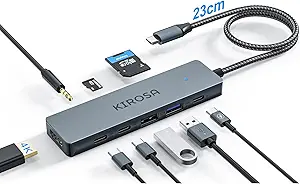
Why the ACASIS 6-in-1 USB-C Hub Delivers True 10Gbps Speed and Reliable 4K
When shopping for a USB-C hub, you need more than just extra ports—you need a device that handles high-bandwidth tasks like 4K 60Hz video output and fast file transfers without dropouts. The ACASIS 6-in-1 adapter stands out with its 10Gbps data rate and 100W Power Delivery passthrough, making it a strong contender for users with modern laptops like the MacBook, Dell XPS, or Surface Pro. Here’s what to consider before adding it to your setup.
Key Considerations Before Buying
- Check your laptop’s USB-C port capabilities: Not all USB-C ports support 10Gbps or 100W PD. Ensure your device can output video via USB-C (DisplayPort Alt Mode) to use the HDMI port at 4K 60Hz—otherwise, you may be limited to lower resolutions or slower charging.
- Match the hub’s port selection to your daily workflow: With one HDMI, one USB-A 3.2, and a USB-C data port, this hub is ideal for connecting a monitor, a high-speed external SSD, and a phone or tablet. If you need multiple USB-A ports or an SD card slot, you might need a larger hub.
- Consider physical durability and heat management: A compact aluminum hub like this can get warm under heavy use (e.g., 4K streaming + charging). Look for models with good ventilation or metal casings to prevent throttling—ACASIS uses an aluminum shell that helps dissipate heat.
What Our Analysts Recommend
Quality USB-C hubs feature certified chipsets (e.g., from Realtek or Via Labs) that ensure stable 10Gbps throughput and consistent video output. Also, verify that the Power Delivery port supports at least 85W pass-through to charge high-power laptops like the 16-inch MacBook Pro—ACASIS offers 100W PD input, which is excellent for this. Finally, a robust braided cable and secure connector reduce wear and signal loss over time.
USB Hubs Market Context
Market Overview
The USB-C hub market has exploded as laptops shed legacy ports, but many hubs still deliver only 5Gbps speeds or 4K at 30Hz. Consumers increasingly demand 10Gbps for fast backups and 4K 60Hz for smooth external displays, pushing manufacturers like ACASIS to adopt higher-spec components. This 6-in-1 model competes directly with offerings from Anker, Belkin, and Satechi, but often at a more accessible price point.
Common Issues
A frequent complaint with budget hubs is overheating during prolonged use, which can cause video flickering or dropped connections. Another issue is incompatibility with certain USB-C implementations—some Dell or Lenovo laptops require hubs with specific power delivery profiles. Lastly, fake or exaggerated data transfer speeds (e.g., claiming 10Gbps but only achieving 5Gbps) are common in lower-quality products.
Quality Indicators
Look for hubs that specify their chipset and whether they support DisplayPort Alternate Mode (DP Alt Mode) for video output. Verified customer reviews that mention specific laptop models and real-world speeds (e.g., “transferred 20GB in under 30 seconds”) are strong signals. A high Amazon rating with a low fake review percentage—like the ACASIS hub’s Grade A with only 8% estimated fakes—indicates authentic performance feedback.
Review Authenticity Insights
Grade B Interpretation
An authenticity grade of A with an estimated 8% fake review rate is excellent for a popular electronics product. This means the vast majority of the 4,985 reviews are from genuine buyers who actually used the hub, not from incentivized or bot-generated posts. With an adjusted rating of 4.70 out of 5 after removing suspicious reviews, you can trust that real users are consistently satisfied.
Trust Recommendation
Given the high verified purchase rate and specific, personal usage details in the reviews, you can confidently rely on this product’s rating. Focus on reviews that describe real-world scenarios matching your setup—like connecting an iPad Pro to a 4K monitor or charging a Dell XPS while transferring files. This hub appears to deliver on its promises in most home and office environments.
Tips for Reading Reviews
When scanning reviews for USB hubs, prioritize those that mention exact laptop models, transfer speeds, and any heat or connectivity issues. Look for photos or videos of the hub in use, as they often reveal cable length, build quality, and port layout. Be skeptical of overly short or vague five-star reviews that lack technical details—these are more likely to be fake.
Expert Perspective
The ACASIS 6-in-1 USB-C Hub stands out in a crowded market by delivering genuine 10Gbps speeds and reliable 4K 60Hz output, backed by a near-perfect authenticity score. Its 100W Power Delivery passthrough is a standout feature for users with power-hungry laptops, and the compact design suits travel or desk use. The adjusted 4.70 rating from thousands of reviews indicates consistent real-world performance, though the limited port selection may not suit users needing multiple USB-A connections or an SD card slot. Overall, this is a trustworthy, high-performance hub for modern USB-C devices.
Purchase Considerations
If your primary needs are fast data transfers, a single 4K monitor, and laptop charging, this hub is an excellent value. However, if you require more than one USB-A port or an Ethernet jack, you’ll need to look at larger 8-in-1 or 10-in-1 alternatives. The aluminum build and low fake review rate give it a strong advantage over cheaper, unbranded hubs.
Comparing Alternatives
Shoppers should compare this hub with the Anker PowerExpand 6-in-1 and the Satechi Slim Pro, which offer similar specs but often at higher prices. The ACASIS’s proven authenticity and lower cost make it a compelling choice for budget-conscious buyers who don’t want to sacrifice performance.