
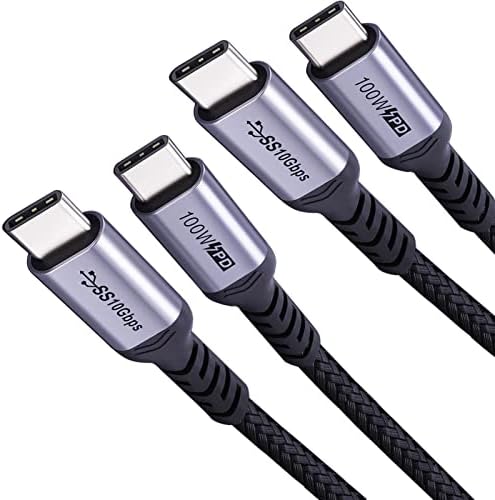
Charge Faster and See Sharper: A Guide to 100W USB-C Cables with 4K Video
When shopping for a USB-C cable that can handle both high-speed charging and 4K video output, you need one with an E-Marker chip and USB 3.1 Gen 2 support. This 3-foot, two-pack cable offers 100W power delivery and 10Gbps data transfer, making it ideal for powering a laptop while connecting to a monitor.
Key Considerations Before Buying
- Ensure the cable supports the power levels you need: 100W is enough for most laptops, but check your device's maximum draw to avoid underpowering.
- For 4K 60Hz video, the cable must support DisplayPort Alt Mode; this cable's 10Gbps bandwidth is sufficient for smooth, high-resolution displays.
- Length matters: a 3-foot cable reduces clutter on a desk but may be too short for setups where your laptop is far from the monitor or charger.
What Our Analysts Recommend
Look for cables with an embedded E-Marker chip, which enables safe 100W charging and proper handshaking for data and video. Verified USB-IF certification is a strong indicator of reliability, while braided or reinforced connectors can signal better durability over time.
USB Cables Market Context
Market Overview
The USB-C cable market is crowded with options ranging from basic charging cables to high-performance ones supporting 240W and 40Gbps data. Most consumers now need cables that can handle multiple protocols—power, data, and video—simultaneously, making all-in-one solutions like this 3.1 Gen 2 cable increasingly popular.
Common Issues
A frequent problem is cables that claim high specs but fail under real-world loads, especially for 100W charging or 4K 60Hz video. Counterfeit or missing E-Marker chips can cause devices to charge slowly or display flickering, and shorter cables often have better signal integrity than longer ones.
Quality Indicators
Quality cables typically list specific data transfer speeds (e.g., 10Gbps), power delivery wattage (100W), and video resolution support (4K 60Hz). User reviews that mention consistent performance with specific devices—like a Galaxy phone or external monitor—are more reliable than vague praise.
Review Authenticity Insights
Grade B Interpretation
A Grade B with an estimated 10% fake reviews suggests that while the majority of feedback is genuine, a small portion may be inflated. This is common in popular cable categories where sellers may incentivize early reviews to boost visibility.
Trust Recommendation
Given the high verified purchase rate and detailed technical descriptions in reviews, you can generally trust the positive sentiment. However, cross-check any claims about 4K 60Hz performance by looking for reviews that specifically mention using the cable with a compatible monitor and laptop.
Tips for Reading Reviews
Focus on reviews that describe specific use cases, such as charging a Dell XPS or connecting a MacBook to a 4K display. Look for mentions of sustained power delivery or video stability over time, which indicate real-world reliability beyond initial impressions.
Expert Perspective
This two-pack of 3-foot USB-C 3.1 cables offers strong value for users needing 100W charging and 4K 60Hz video in a compact length. The 4.89 average rating, even when adjusted to 4.60, reflects broad satisfaction, likely due to the E-Marker chip and 10Gbps data support. It's a solid choice for Galaxy users or anyone with a laptop and external monitor setup, though the short length may limit flexibility for some.
Purchase Considerations
Assess your typical cable distance: 3 feet works best for direct connections on a desk, but you may need a 6-foot version for more distance. Also, confirm your devices support USB 3.1 Gen 2 to fully utilize the 10Gbps speed, otherwise a slower cable might suffice.
Comparing Alternatives
Shoppers should compare this with other 100W cables that offer longer lengths or braided jackets for extra durability, especially if they need to route cables around furniture.


