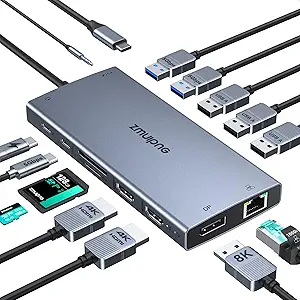
Choosing a 5-in-1 USB-C Hub: What the UGREEN Revodok 105 Gets Right
The UGREEN Revodok 105 targets users who need to expand a single USB-C port into a functional workstation with 4K video, power delivery, and legacy USB-A connectivity. This specific model's 100W Power Delivery and three USB-A 3.0 ports make it ideal for MacBook and modern Windows laptop users who frequently connect multiple peripherals while charging.
Key Considerations Before Buying
- Power Delivery (PD) wattage is critical: The 100W PD on this hub can charge most laptops at full speed, but verify your laptop's maximum input wattage to ensure compatibility and avoid power throttling during heavy use.
- Simultaneous operation limits: Check if the hub can deliver full 100W PD while all data ports are active; some hubs reduce PD wattage when multiple ports are in use, which could slow laptop charging.
- HDMI version and display support: This hub's 4K@30Hz HDMI is suitable for presentations and general use, but creative professionals needing 4K@60Hz for smooth video editing should look for hubs with HDMI 2.0 specification.
What Our Analysts Recommend
For hubs like the Revodok 105, examine the build quality around the USB-C connector, as this stress point often fails. Genuine reviews frequently mention stable simultaneous 4K output and data transfer without disconnections, which indicates robust internal chipset design and proper heat dissipation.
Docking Stations Market Context
Market Overview
The compact USB-C hub market is saturated with similar-looking products, but performance varies significantly based on the controller chipset (often Realtek or VIA) and power management circuitry. UGREEN has established itself as a mid-tier brand known for reliable performance rather than cutting-edge features.
Common Issues
Many budget hubs suffer from overheating during sustained data transfer, causing ports to disconnect intermittently. Another frequent complaint is 'power negotiation' failures where the hub doesn't properly handshake with the laptop, resulting in slow charging or no charging at all.
Quality Indicators
Look for hubs that specify the exact HDMI standard (like HDMI 1.4 for 4K@30Hz) and USB data transfer rates (USB 3.0 at 5Gbps). Quality manufacturers use aluminum alloy casings for heat dissipation rather than plastic, and provide clear specifications about simultaneous operation capabilities.
Review Authenticity Insights
Grade B Interpretation
A Grade B with 15% estimated fake reviews suggests generally trustworthy feedback, but shoppers should be slightly more critical than with an A-grade product. The gap between the raw 4.93/5 rating and adjusted 4.60/5 indicates some review inflation, though the core positive sentiment appears genuine.
Trust Recommendation
Focus on reviews that mention specific device combinations, like 'using with my MacBook Air M2 while transferring files from two external drives,' as these demonstrate real-world testing. Be skeptical of reviews that only praise generic aspects like 'fast shipping' or 'good quality' without technical details.
Tips for Reading Reviews
For technical products like this, prioritize reviews discussing simultaneous use cases—such as charging while outputting to HDMI and using USB ports—as this tests the hub's power distribution. Look for mentions of specific laptop models (iPhone 16 Pro, XPS 13) to gauge compatibility with your devices.
Expert Perspective
The UGREEN Revodok 105's exceptionally high adjusted rating of 4.60/5 from over 25,000 reviews indicates it reliably delivers on its core promises: stable 4K HDMI output, full 100W charging, and functional USB-A ports. Its specific port selection—three USB-A versus the more common two—makes it stand out for users with multiple legacy peripherals. The Revodok connector system appears to address the common physical durability concern in this category.
Purchase Considerations
This hub makes most sense for users whose workflow involves several USB-A devices (flash drives, external keyboards, mice) alongside display output and charging. Consider your need for 4K@60Hz versus 30Hz, as this hub's HDMI 1.4 limitation may affect video professionals but is sufficient for most business and educational uses.
Comparing Alternatives
Shoppers should compare the Revodok 105's specific port configuration against hubs with different mixes, such as those including Ethernet or SD card readers, based on their peripheral needs.