Unlock Your Wired CarPlay: Carlinkit AI Box Brings Android 13 to Your Dashboard
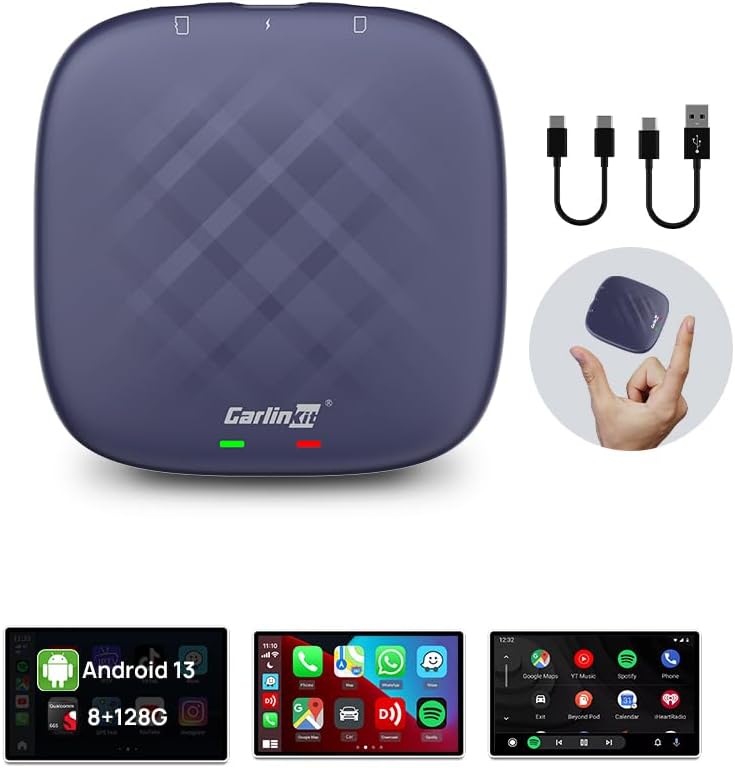
If you own a wired-only CarPlay vehicle, the Carlinkit Android 13.0 AI Box is a transformative upgrade that adds wireless CarPlay, Android Auto, and a full Android 13.0 experience to your factory touchscreen. This adapter is designed specifically for OEM wired cars, making it a targeted solution for drivers who want streaming apps, navigation flexibility, and 4G connectivity without replacing their head unit.
Key Considerations Before Buying
- Compatibility is king: Ensure your car's wired CarPlay system is supported. While it fits many OEM wired touchscreen cars (e.g., Toyota, BMW), not all vehicles are compatible, so check Carlinkit's fitment list before buying.
- Dual-system functionality: This AI box runs both wireless CarPlay and Android Auto, but also offers a standalone Android 13.0 interface. Consider whether you'll primarily mirror your phone or use the built-in Android apps (YouTube, Google Play) for a more standalone experience.
- Connectivity setup: The 4G capability requires a SIM card (not included) for full standalone internet, but you can also rely on your phone's hotspot. Understand your data plan and how you'll power the device—it draws power from the car's USB port, so ensure adequate power output.
What Our Analysts Recommend
When evaluating AI boxes like this, prioritize a recent Android version (13.0 ensures app compatibility), sufficient RAM (look for specs like 4GB+ for smooth multitasking), and reliable after-sales support. Also, check for firmware update availability, as these devices often need updates to maintain compatibility with new phone OS versions.
In-Dash Navigation Market Context
Market Overview
The car AI box market is rapidly expanding, driven by drivers wanting to modernize older wired CarPlay systems without purchasing a new vehicle. These devices bridge the gap between factory infotainment and the latest smartphone integration, offering a cost-effective alternative to aftermarket head units.
Common Issues
Common problems in this category include intermittent connectivity (especially Bluetooth/Wi-Fi handoff), overheating during heavy use, and software bugs after phone OS updates. Users also report that some apps may not display correctly on non-touchscreen or low-resolution displays, so verify your screen's resolution.
Quality Indicators
Quality indicators include a manufacturer that provides regular firmware updates, a product with a robust processor (e.g., Qualcomm Snapdragon) and ample RAM, and consistent user reviews mentioning stable wireless connections. A clear return policy and responsive customer support are also positive signs.
Review Authenticity Insights
Grade B Interpretation
The Grade B and 10% estimated fake review percentage indicate that while the majority of reviews are authentic, a small but notable fraction may be incentivized or fabricated. This is typical for popular electronics on Amazon, but it means you should weigh individual reviews with a bit of caution.
Trust Recommendation
Focus on reviews that mention specific vehicle models and detailed usage scenarios—these are likely genuine. Be skeptical of overly positive, vague reviews that lack specifics. The adjusted rating of 3.70 suggests that real-world satisfaction is slightly lower than the raw 3.89, so set realistic expectations.
Tips for Reading Reviews
When reading reviews, filter for 'Verified Purchase' and look for comments about setup difficulty, wireless stability, and app performance. Pay attention to reviews that mention a specific car model and firmware version, as these provide the most actionable insights for your own purchase.
Expert Perspective
The Carlinkit Android 13.0 AI Box is a compelling option for owners of wired CarPlay vehicles who want to expand functionality. Its main strengths are the integration of Android 13.0, wireless CarPlay/Android Auto, and 4G support, all in a plug-and-play form factor. However, the moderate review rating and authenticity grade suggest that while it works well for many, there are potential reliability concerns that could affect long-term satisfaction.
Purchase Considerations
Before buying, verify compatibility with your exact car model and consider your technical comfort level—firmware updates and SIM card setup may require some patience. Also, think about your primary use case: if you mainly need wireless CarPlay, a simpler adapter might suffice; if you want a full Android tablet experience, this is a strong competitor.
Comparing Alternatives
Shoppers should compare this with other AI boxes from brands like Ottocast or AAWireless, which may offer different Android versions or form factors. Evaluate each based on your specific vehicle's compatibility and your desired features, such as built-in GPS or video output.