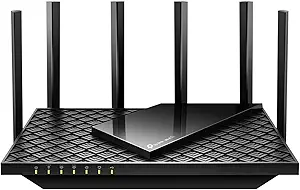
Evaluating the Cudy AX1500: A Budget Wi-Fi 6 Router with Specific Strengths and Limitations
The Cudy AX1500 positions itself as an entry point into Wi-Fi 6 (802.11ax) technology, offering features like OFDMA and WPA3 at a competitive price. Buyers should understand that its 'AX1500' classification denotes a combined theoretical speed across both bands, with real-world performance heavily dependent on its quad 5dBi antenna design and MU-MIMO implementation. This router is fundamentally designed for basic home networks seeking a Wi-Fi 6 upgrade rather than heavy multi-user environments.
Key Considerations Before Buying
- The 1500 Mbps total bandwidth (300 Mbps on 2.4GHz + 1200 Mbps on 5GHz) is adequate for typical streaming and browsing but may bottleneck with multiple simultaneous 4K streams or large file transfers.
- Its operation as an Access Point is a key feature for extending existing networks, but performance in this mode relies on the quality of your upstream wired connection.
- The inclusion of WPA3 security is a forward-looking advantage, but ensure your client devices (phones, laptops) support it to fully utilize this protection.
What Our Analysts Recommend
For this category, scrutinize reviews mentioning consistent 5GHz band performance at range, as budget routers often struggle here. Quality indicators include stable firmware with functional beamforming (which directs signal to devices) and effective heat dissipation, as overheating can throttle the AX1500's Mediatek chipset. Look for mentions of the setup process via the Cudy web interface.
Routers Market Context
Market Overview
The sub-$100 Wi-Fi 6 router market is intensely competitive, with brands like TP-Link, Netgear, and ASUS offering similar specs. The Cudy AX1500 competes primarily on price and the inclusion of four external antennas, which are less common at this tier. Wi-Fi 6 is becoming the new standard, making older AC routers less future-proof.
Common Issues
Common issues in budget Wi-Fi 6 routers include inconsistent beamforming performance, limited QoS (Quality of Service) customization, and firmware that lacks frequent updates. Users often report the 5GHz band having shorter effective range than advertised, a critical factor for the Cudy's 5dBi antennas.
Quality Indicators
In this tier, quality is shown by stable dual-band performance, reliable MU-MIMO handling for several devices, and a physical design that promotes good airflow. A router that maintains connections without frequent reboots and offers a usable, if basic, parental control suite is typically considered a good value.
Review Authenticity Insights
Grade B Interpretation
A 'Grade B' with an 11% estimated fake review rate suggests the majority of feedback is authentic, but there is a modest level of potentially incentivized or inauthentic praise. The adjusted rating of 4.20/5 (down from 4.44) is a more reliable indicator of genuine user satisfaction.
Trust Recommendation
Focus on reviews that detail specific use cases, like replacing an old N600 router or using it as an access point in a garage. Be slightly more skeptical of vague, overly enthusiastic 5-star reviews that don't mention setup, range, or device count. The 4-star reviews are often the most informative for this product.
Tips for Reading Reviews
Prioritize reviews that mention the router's performance with 15+ devices, its range through walls, and any comments on the 2.4GHz band performance for IoT devices. Look for discussions about the access point mode's ease of use, as this is a highlighted feature of the WR1500 model.
Expert Perspective
The Cudy AX1500 is a competent budget-conscious introduction to Wi-Fi 6, with its genuine user rating of ~4.2 reflecting satisfaction for basic upgrades. Its value is clearest for users with internet plans under 300 Mbps who need better coverage than an ISP-provided gateway offers. The quad-antenna design is a visual plus, but real-world beamforming and OFDMA efficiency will determine if it feels like an upgrade over a good AC1750 router. The WPA3 support is a legitimate security benefit for compatible devices.
Purchase Considerations
Purchase this router if your primary needs are reliable whole-home coverage for browsing/streaming on a budget, or a dedicated Wi-Fi 6 access point. Consider alternatives if you have a gigabit internet connection, regularly transfer large files over your local network, or require advanced gaming QoS features. Its performance is highly environment-dependent.
Comparing Alternatives
Shoppers should compare the Cudy AX1500's real-world feedback against similarly priced models like the TP-Link Archer AX10 or Netgear RAX10, focusing on interface usability and long-term stability.