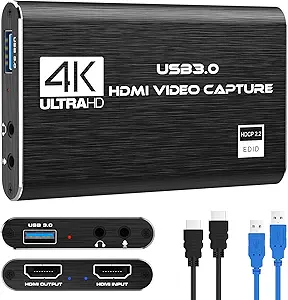
Capture Your Nintendo Switch Gameplay: 4K Passthrough, 1080p Streaming
If you're looking to stream or record gameplay from your Nintendo Switch, Xbox, or PS5, this capture card offers a practical solution: it accepts a 4K HDMI input but captures at a crisp 1080p 60FPS. This means you can play in full resolution while your stream or recording stays smooth and detailed, making it a solid choice for console gamers who want to share their gameplay without breaking the bank.
Key Considerations Before Buying
- Resolution vs. capture quality: This card passes through 4K video to your TV or monitor, but it records and streams at 1080p 60FPS. Make sure that matches your needs—if you require native 4K recording, you'll need a higher-end card.
- USB 3.0 requirement: For lag-free performance, your computer must have a USB 3.0 port. Using a USB 2.0 port will limit bandwidth and may cause dropped frames or lower quality captures.
- Console compatibility: The card works with Nintendo Switch, Xbox One/Series, PS4/PS5, and even cameras via HDMI. However, some consoles (like PS5) may require disabling HDCP in settings for the signal to work.
What Our Analysts Recommend
Look for a capture card that explicitly supports your console's HDMI output version (e.g., HDMI 2.0 for 4K60 passthrough). Check that the USB interface is 3.0 or higher, and read reviews mentioning specific software compatibility (like OBS or Streamlabs) and latency performance.
Internal TV Tuner & Capture Cards Market Context
Market Overview
The USB capture card market has exploded with the rise of game streaming and content creation. Affordable 1080p60 capture cards are now common, but many struggle with build quality, driver stability, or false advertising around 4K support. This card sits in the mid-range, offering a balance of features and price for console streamers.
Common Issues
Common problems include audio sync drift, dropped frames under load, and poor compatibility with certain USB controllers or laptops. Some budget cards also overheat during long streams. Authentic reviews often mention these specifics, so they're worth scanning for.
Quality Indicators
A quality capture card should have a metal housing for heat dissipation, a reliable chipset (like the MS2130), and clear documentation for driver installation. Verified purchases that mention stable 60fps capture across multiple platforms are strong signals of reliability.
Review Authenticity Insights
Grade B Interpretation
With a Review Authenticity Grade of B and an estimated 10% fake reviews, most of the 219 ratings are trustworthy. The 4.33-star average is likely close to the real user experience, though you should discount the most glowing or vague five-star reviews.
Trust Recommendation
Given the B grade, you can generally trust the consensus but should focus on reviews that mention specific use cases (e.g., 'works with my Switch and OBS at 1080p60') and include verified purchase badges. Avoid reviews that only praise 'great quality' without details.
Tips for Reading Reviews
When reading reviews, look for those that describe setup steps, software used, and any troubleshooting. For a capture card, negative reviews about audio lag or dropped frames are especially informative. Filter by 'Verified Purchase' and sort by 'Most Recent' to spot recurring issues.
Expert Perspective
This capture card delivers on its core promise: 4K passthrough and 1080p60 capture at a reasonable price. The adjusted rating of 4.10/5 (after removing ~10% suspicious reviews) aligns with solid but not exceptional performance. It's a great entry-level option for Nintendo Switch streamers, especially since the Switch caps output at 1080p anyway. However, power users needing 4K recording or ultra-low latency should consider pricier alternatives.
Purchase Considerations
Weigh the card's compatibility with your specific console and streaming software. If you're on a budget and primarily stream Switch or PS4 games, this is a strong value. But if you plan to capture high-motion PC gameplay at 1440p or 4K, look for a card with HDMI 2.0 input and USB 3.1 gen 2.
Comparing Alternatives
Shoppers should compare this with the Elgato HD60 S or AVerMedia Live Gamer Mini, which offer similar features but with more robust software ecosystems and proven reliability.