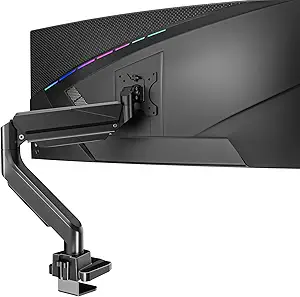
Master Your Triple Monitor Setup with the Right Mount
If you're looking to elevate your productivity with a triple monitor configuration, the UPGRAVITY 3 Monitor Desk Mount is designed to secure 17 to 32-inch screens, each supporting up to 17.6 lbs. This fully adjustable stand offers tilt, swivel, and rotation, making it a versatile choice for creating an ergonomic workspace. Before purchasing, consider your desk's thickness and the weight and VESA compatibility of your monitors to ensure a seamless fit.
Key Considerations Before Buying
- Verify your monitors have VESA patterns of 75x75mm or 100x100mm, as this mount is compatible with both, but not all screens support these standards.
- Check the total weight of your monitors; each arm holds up to 17.6 lbs, so heavier displays like some 32-inch gaming monitors may exceed this limit.
- Ensure your desk can accommodate the clamp or grommet installation; the clamp fits desks up to 3.5 inches thick, while the grommet requires a hole of at least 0.4 inches.
What Our Analysts Recommend
Quality triple monitor mounts often feature sturdy construction, such as heavy-duty steel or aluminum, and smooth adjustment mechanisms. Look for models with integrated cable management to reduce clutter and ensure long-term stability. The UPGRAVITY mount's ability to tilt, swivel, and rotate each arm independently is a key indicator of flexibility, but confirm that the arms can be positioned to avoid screen overlap or sag.
Monitor Arms Market Context
Market Overview
The monitor arm market has grown significantly with the rise of remote work and multi-monitor setups, with triple mounts becoming popular among traders, programmers, and content creators. Brands like UPGRAVITY compete on features like weight capacity, adjustability, and ease of installation, often targeting budget-conscious buyers. The demand for ergonomic solutions has led to innovations in gas spring mechanisms and tool-free adjustments.
Common Issues
Common concerns with triple monitor mounts include sagging over time, especially with heavier screens, and difficulty in aligning monitors perfectly. Users also report challenges with installation on non-standard desks, such as those with rounded edges or glass tops. Cable management can be a pain point, as some mounts lack adequate routing channels, leading to messy setups.
Quality Indicators
High-quality mounts typically use robust materials like aluminum alloy or reinforced steel, and offer smooth, gas-spring-assisted adjustments. Look for mounts with positive user feedback on long-term durability and easy leveling, as well as those that include detailed installation guides. The UPGRAVITY's 4.89 rating suggests strong build quality, but the 10% estimated fake reviews warrant cautious optimism.
Review Authenticity Insights
Grade B Interpretation
The Grade B rating and 10% estimated fake review rate indicate that while most reviews are genuine, there is a small but notable portion that may be incentivized or fabricated. This is common for popular products on Amazon, where sellers sometimes boost ratings. For the UPGRAVITY mount, the high adjusted rating of 4.60/5 suggests that even excluding suspicious reviews, it remains well-regarded.
Trust Recommendation
You can trust the UPGRAVITY mount based on the majority of verified purchases, but cross-check reviews on third-party sites like Reddit or tech forums for additional perspectives. Focus on reviews that mention specific use cases, like mounting three 27-inch monitors, as these are more likely authentic. The strong authenticity signals from personal context in reviews support a positive buying decision.
Tips for Reading Reviews
When reading reviews for monitor mounts, prioritize those with detailed photos or videos showing the setup, as these are harder to fake. Look for comments on stability over time, ease of adjustment, and installation challenges, as these reflect real-world use. Be wary of overly generic praise or reviews that lack specifics about monitor sizes or desk types.
Expert Perspective
The UPGRAVITY 3 Monitor Desk Mount offers solid value for users seeking a flexible triple monitor solution, with its 17.6 lbs per arm capacity and full adjustability suiting most standard setups. The high adjusted rating of 4.60/5 underscores its reliability, though the 10% fake review rate is a minor red flag. It excels in providing ergonomic benefits for productivity-focused users, but those with ultra-wide or heavy monitors should verify compatibility. Overall, this mount is a strong contender in the budget-to-midrange segment, balancing features and cost effectively.
Purchase Considerations
Consider your desk setup and monitor weights carefully, as this mount may not support larger gaming monitors or curved screens beyond 32 inches. The clamp and grommet options offer installation flexibility, but ensure your desk material can handle the pressure. If you prioritize cable management or need tool-less adjustments, compare this mount with premium options from brands like Ergotron or VIVO.
Comparing Alternatives
Shoppers should compare the UPGRAVITY mount with similar triple stands from brands like HUANUO or WALI, which offer comparable features at similar price points. For heavier monitors, consider mounts with higher weight capacities, such as those rated for 22 lbs per arm, to avoid sagging issues.