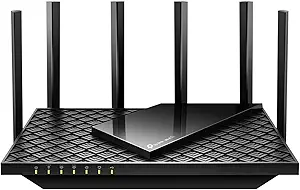
Wi-Fi 7 on a Budget: TP-Link Archer BE230 Buyer's Guide
The TP-Link Archer BE230 is a dual-band Wi-Fi 7 router that aims to bring next-generation speeds to the mainstream. As one of the more affordable Wi-Fi 7 options, it's crucial to understand its strengths and limitations—like its lack of a 6 GHz band—before you buy.
Key Considerations Before Buying
- Dual-band vs. tri-band: This router uses 2.4 GHz and 5 GHz only, so you won't get the full Wi-Fi 7 experience with the 6 GHz band. If you have many Wi-Fi 7 devices, consider a tri-band model for less congestion and higher peak speeds.
- Coverage and mesh: The Archer BE230 is designed for smaller homes or apartments. If you need to cover a larger area, check if its Mesh capabilities (which some reviews note are limited) fit your needs, or look for a router with stronger antennas or a mesh system.
- Ports and connectivity: Look at the Ethernet ports—if you have a fast internet plan (gigabit or more), ensure the router has at least one 2.5 Gbps port to avoid a bottleneck. The BE230 typically includes such a port, but verify for your specific needs.
What Our Analysts Recommend
When evaluating a Wi-Fi 7 router, check for the latest security standards (WPA3), MU-MIMO support, and the presence of a dedicated 6 GHz band for true tri-band performance. Also, consider the router's processor and RAM—a faster CPU ensures smooth handling of multiple devices and high-throughput tasks like 4K streaming or gaming.
Routers Market Context
Market Overview
The router market is rapidly transitioning to Wi-Fi 7, with manufacturers like TP-Link introducing affordable dual-band models to entice early adopters. While the full benefits of Wi-Fi 7—like multi-link operation and 320 MHz channels—are best realized on tri-band flagships, budget options like the BE230 offer a taste of the future at a lower price point.
Common Issues
Common issues in this category include inconsistent speeds on dual-band Wi-Fi 7 routers due to the absence of the 6 GHz band, and firmware bugs that affect stability and Mesh performance. Users often report that early Wi-Fi 7 routers require regular updates to reach their potential.
Quality Indicators
Quality indicators for routers include solid build quality, a user-friendly app interface, and a track record of firmware updates. Look for routers with multiple high-speed Ethernet ports, beamforming technology, and positive user feedback on reliability and range.
Review Authenticity Insights
Grade B Interpretation
The 'B' grade and 10% estimated fake review rate suggest that while most reviews are genuine, a small but notable fraction may be incentivized or fabricated. This is typical for popular networking products, but it means you should weigh the overall rating (4.78) with slight caution, as the adjusted rating (4.50) is still strong.
Trust Recommendation
Given the relatively low fake review percentage, you can trust the general consensus that the Archer BE230 is a solid performer. However, focus on detailed, balanced reviews—especially those from users with specific technical knowledge—to get a realistic picture of any caveats.
Tips for Reading Reviews
When reading reviews for routers, look for comments that mention specific use cases (e.g., gaming, streaming, large homes) and whether the reviewer has compared it to other routers. Be wary of overly vague praise or repetitive language, and prioritize reviews that discuss firmware updates and long-term reliability.
Expert Perspective
The TP-Link Archer BE230 is a compelling entry point into Wi-Fi 7 for budget-conscious users, offering improved speeds and lower latency over Wi-Fi 6, but its dual-band design means you'll miss out on the 6 GHz band's benefits. With a genuine 4.50 adjusted rating, it's clear that most owners are satisfied, though some note limitations in Mesh and firmware maturity. For small to medium homes with a few Wi-Fi 7 devices, this router delivers solid value, but tech enthusiasts may want to invest in a tri-band model for future-proofing.
Purchase Considerations
Before purchasing, assess your internet speed and device ecosystem—if you don't have Wi-Fi 7 devices yet, the BE230's benefits are minimal over a good Wi-Fi 6 router. Also, consider your need for advanced features like VPN support, parental controls, and QoS—these can vary by firmware version.
Comparing Alternatives
Shoppers should compare the BE230 with other budget Wi-Fi 7 routers from brands like Asus and Netgear, and also consider Wi-Fi 6E models that offer a 6 GHz band at similar prices.