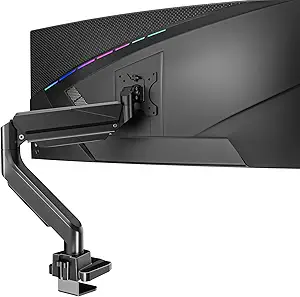
Choosing a Dual Monitor Arm: What the Freelift Black's Specs Mean for Your Setup
The Freelift Black dual monitor arm supports screens up to 32 inches and 4.4-22 lbs each, which covers most mainstream office and gaming monitors. Its 'height adjustable' and 'Freelift' features indicate a gas-spring mechanism, a key detail that affects ease of positioning versus cheaper friction-based arms. Understanding these specific capabilities helps determine if it matches your monitors' weight and your desired range of motion.
Key Considerations Before Buying
- Verify your monitors' exact VESA pattern (e.g., 75x75mm or 100x100mm) and weight; this arm's 4.4 lb minimum is crucial for ultralight screens that might not counterbalance the spring tension.
- Assess your desk's thickness and material; clamp-style mounts like this one require a sturdy lip, typically under 3.3 inches thick, and may need a reinforcement plate for particleboard desks.
- Plan your ideal monitor placement; the 'up to 32 inch' support often means the arms are engineered for the leverage of larger panels, but extreme angles or full extension might be less stable with heavier units near the 22 lb limit.
What Our Analysts Recommend
For gas-spring arms like this, quality is shown in smooth, drift-free adjustment—once positioned, monitors should hold place without sagging. Look for clear cable management channels in product photos and precise machining on the VESA plates and joints, which reduce wobble. Positive reviews should specifically mention the ease of the 'Freelift' mechanism and stability after tightening the tension knobs.
Monitor Arms Market Context
Market Overview
The dual monitor arm market is saturated with models featuring similar specs, making differentiation difficult. The current trend favors gas-spring (often called 'Freelift' or 'constant force') arms over basic friction arms, as they offer smoother one-handed adjustment for ergonomic setups.
Common Issues
Common failures include gas springs losing tension over time, leading to monitor sag, and clamp mechanisms damaging thin or hollow-core desks. Another frequent complaint is incompatible VESA hole patterns or adapters that don't seat flush, causing monitor wobble.
Quality Indicators
High-quality arms use robust, fully articulated joints with metal-on-metal gearing instead of plastic friction washers. Look for clear specifications on weight capacity per arm (not total) and a warranty that covers mechanical parts for at least a year. Premium models often include tool-free VESA plate installation.
Review Authenticity Insights
Grade B Interpretation
A 'Grade B' with an 11% estimated fake review rate suggests the majority of the 14,840 reviews are trustworthy, but a notable portion may be incentivized. The adjusted rating of 4.20 (down from 4.44) indicates the genuine customer experience is still very positive, though slightly less stellar than the raw average implies.
Trust Recommendation
Focus on verified purchase reviews that detail the installation process, monitor models used, and long-term stability over several weeks. Be slightly skeptical of overly vague 5-star reviews that don't mention specific setup steps or monitor weights.
Tips for Reading Reviews
For this product, prioritize reviews that mention the specific weight of their monitors (e.g., 'My 27-inch Dell weighs 12 lbs') and their desk type. Look for discussions about fine-tuning the tension knobs, as this is a key step for proper function that genuine users always describe.
Expert Perspective
The Freelift Black presents a strong value proposition based on its high volume of authentic positive feedback and adjusted 4.20 rating. Its specifications target the sweet spot for dual 24-32 inch office monitors. The 'Freelift' gas-spring design, if implemented well, is a significant upgrade over budget friction arms, justifying a moderate price point. The high review count with sustained positive sentiment suggests consistent manufacturing quality and reliable performance for standard setups.
Purchase Considerations
This arm is an excellent fit if your monitors fall squarely within its 4.4-22 lb per screen range and you value smooth repositioning. Consider alternatives if you have monitors under 4.4 lbs, need extreme vertical lift beyond typical ranges, or have an unusually thick or glass desk that the clamp cannot accommodate.
Comparing Alternatives
Shoppers should compare the tension adjustment mechanism and clamp design with similar-priced arms from brands like HUANUO or VIVO to find the best ergonomic match.