Tri-Mode Mice: What You Need to Know Before Buying
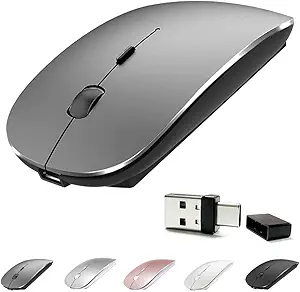
The Uineer Bluetooth Mouse offers tri-mode connectivity (Bluetooth, 2.4GHz, and wired), a rechargeable battery, and the ability to switch between three devices. This guide covers key factors to consider when shopping for a multi-device wireless mouse.
Key Considerations Before Buying
- Connectivity options: Tri-mode mice support Bluetooth for compatibility with various devices, a 2.4GHz USB receiver for low-latency performance, and sometimes a wired mode for charging while in use. Consider which modes you'll use most and whether the included receiver is necessary for your setup.
- Battery life and charging: A rechargeable mouse eliminates the need for disposable batteries, but battery life varies. Look for a mouse that offers at least a few weeks of use per charge and supports charging while in use, so you're never left without a mouse.
- Device switching: The ability to pair with multiple devices and switch between them with a button press is a key feature for multitaskers. Ensure the mouse can remember paired devices and switch seamlessly without re-pairing each time.
What Our Analysts Recommend
When evaluating a tri-mode mouse, check the build quality, sensor accuracy, and comfort for your hand size. A good mouse should have a reliable sensor with adjustable DPI, quiet or responsive buttons, and a comfortable shape for extended use. Also, consider the warranty and customer support, as these can vary significantly between brands.
Mice Market Context
Market Overview
The wireless mouse market is highly competitive, with many brands offering similar features at various price points. Tri-mode and multi-device support have become increasingly common, even in budget-friendly options. Consumers now expect reliable connectivity, long battery life, and ergonomic designs without paying a premium.
Common Issues
Common complaints in this category include connectivity dropouts, especially when switching between modes or devices, and battery life that degrades over time. Some users also report that the mouse feels cheap or develops button issues after a few months of use. Compatibility issues with certain operating systems or Bluetooth versions can also arise.
Quality Indicators
A quality wireless mouse typically has a solid feel, responsive buttons, and a sensor that tracks accurately on various surfaces. Look for reviews that mention long-term durability and consistent performance. Brands that offer clear warranty terms and responsive customer support are often a safer bet.
Review Authenticity Insights
Grade A Interpretation
The Uineer Bluetooth Mouse has an authenticity grade of A, with only 8% of reviews estimated to be fake. This means the vast majority of its 4,283 reviews are genuine, providing reliable insights into real-world performance. The adjusted rating of 4.50/5, slightly lower than the overall 4.67, still indicates high customer satisfaction.
Trust Recommendation
Given the high authenticity grade, you can trust the overall sentiment of the reviews. Focus on reviews that detail specific use cases, such as switching between devices or battery life, as these are likely from genuine users. The low percentage of suspicious reviews means you can rely on the aggregate rating as a strong indicator of quality.
Tips for Reading Reviews
When reading reviews for this mouse, pay attention to comments about connectivity stability, battery performance, and comfort during long sessions. Look for patterns in both positive and negative feedback to identify consistent strengths and weaknesses. Verified purchase reviews with detailed pros and cons are particularly valuable.
Expert Perspective
The Uineer Bluetooth Mouse appears to be a solid choice for users seeking a budget-friendly tri-mode wireless mouse with multi-device support. Its high authenticity rating and strong customer satisfaction suggest it performs well in everyday tasks. However, as with any budget mouse, there may be trade-offs in build quality or sensor precision compared to premium brands. The ability to switch between three devices is a standout feature at this price point.
Purchase Considerations
Before buying, consider your primary use: if you need a reliable mouse for office work and light gaming, this could be a great fit. If you require advanced features like high-precision sensors or customizable buttons, you might need to look at higher-end models. Also, check the return policy in case the ergonomics don't suit your hand.
Comparing Alternatives
Shoppers should compare this mouse with other tri-mode options from brands like Logitech and Razer, which may offer better build quality or additional features at a higher price. Reading comparisons and reviews can help you decide if the Uineer meets your specific needs.