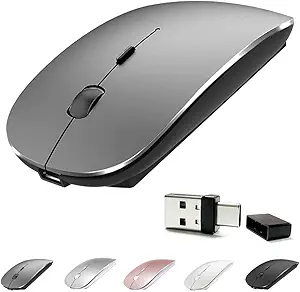
Find Your Grip: Orange Ergonomic Wireless Mouse with Side Buttons
Shopping for an ergonomic wireless mouse with side buttons and silent clicks requires balancing comfort, connectivity, and battery life. This orange model stands out with its anti-slip roller and 2400 DPI sensor, making it a practical choice for laptop, PC, and Chromebook users running Windows 11/10/7.
Key Considerations Before Buying
- Ergonomic design with side buttons improves workflow for tasks like browsing or editing, but ensure the shape fits your hand size and grip style to avoid strain over long sessions.
- The 2.4GHz wireless connection with USB receiver offers reliable, lag-free performance, though you'll need to keep the receiver handy—unlike Bluetooth, it occupies a USB port.
- Silent clicks and an anti-slip roller reduce noise and improve control, ideal for shared workspaces or late-night use, but verify the click feedback isn't too mushy for your taste.
What Our Analysts Recommend
In an ergonomic mouse, check for a comfortable contour that supports your palm, responsive side buttons that are easy to reach, and a smooth scroll wheel. The DPI range (here up to 2400) should match your screen resolution and typical tasks—higher DPI suits large monitors or fast cursor movement.
Mice Market Context
Market Overview
The wireless mouse market is crowded with options from budget to premium, with ergonomic models gaining traction as remote work and gaming drive demand for comfort. Many users now prioritize silent operation and customizable buttons over raw specs.
Common Issues
Common problems include unreliable wireless connections, short battery life, and side buttons that are too stiff or poorly placed. Some budget mice also suffer from sensor lag or inconsistent DPI tracking on different surfaces.
Quality Indicators
Quality wireless mice feature a robust USB receiver, responsive buttons with tactile feedback, and a sensor that tracks smoothly on various surfaces. A solid build with no creaking, a precise scroll wheel, and consistent battery performance (often weeks of use) signal a well-made product.
Review Authenticity Insights
Grade B Interpretation
With a Review Authenticity Grade of B and an estimated 10% fake review rate, this product has a relatively trustworthy review set, but roughly 1 in 10 reviews may be unreliable. The verified purchase badge on all reviews adds confidence, though some could still be incentivized or biased.
Trust Recommendation
You can generally trust the 4.22/5 star average, but focus on detailed reviews that mention specific pros and cons, especially those from users with similar devices (laptops, Chromebooks). Weigh the adjusted rating of 4.00/5 as a more conservative estimate of genuine satisfaction.
Tips for Reading Reviews
When reading reviews, look for comments on ergonomic fit, side button placement, and battery life—common pain points. Ignore vague praise like 'works great' and prioritize reviews that describe real-world use, such as 'silent clicks are perfect for the office' or 'the orange color is vibrant.'
Expert Perspective
This orange ergonomic wireless mouse offers a solid set of features—2400 DPI, silent clicks, anti-slip roller, and six buttons—at a competitive price point. The Grade B authenticity rating suggests most reviews are genuine, with the 4.00/5 adjusted rating indicating reliable performance for daily computing tasks. However, the 10% fake review rate warrants caution, and the lack of Bluetooth means you're tethered to the USB receiver.
Purchase Considerations
Consider your need for silent operation and side buttons versus the convenience of Bluetooth multi-device pairing. If you primarily use one laptop or PC and value a quiet, ergonomic design, this mouse is a strong candidate. But if you switch between devices often, look for a model with dual connectivity.
Comparing Alternatives
Shoppers should compare this mouse with other ergonomic wireless options in the same price range, such as those from Logitech or Anker, to weigh factors like battery life, shape, and additional features like adjustable DPI on the fly.