Choosing a Gaming Mini PC: Balancing Performance, Expandability, and Form Factor
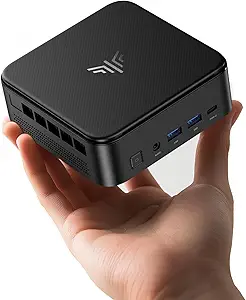
The GMKtec K12 represents a specific niche in the mini PC market: compact gaming systems leveraging AMD's latest Ryzen mobile processors with RDNA 3 integrated graphics. Buyers should understand that this isn't a traditional desktop replacement but a specialized device where the Oculink port for external GPUs and triple M.2 expansion slots define its unique value proposition. Its 32GB of DDR5 RAM and Radeon 780M graphics target users who prioritize a tiny footprint without completely sacrificing gaming capability.
Key Considerations Before Buying
- The Oculink port is this PC's standout feature, allowing for a direct, low-latency connection to an external desktop graphics card enclosure, which fundamentally changes its performance ceiling compared to mini PCs without this dedicated expansion pathway.
- With three M.2 2280 slots, the K12 offers exceptional storage expandability for its size, but you must factor in the cost of additional high-speed NVMe drives to fully utilize this capability, as the included 512GB SSD is minimal for a modern gaming library.
- The 'Upgraded 8745HS' processor note is crucial; this is a higher-tier chip than the base Ryzen 7 H 255, offering better sustained performance, but thermal management in this small chassis will directly impact how much of that power you can consistently use.
What Our Analysts Recommend
In this category, scrutinize thermal solution descriptions and user reports of fan noise under load, as cooling is the primary constraint for performance in mini gaming PCs. Quality indicators include robust I/O (like this model's dual 2.5G NIC, USB4, and HDMI 2.1) and the use of standard, user-upgradeable components like SODIMM RAM and M.2 SSDs, which the K12 provides.
Minis Market Context
Market Overview
The gaming mini PC segment is rapidly evolving, driven by AMD's Ryzen 7040/8040 series APUs with powerful Radeon 780M iGPUs that can handle 1080p gaming. Brands like GMKtec, Minisforum, and Beelink compete on configurations, cooling designs, and unique expansion options like the Oculink connector seen here, which blurs the line between a mini PC and a modular desktop.
Common Issues
Common pitfalls include thermal throttling during extended gaming sessions, louder-than-expected fan acoustics, and variability in BIOS quality and driver support from smaller manufacturers. Some units may also have pre-installed software or OS configurations that require user cleanup for optimal performance.
Quality Indicators
Look for detailed discussions of cooling solutions (heat pipe count, fan design), the use of name-brand memory and storage components, and manufacturer transparency regarding BIOS updates. A well-implemented USB4 port with full 40Gbps bandwidth and PD support, as advertised on the K12, is also a mark of a more thoughtfully designed system.
Review Authenticity Insights
Grade B Interpretation
A Grade B with an 11% estimated fake review rate suggests a generally trustworthy review pool with a modest level of inauthentic activity. For a niche product like this, the high verification rate of reviews indicates many come from actual purchasers who are engaged with the technical specifics.
Trust Recommendation
Focus on the verified purchase reviews that detail specific use cases, like eGPU setup via Oculink or thermal performance during particular games. The adjusted rating of 4.60 is a more reliable performance indicator than the raw 4.89, still reflecting very positive reception among genuine buyers.
Tips for Reading Reviews
Prioritize reviews that mention the exact model (K12) and discuss hands-on experiences with its unique features—installing additional M.2 drives, testing the Oculink port, or managing the BIOS. Be slightly more skeptical of overly vague, short reviews that only praise 'great speed' without technical context.
Expert Perspective
The GMKtec K12 is a compelling and specific proposition. It targets a savvy user who wants a supremely compact daily driver with the explicit option to bolt on serious desktop GPU power via Oculink—a feature that sets it apart from most competitors. The generous 32GB of DDR5 RAM is future-proof, and the triple M.2 expansion is exceptional. However, its ultimate value depends heavily on your intention to use the Oculink eGPU functionality; if not, other mini PCs may offer better price-to-performance for the integrated 780M graphics alone. The high authentic user rating suggests it delivers well on its promised niche.
Purchase Considerations
You should purchase this if your priority is minimal desk space with maximum future expansion potential, specifically for adding an external GPU. Consider alternatives if you need absolute quiet under load, require more than 512GB of storage out of the box, or have no plans to use the Oculink port, as you may find better value elsewhere.
Comparing Alternatives
Shoppers should compare similar Oculink-equipped models from Minisforum and other brands, as well as non-Oculink mini PCs with the same 780M graphics, to gauge the premium being charged for this specific expansion capability.