
Choosing a 360° Swivel Keyboard Case: What iPad 11-Inch Users Need to Know
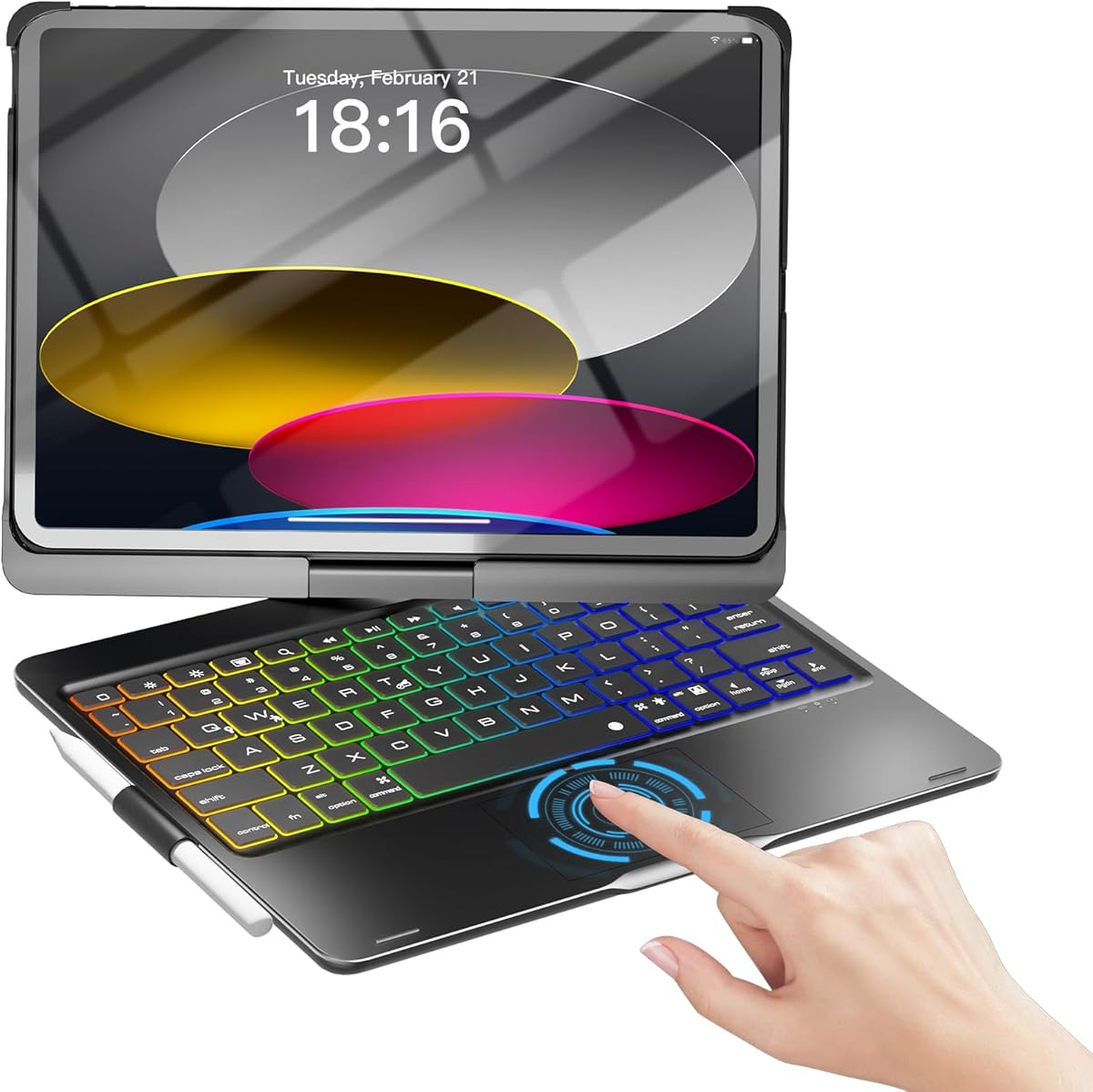
The NOKBABO case represents a specific hybrid category: a protective folio with integrated backlit keyboard and trackpad that offers 360-degree rotation. This combination creates unique trade-offs between typing functionality, viewing angles, and protection that buyers should understand before purchasing. Unlike simpler folios, this product aims to transform your iPad into a laptop alternative while maintaining tablet flexibility.
Key Considerations Before Buying
- The 360° swivel mechanism adds versatility for drawing or media consumption but introduces potential durability concerns at the pivot point compared to fixed-angle designs.
- Compatibility across multiple iPad generations (10th/11th, Air 4/5, Pro 11) means precise fit can vary slightly—check your exact model's camera cutouts and button alignment.
- Backlit keyboards in this price segment often use single-color LEDs with limited brightness adjustment; evaluate whether you truly need this feature versus battery life trade-offs.
What Our Analysts Recommend
Examine reviews mentioning the trackpad's responsiveness with iPadOS gestures and the keyboard's key travel depth—these differentiate functional keyboard cases from mediocre ones. Quality indicators include precise CNC-cut speaker/microphone ports, stable magnetic attachment when detached from the keyboard, and consistent backlighting without bleed-through around keys.
Keyboard Cases Market Context
Market Overview
The iPad keyboard case market has fragmented into three tiers: premium brands like Logitech and Apple's Magic Keyboard, mid-range universal cases, and budget models like NOKBABO that offer maximum features at minimum cost. This product competes in the crowded $40-70 segment where manufacturers prioritize feature lists over material quality.
Common Issues
Budget 360-degree cases frequently develop hinge looseness over time, and trackpads may exhibit lag or inconsistent click registration. Keyboard connectivity issues—particularly with Bluetooth pairing after detachment—are disproportionately reported in this category compared to premium alternatives.
Quality Indicators
Look for reinforced hinge construction with metal components rather than all-plastic, scissor-switch keyboard mechanisms (not membrane), and POGO pin connectors that maintain charging capability. Higher-quality cases use polycarbonate or TPU inner shells rather than hard plastic that can scratch iPad edges.
Review Authenticity Insights
Grade B Interpretation
A Grade B authenticity rating with 15% estimated fake reviews indicates generally trustworthy feedback, but suggests some review manipulation exists—common in competitive keyboard case categories. The 0.32-point drop from the displayed 4.22 to adjusted 3.90 rating reveals inflated positive sentiment.
Trust Recommendation
Focus on verified purchase reviews mentioning specific iPad models (like 'Air 5' or 'Pro 11 3rd gen') rather than generic praise. The healthy mix of 1-3 star reviews (not just 5-star) increases credibility—pay particular attention to critical reviews discussing long-term durability beyond 3 months.
Tips for Reading Reviews
Prioritize reviews discussing the trackpad's palm rejection and keyboard shortcut compatibility with iPadOS 17+, as these reveal actual usage experience. Be skeptical of reviews that only mention unboxing impressions without detailing typing feel or swivel mechanism performance over time.
Expert Perspective
The NOKBABO case presents a classic value proposition: maximum features (backlighting, trackpad, 360° rotation) at a budget price point, with expected compromises in material quality and long-term durability. The 3.90 adjusted rating from verified purchasers aligns with typical performance in this segment—satisfactory for light to moderate use but potentially disappointing for daily heavy users. The broad compatibility across 11-inch iPad models is both a strength (wider appeal) and weakness (potentially imperfect fit for specific generations).
Purchase Considerations
Consider this case if you need occasional laptop-style functionality but primarily use your iPad as a tablet—the 360° swivel supports this hybrid use well. However, if you plan to type extensively daily, invest in a keyboard with better key travel. Evaluate whether you truly need both trackpad and 360° rotation, as simpler folio keyboards often offer better typing experiences at similar prices.
Comparing Alternatives
Compare this against the Zagg Pro Keys for better typing quality or the Logitech Combo Touch for superior trackpad experience, acknowledging their higher price points.


