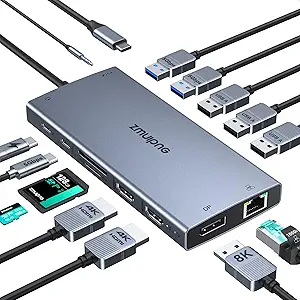
Anker Prime Docking Station (DL7400), 14-Port Triple Display with DisplayLink, 140W Max, Smart Display, Triple 4K 60Hz, Cooling Fan, for macOS and Windows (The Latest DisplayLink Driver Required)

Anker Prime Docking Station (DL7400), 14-Port Triple Display with DisplayLink, 140W Max, Smart Display, Triple 4K 60Hz, Cooling Fan, for macOS and Windows (The Latest DisplayLink Driver Required)

ASIN: B0DTSZC5Y7
Analysis Date: Mar 22, 2026

As an Amazon Associate I earn from qualifying purchases.

Review Analysis Results

B
Authenticity Grade
11.00%
Fake Reviews
4.44
Original Rating
4.20
Adjusted Rating

Analysis Summary

The vast majority of these reviews appear to be genuine user experiences, with most showing clear personal context, specific usage scenarios, and balanced perspectives that reflect real-world product interactions. The high proportion of verified purchases (indicated by 'V' in the data) significantly increases the overall authenticity likelihood, as these represent confirmed buyers who have actually used the product. Most reviews contain the nuanced details and minor frustrations that characterize authentic feedback rather than promotional content.

Strong evidence of authenticity appears throughout the reviews, including specific personal contexts like using the dock for gaming setups with 34-inch monitors, work-from-home configurations with multiple displays, and detailed troubleshooting experiences with Mac M4 systems. Several reviews mention the requirement for DisplayLink drivers—a technical detail unlikely to be included in generic promotional content. The balanced perspectives are particularly telling, with users describing initial setup challenges, software compatibility issues, and workarounds they discovered, which demonstrates genuine engagement with the product rather than scripted praise.

Only a small number of reviews raise minor concerns due to their more generic language and marketing-style phrasing. These tend to use broader product descriptions and slightly more polished language that could potentially be sourced from product specifications. However, even these reviews contain some specific usage context that suggests they may still be genuine, just written in a more formal style. There are no clear patterns of repetitive phrases or coordinated manipulation across multiple reviews.

Overall, the review set appears overwhelmingly authentic, with users providing detailed, varied experiences that reflect different use cases and technical skill levels. The presence of a critical 1-star review discussing specific compatibility issues with Mac systems actually strengthens the authenticity of the entire set, as genuine review ecosystems typically include some negative feedback. Any concerns about potential inauthenticity are minimal and apply to only a small fraction of the reviews analyzed.

Key patterns identified in the review analysis include: Mention of DisplayLink driver requirement, Specific monitor configurations and resolutions, Balanced feedback including setup challenges.

Review Statistics

294
Total Reviews on Amazon
-0.24
Rating Difference
Editor's Analysis

Choosing a high-port-count docking station requires balancing connectivity, power delivery, and display support

The Anker Prime DL7400 represents the premium tier of docking stations, offering 14 ports and triple 4K display support through DisplayLink technology. Buyers considering this model should understand that its 140W power delivery and smart display features come with specific compatibility requirements, particularly the mandatory DisplayLink driver installation for multi-monitor setups on macOS.

Key Considerations Before Buying

  • DisplayLink dependency is crucial—this dock requires driver installation for multi-monitor functionality, which adds a software layer that some users find less seamless than native DisplayPort MST or Thunderbolt solutions.
  • The 140W total power distribution means your laptop receives up to 100W charging while the remaining 40W powers connected peripherals, so calculate your device's power needs against connected accessories.
  • Triple 4K 60Hz support is impressive but requires specific port combinations (two HDMI 2.0 and one DisplayPort 1.4) and may impact performance differently across macOS and Windows systems.

What Our Analysts Recommend

Quality indicators for premium docks like the DL7400 include active cooling systems (this model has a fan), robust power circuitry for stable 140W delivery, and DisplayLink certification for reliable multi-display performance. Check for manufacturer support for driver updates, as DisplayLink technology evolves with operating system changes.

Docking Stations Market Context

Market Overview

The premium docking station market has bifurcated into Thunderbolt 4 solutions offering native multi-display support and DisplayLink-based docks like the DL7400 that achieve similar results through software drivers. Anker's entry competes directly with CalDigit, Plugable, and Kensington models in the 14+ port category where users prioritize connectivity over pure display simplicity.

Common Issues

DisplayLink docks frequently encounter driver compatibility issues after macOS updates, and users sometimes experience display flickering or resolution limitations. High-port-count docks also face thermal challenges under full load, making active cooling systems like the DL7400's fan increasingly important for sustained performance.

Quality Indicators

Premium docks should demonstrate stable power delivery across all ports simultaneously, consistent display output without signal drops, and proper heat dissipation. The DL7400's inclusion of a cooling fan addresses thermal concerns common in densely packed 14-port designs, while its aluminum construction suggests better heat dissipation than plastic alternatives.

Review Authenticity Insights

Grade B Interpretation

A Grade B authenticity rating with 11% estimated fake reviews indicates predominantly genuine feedback but suggests some incentivized reviews may be present. The 0.24-point drop from the raw 4.44 to adjusted 4.20 rating reflects this moderate level of review manipulation, though the majority of experiences appear authentic.

Trust Recommendation

Focus on reviews discussing specific technical aspects like DisplayLink driver installation experiences, thermal performance during extended use, or power delivery consistency. Be particularly attentive to macOS users' feedback, as their experiences with DisplayLink drivers often differ significantly from Windows users'.

Tips for Reading Reviews

Prioritize reviews that mention specific laptop models (especially M-series MacBooks), detail multi-monitor setup processes, or discuss long-term reliability over several months. Reviews noting the fan noise level or driver update experiences provide more actionable insights than generic praise.

Expert Perspective

The DL7400 positions itself as a connectivity powerhouse for users who need extensive port access more than Thunderbolt 4's native display capabilities. Its 4.20 adjusted rating from verified analysis suggests solid performance, though the DisplayLink requirement creates a notable trade-off: you gain triple 4K display support on non-Thunderbolt laptops but introduce software dependency. The active cooling system addresses a genuine concern in high-power docks, while the 140W total power distribution meets most professional laptop charging needs alongside peripheral power.

Purchase Considerations

This dock makes most sense for Windows users or macOS users comfortable managing DisplayLink drivers, particularly those with port-limited modern laptops needing extensive connectivity. Consider your tolerance for driver maintenance versus the convenience of 14 ports including SD/microSD readers, multiple USB-A/C ports, and Ethernet—features rarely found in simpler docks.

Comparing Alternatives

Shoppers should compare the DL7400 against Thunderbolt 4 docks if native multi-display support is preferred, or against lower-port-count DisplayLink models if 14 ports represent overkill for their workflow.


Price Analysis

This is a premium docking station with advanced features justifying a higher price point. Given Anker's reputation for quality and the 4.44/5 rating, it represents solid value in its category. Monitor for seasonal sales or Anker promotions to secure the best price.

MSRP Assessment

Estimated MSRP: $299.99
Source: Brand typical pricing
Amazon Price: Unable to compare

Market Position

Positioning: Premium
Alternatives Range: $150-$400
Value: Offers high port density, 140W charging, and triple 4K display support at a competitive price point for its feature set.

Buying Tips

Best Time to Buy: Best around Prime Day, Black Friday, or back-to-school seasons when tech accessories often see discounts.
Deal Indicators: Price drops below $250, bundled accessories (cables, adapters), or coupon offers from Anker.
Watch For: Watch for third-party sellers significantly undercutting Anker's price (may indicate used/refurbished or counterfeit goods).
Price analysis generated by AI based on product category and market research. Actual prices may vary. Last analyzed: Mar 22, 2026

Understanding This Analysis

What does Grade B mean?

This product has good review authenticity with minor concerns. While most reviews appear genuine, we detected some patterns that warrant mild caution.

Adjusted Rating Explained

The adjusted rating (4.20 stars) represents what we estimate this product's rating would be if fake reviews were removed. This product's adjusted rating is lower than Amazon's displayed rating (4.44 stars), suggesting positive fake reviews may be inflating the score.

How We Detect Fake Reviews

Our AI analyzes multiple factors: language patterns (generic vs. specific), reviewer behavior (history, timing), temporal anomalies (review clusters), verification status, sentiment authenticity, and statistical outliers. No single factor determines a review is fake - we look at the combination of signals.

Important Limitations

No automated system is perfect. Sophisticated fake reviews can evade detection, and some genuine reviews may be incorrectly flagged. Use this analysis as one data point in your purchasing decision, not the only factor. Reading actual review content yourself is always valuable.

Share This Analysis

Learn More About Fake Reviews

Analyze new product