
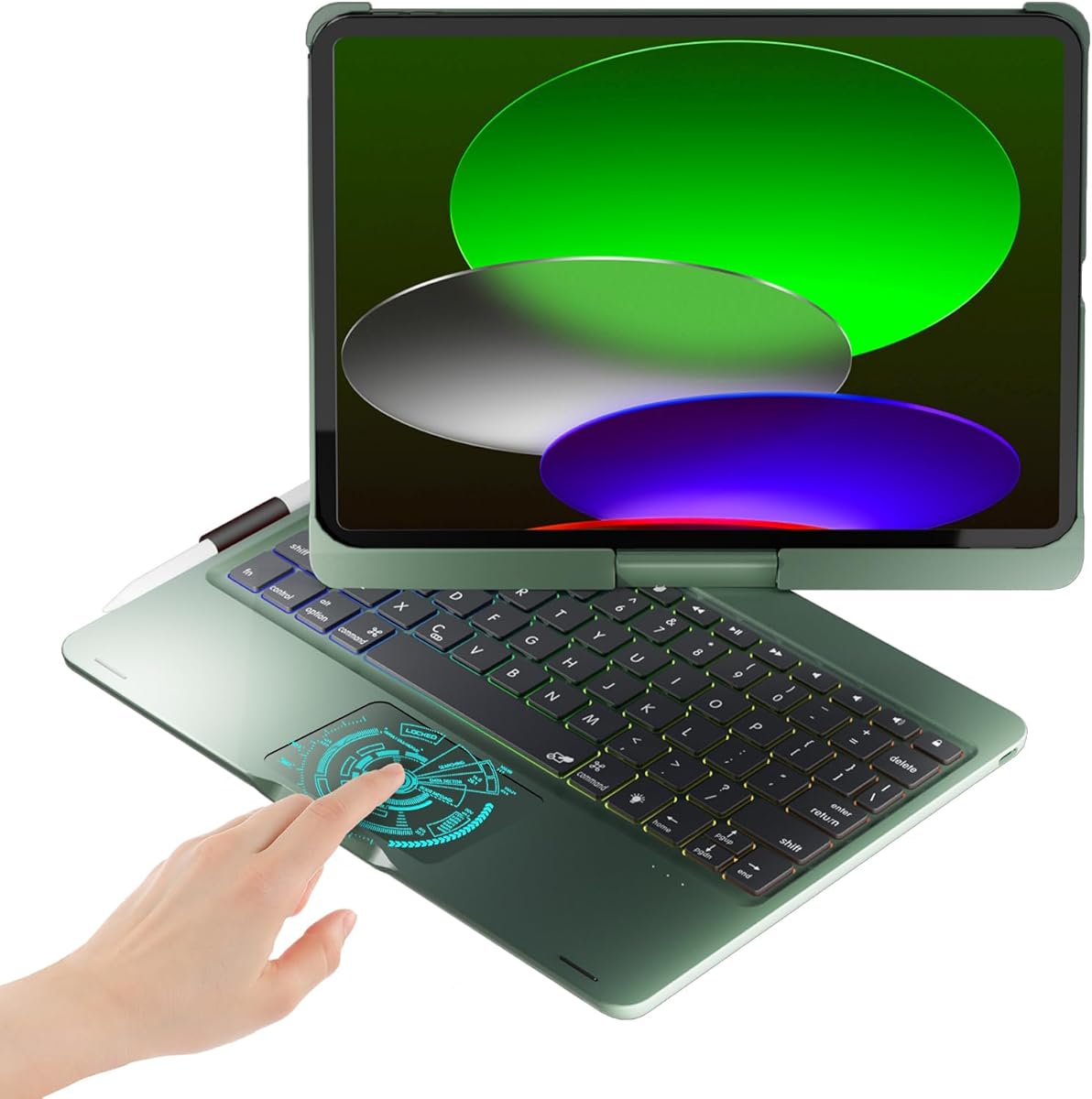
Choosing a 360° Swivel Keyboard Case: Balancing Versatility with iPad Protection
For iPad Pro 11-inch and iPad Air 11-inch users, a 360° swivel case with a backlit keyboard represents a specific hybrid between a protective shell and a productivity accessory. This BABG model, with its seven use modes and rainbow backlight, promises flexibility but requires careful evaluation of hinge durability and typing experience. Buyers should prioritize how the swivel mechanism and multi-angle positioning align with their actual workflow, whether for media consumption, typing, or sketching.
Key Considerations Before Buying
- Swivel Mechanism Longevity: The 360° rotating hinge is the core feature; inspect reviews for mentions of wobble, looseness over time, or resistance, as this is a common mechanical failure point in multi-mode cases.
- Keyboard-Trackpad Integration: With a built-in keyboard, assess the key travel, backlight brightness (especially the 'rainbow' effect's utility), and trackpad responsiveness, as these are often compromised versus standalone Bluetooth keyboards.
- iPad Model Precision: This case claims compatibility across 11-inch iPad Pro (1st-4th Gen), iPad Air 4th/5th, and newer base iPads; verify the fit for your specific model, as camera cutouts and button alignment can vary.
What Our Analysts Recommend
In this category, quality is indicated by a secure magnetic attachment for the iPad, a hinge that holds positions firmly without sagging, and a keyboard with reliable Bluetooth connectivity that doesn't drop. Reviews mentioning solid 'lapability'—where the case remains stable when used on your lap—signal good weight distribution and hinge design. Also, look for comments on the material quality of the 'Green' colored exterior regarding scuff resistance.
Keyboard Cases Market Context
Market Overview
The market for iPad keyboard cases with 360-degree rotation is crowded, with many brands offering similar feature sets (multiple viewing modes, backlit keys) at competitive price points, making differentiation difficult. These products sit between Apple's own premium Magic Keyboard and basic folios, targeting users who want all-in-one versatility without the Apple price tag.
Common Issues
Common pain points include fragile swivel hinges that develop play, keyboards with shallow or mushy key feel, and Bluetooth pairing problems. Bulk is another frequent complaint, as the mechanism and keyboard add significant weight and thickness, potentially negating the iPad's portability advantage.
Quality Indicators
Beyond star ratings, look for detailed reviews discussing the tactile feedback of the scissor-switch keys, the stability of the stand in 'tent' or 'floating' modes, and the durability of the PU leather or plastic exterior. Long-term reviews (mentioning 3+ months of use) are particularly valuable for assessing hinge wear.
Review Authenticity Insights
Grade B Interpretation
A 'Grade B' with an estimated 11% fake review rate suggests the review corpus is reasonably trustworthy but requires discernment. The adjusted rating of 3.40 (down from 3.56) indicates that potentially inflated reviews were slightly boosting the score, making the true user experience marginally lower than the surface average suggests.
Trust Recommendation
Focus on the 1,000+ verified purchase reviews, particularly 3-star ratings, which often provide the most balanced critiques of the swivel mechanism and keyboard performance. Be slightly more skeptical of extreme 5-star reviews that lack specific details about the seven modes or build quality.
Tips for Reading Reviews
Prioritize reviews that specify the exact iPad model used (e.g., 'iPad Air 5th') and describe a specific use case, like note-taking in 'writing mode' or watching videos in 'stand mode.' These contain the contextual details needed to judge real-world compatibility and utility.
Expert Perspective
The data presents a case with clear trade-offs. The 3.40 adjusted rating from a large review pool signals a product that works adequately for many but has consistent flaws—likely in the hinge durability or typing experience—that prevent higher satisfaction. The 360° swivel and seven modes offer genuine versatility, but this complexity often introduces mechanical vulnerabilities not found in simpler folio cases. The rainbow backlight is an aesthetic differentiator but rarely a core functional benefit.
Purchase Considerations
Weigh the necessity of a fully rotating hinge and built-in keyboard against the potential for increased bulk and mechanical failure. If your primary need is a typing desk solution, a detachable keyboard case might offer better ergonomics. If you frequently switch between portrait sketching, landscape viewing, and typing, the swivel's convenience may justify the compromise.
Comparing Alternatives
Shoppers should compare this model's hinge design and keyboard specs directly against alternatives from brands like Logitech, Zagg, or Brydge, which may use different attachment mechanisms.


