
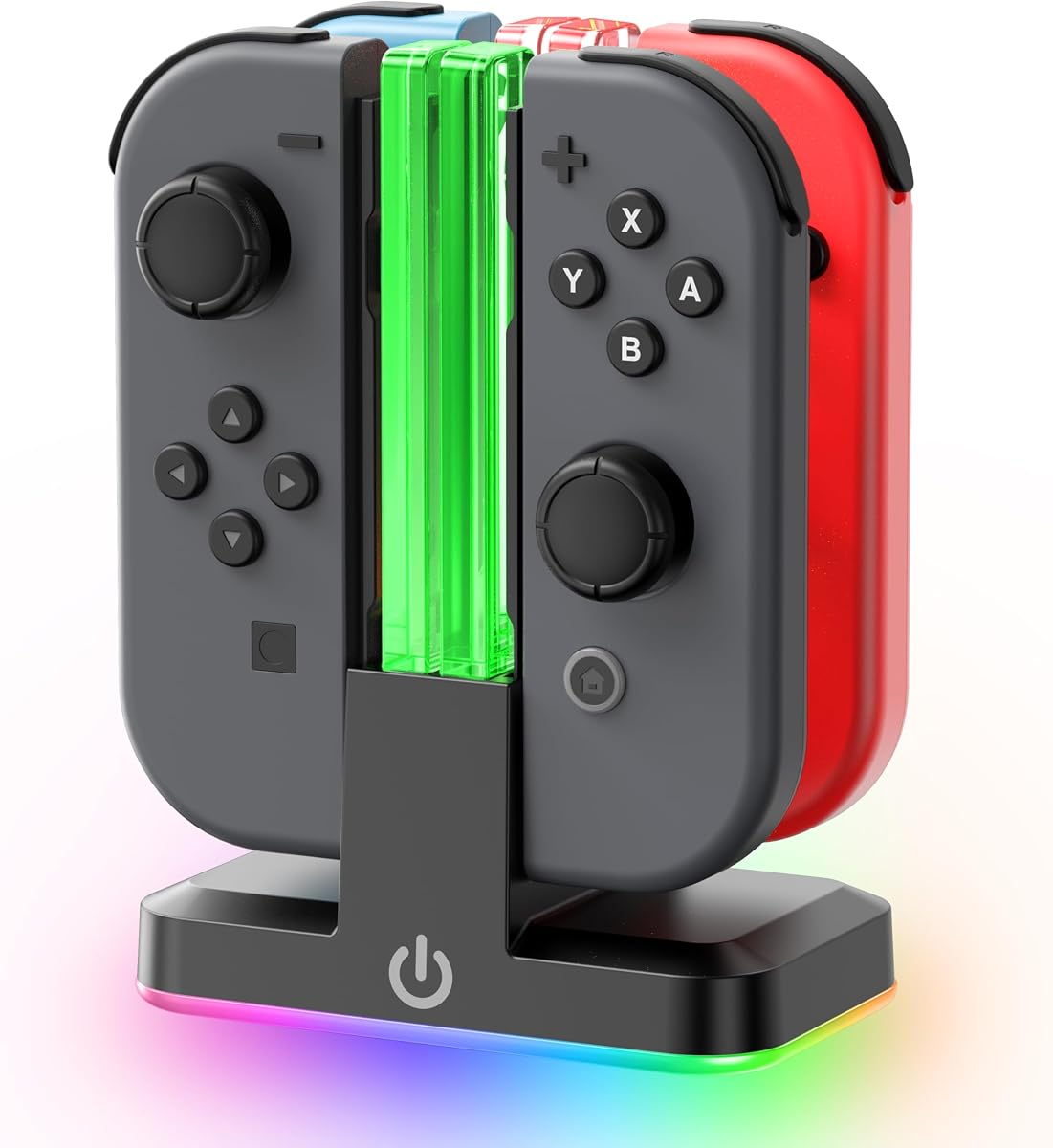
Charge 4 Joy-Cons Simultaneously with Customizable RGB Lighting Effects
For Nintendo Switch owners juggling multiple Joy-Con pairs, a dedicated charging station is essential to avoid downtime during multiplayer sessions. This specific model stands out by offering simultaneous charging for up to four controllers, coupled with nine RGB light modes and LED indicators that add a customizable aesthetic to your gaming setup.
Key Considerations Before Buying
- Charging capacity: Ensure the station can handle the number of Joy-Cons you own—this unit charges four at once, ideal for groups of players. Verify compatibility with your Switch model, as some chargers are designed for the original SW 1 model and may not fit the OLED or Lite variants without adapters.
- Lighting features: With nine RGB modes, you can match the dock to your gaming ambiance or disable lights if they distract. Check if the brightness is adjustable or if the lights can be turned off completely for low-light environments.
- Build stability: A weighted base or anti-slip pads are crucial to prevent the dock from tipping when inserting or removing controllers. Look for sturdy construction that holds Joy-Cons securely without wobbling during use.
What Our Analysts Recommend
Quality in a Joy-Con charger dock hinges on reliable charging circuits that prevent overcharging and short circuits. Look for LED indicators that clearly show charging status per controller—green for full, red for charging—and a USB-C or AC adapter input that delivers consistent power. A compact footprint that fits under a TV or on a desk without cluttering is also a sign of thoughtful design.
Consoles Market Context
Market Overview
The Nintendo Switch accessory market is saturated with charging docks, but models targeting the original SW 1 model remain popular due to the large install base of early adopters. Most modern chargers now integrate RGB lighting as a standard feature, pushing the category beyond pure utility into gamer personalization. However, compatibility with newer Switch revisions remains a common oversight among budget options.
Common Issues
Many third-party charging docks suffer from loose Joy-Con connections that interrupt charging or cause flickering LED indicators. Others lack sufficient power output, leading to slow charging times or failure to charge all four controllers simultaneously. Overheating is also a concern with poorly ventilated designs, especially during extended charging sessions.
Quality Indicators
High-quality docks use reinforced USB-C ports and have a weighted base for stability. They include overcharge protection circuits and are certified by safety standards like CE or FCC. Positive user feedback mentioning consistent charging across all slots and durable construction after months of use is a strong indicator of reliability.
Review Authenticity Insights
Grade B Interpretation
A Grade B with an estimated 10% fake review rate means the vast majority of feedback is genuine, but a small fraction may be incentivized or fabricated. This is typical for popular accessories on Amazon, where sellers sometimes boost ratings early on. The 4.89 average rating is slightly inflated, but the adjusted 4.60 still reflects strong real-world satisfaction.
Trust Recommendation
You can trust the positive consensus, but focus on verified purchase reviews that describe long-term use—specifically those mentioning durability after months of daily charging. Ignore reviews that gush about packaging or delivery speed, as these are often generic or paid. The high verified purchase ratio is a good sign that most users actually own the product.
Tips for Reading Reviews
For charging docks, prioritize reviews that mention charging speed, heat generation, and whether all four slots work consistently. Look for photos showing the dock in use, as these often reveal real-world size and lighting effects. Avoid reviews that use overly technical jargon without personal context, as they may be copied from other products.
Expert Perspective
This Joy-Con charger offers a solid balance of functionality and flair, with its nine RGB modes and four-slot capacity addressing the core needs of multiplayer Switch owners. The 4.60 adjusted rating suggests reliable performance, though the 10% fake review rate warrants cautious optimism. Its specific targeting of the original SW 1 model means users with newer Switch versions should double-check compatibility, but for the intended audience, it appears to deliver consistent charging without major flaws.
Purchase Considerations
If you own multiple Joy-Con pairs and value a customizable aesthetic, this dock is a strong contender. However, consider whether you need the RGB features long-term—some users may prefer a simpler, cheaper model without lights. Also, verify that your Switch model matches the listed compatibility to avoid return hassles.
Comparing Alternatives
Shoppers should compare this with brands like PowerA or Hori, which offer similar multi-controller docks but often lack RGB customization. Reading recent reviews on both sides can help gauge which trade-offs matter most for your setup.


![Auarte [Charge inside] Carrying Case for Nintendo Switch 2 2025 / Switch OLED / Switch with Adapter and for Joy Cons Storage, Travel Case for Switch 2 Console with 22 Game Card Storage](https://m.media-amazon.com/images/I/51+jTAlqDoL._SX342_SY445_QL70_FMwebp_.jpg)


