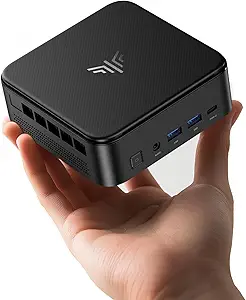
AOOSTAR WTR PRO: A Barebones NAS With Unique Display and LAN Features
The AOOSTAR WTR PRO, powered by an AMD R7 5825U processor and offering 4+2 drive bays, presents a distinct option in the mini desktop NAS market. Designed as a home server or mini home lab, it comes without RAM, SSD, or OS, giving you full control over configuration. Understanding its barebones nature and specific capabilities—like dual 2.5GbE LAN and triple 4K display support—is crucial before you buy.
Key Considerations Before Buying
- Barebones Setup: Since this NAS lacks RAM, storage, and an OS, factor in the extra cost and time for sourcing compatible DDR4 SO-DIMM memory, M.2 SSDs, and an operating system like TrueNAS or Unraid.
- Dual 2.5GbE LAN: The two 2.5 Gigabit Ethernet ports enable link aggregation or direct connections for faster file transfers, but ensure your network switch and devices support 2.5GbE to fully leverage this.
- Triple 4K Display Output: The ability to drive three 4K displays is unusual for a NAS, making it suitable for a home lab running multiple virtual machines or a media server with direct display output.
What Our Analysts Recommend
When evaluating a barebones NAS like the WTR PRO, prioritize build quality—check for sturdy metal chassis and adequate ventilation for the AMD processor. Also, verify that the M.2 slots support NVMe for fast caching, and that the SATA ports align with your planned hard drive configuration.
Minis Market Context
Market Overview
The mini desktop NAS market is expanding, with more users seeking compact, power-efficient systems for home labs and media servers. Devices like the AOOSTAR WTR PRO compete with established names by offering unique features like multiple display outputs and high-speed LAN, often at a lower price point.
Common Issues
Common issues in this category include thermal throttling under sustained load, especially with powerful CPUs in small chassis, and compatibility headaches with barebones systems. Users also report challenges with BIOS settings for low-power server configurations or finding drivers for niche hardware.
Quality Indicators
Quality indicators include a robust warranty, active firmware updates, and detailed documentation from the manufacturer. For the WTR PRO, look for user reports on thermal performance and the reliability of the dual LAN ports, as these are critical for NAS functionality.
Review Authenticity Insights
Grade B Interpretation
The Grade B authenticity rating with an estimated 10% fake review rate suggests that while most reviews for the AOOSTAR WTR PRO are genuine, a small fraction may be untrustworthy. This is typical for niche tech products, where enthusiastic early adopters often leave detailed feedback, but some incentivized or fabricated reviews can slip through.
Trust Recommendation
Given the 10% fake rate, focus on verified purchase reviews that include specific technical details about setup, performance, or issues. The overall 4.33 rating is likely reliable, but cross-reference critical points like heat management or LAN stability across multiple reviews to confirm patterns.
Tips for Reading Reviews
When reading reviews for a barebones NAS, prioritize comments that discuss hardware compatibility (e.g., RAM speeds, drive types) and real-world use cases like Plex transcoding or virtualization. Be skeptical of overly short, vague praise, and look for photos or benchmarks that back up claims.
Expert Perspective
The AOOSTAR WTR PRO offers a compelling mix of features for a home server or mini lab, particularly its dual 2.5GbE LAN and triple 4K display support, which are rare in this form factor. The AMD R7 5825U provides solid multi-core performance for virtualization or media serving, but the barebones design requires technical know-how and additional investment. With a 4.10 adjusted rating and mostly genuine reviews, it’s a credible option for enthusiasts, though the lack of pre-installed components may deter less experienced users.
Purchase Considerations
Weigh the extra cost and effort of sourcing RAM, SSDs, and an OS against the flexibility of customizing your build. If you value out-of-the-box simplicity, consider a pre-configured NAS, but if you want control and unique features like multi-display output, the WTR PRO is a strong candidate.
Comparing Alternatives
Shoppers should compare the AOOSTAR WTR PRO with other mini NAS options like the Synology DS220+ or QNAP TS-233 for ease of use, or the Asustor AS5402T for similar high-speed networking features.