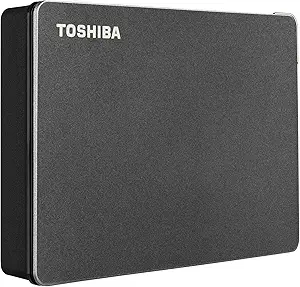
How to Choose a 500GB Portable Hard Drive for All Your Devices
A 500GB external hard drive like this ultra-slim model offers a sweet spot of capacity and portability for everyday backup and storage. But not all portable drives are created equal—especially when cross-platform compatibility with Windows, Mac, PS4, and Xbox is promised.
Key Considerations Before Buying
- Compatibility isn't universal: While this drive claims plug-and-play with PC, Mac, PS4, and Xbox, Macs often require reformatting for write access, and game consoles may need specific formatting. Check the drive's native file system (likely NTFS for Windows) before buying if you plan to use it across multiple platforms.
- Speed matters for large files: This is a portable HDD, not an SSD, so expect transfer rates around 100-120 MB/s. For backing up documents, photos, and occasional game saves, that's fine—but if you regularly move huge video files, consider a faster SSD or a desktop drive with external power.
- Physical durability is key: Ultra-slim drives are easy to carry but more prone to accidental drops. Look for features like shock resistance or a protective case, and remember that mechanical drives are more fragile than solid-state alternatives.
What Our Analysts Recommend
When evaluating a portable hard drive, check the warranty length (1-2 years is standard), the included cable type (USB 3.0 is a must for decent speeds), and whether the manufacturer offers free backup software. Also, read the fine print on console compatibility—some drives require a separate power source for Xbox, and PS4 may need the drive formatted as exFAT.
External Hard Drives Market Context
Market Overview
The portable external hard drive market is mature, with 500GB models now considered entry-level as 1TB and 2TB drives become more affordable. However, 500GB remains popular for budget-conscious buyers or those who only need to store documents and a few games.
Common Issues
A frequent complaint with portable HDDs is that they arrive formatted for Windows, leaving Mac users to reformat before use. Another issue is that some drives run hot or make clicking noises, which can indicate a failing drive. Additionally, advertised compatibility with game consoles often comes with caveats—like needing to erase the drive for console use, making it unusable for PC files simultaneously.
Quality Indicators
A quality portable hard drive will have a sturdy, preferably metal or hard plastic casing, a reputable brand name, and clear documentation on formatting for different operating systems. Look for drives with USB 3.0 or higher and read reviews that mention long-term reliability, not just initial impressions.
Review Authenticity Insights
Grade A Interpretation
This product's A authenticity grade and 8% estimated fake review rate are excellent signs—most reviews are genuine. That means the 4.78-star rating (4.60 adjusted) is likely a reliable reflection of real customer satisfaction, so you can trust the feedback you read.
Trust Recommendation
Given the high authenticity, you can confidently use the reviews to gauge performance and compatibility. Still, scan for reviews that mention your specific use case (e.g., Mac or Xbox) to ensure the drive meets your needs, as individual experiences can vary.
Tips for Reading Reviews
When reading reviews for this drive, focus on those that detail the reviewer's setup and how the drive performed over time. Pay attention to mentions of reformatting steps and any compatibility hiccups, as these are common pain points that generic praise might overlook.
Expert Perspective
Based on the analysis, this 500GB portable hard drive appears to be a solid, budget-friendly option with a high rate of genuine positive reviews. Its ultra-slim design and broad compatibility make it versatile for users who need to transfer files between Windows, Mac, and gaming consoles. However, the 500GB capacity may fill up quickly if you store large media files or many modern games, so consider your storage needs carefully.
Purchase Considerations
Before buying, verify that the drive's format works with your primary device out of the box—if you're a Mac user, you'll likely need to reformat, which erases existing data. Also, check whether the drive requires a Y-cable or external power for Xbox, as some consoles have strict power requirements. Finally, compare the cost per gigabyte with larger drives; sometimes a 1TB model is only a few dollars more.
Comparing Alternatives
While this drive seems reliable, shoppers should compare with similar 500GB models from brands like Seagate, WD, and Toshiba, especially if warranty or included software is important to you.