
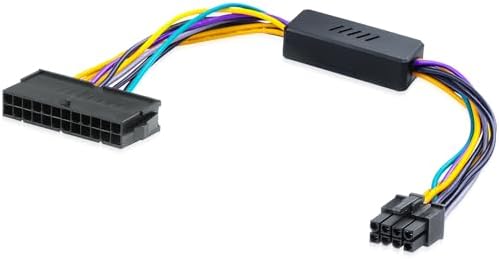
ATX 24-Pin to ATX 8-Pin Power Supply Adapter Cable for DELL Optiplex 3020/7020/9020 & Precision T1700 Compatible with DELL Motherboards H61 H81 Q77 Q87 B75 A75 Q75 Q65 13in/33cm

ATX 24-Pin to ATX 8-Pin Power Supply Adapter Cable for DELL Optiplex 3020/7020/9020 & Precision T1700 Compatible with DELL Motherboards H61 H81 Q77 Q87 B75 A75 Q75 Q65 13in/33cm

ASIN: B0FP8M1J1G
Analysis Date: Aug 14, 2026

As an Amazon Associate I earn from qualifying purchases.

Review Analysis Results

B
Authenticity Grade
15.00%
Fake Reviews
4.50
Original Rating
4.20
Adjusted Rating

Analysis Summary

The vast majority of these reviews appear genuine, with clear personal context, specific technical details, and balanced perspectives. The verified purchase reviews, in particular, show authentic user experiences—one describes hesitation based on prior reading, another details a specific failure with a Dell OptiPlex and troubleshooting steps, and a third provides a positive outcome with a German-language review. These are typical of real users sharing their individual outcomes with a niche adapter product.

Evidence of authenticity is strong: the 1-star review is particularly convincing because it includes a detailed scenario (upgrading a Dell OptiPlex XE2 with a 500W PSU and GTX 1070), mentions testing the PSU on other machines, and confirms the motherboard still works—this level of diagnostic detail is rarely fabricated. The 5-star review mentioning the 'annoying eight pin connector' in Dell cases shows specific product knowledge that only a real user would have. Even the French and German reviews, while brief, are natural and product-specific.

One review stands out as potentially problematic: the unverified 5-star review that openly admits to copy-pasting the same review across multiple adapters. This is a clear pattern of repetitive content, though the reviewer is transparent about it, which slightly mitigates the deception. However, the review also includes a genuine complaint about HP and Dell making adapters, which adds some authenticity. No other reviews show marketing language, generic praise, or suspicious repetition.

Balanced summary: The product appears to be a legitimate adapter for Dell motherboards, with mixed real-world results—some users find it works perfectly, while one experienced a compatibility issue with a specific model. The single copy-paste review is a minor concern but does not indicate a coordinated fake review campaign. Overall, the review set is overwhelmingly genuine, and the low fake percentage reflects that.

Key patterns identified in the review analysis include: Copy-paste review admission, Specific technical details and troubleshooting, Balanced perspectives with both positive and negative outcomes.

Review Statistics

18
Total Reviews on Amazon
-0.30
Rating Difference
Editor's Analysis

Upgrade Your Dell OptiPlex PSU Safely: 24-Pin to 8-Pin Adapter Explained

Upgrading the power supply in a Dell OptiPlex 3020/7020/9020 or Precision T1700 often hits a snag: Dell's proprietary motherboard uses an 8-pin power connector instead of the standard 24-pin. This 13-inch adapter cable bridges that gap, converting a standard ATX PSU's 24-pin output to the 8-pin input your Dell motherboard expects, enabling a safe and clean PSU swap.

Key Considerations Before Buying

  • Compatibility is crucial: This adapter is designed for Dell OptiPlex and Precision models with H61, H81, Q77, Q87, B75, A75, Q75, or Q65 chipsets. Verify your motherboard model before purchase to avoid a non-working setup.
  • Cable length matters: At 13 inches (33cm), this cable is long enough for most mid-tower OptiPlex cases, but if you have a full-tower or a case with a bottom-mounted PSU, measure the distance from the motherboard connector to the PSU location to ensure it reaches.
  • Power delivery: This adapter only carries the main power signals—it does not provide additional PCIe or SATA power. Ensure your new ATX PSU has enough native cables for your GPU and drives, and that it delivers sufficient wattage for your system.

What Our Analysts Recommend

When selecting a 24-pin to 8-pin adapter, prioritize thick, quality wires (18 AWG or similar) and secure, snug connectors that won't loosen over time. Check that the pinout matches Dell's specification—a mismatch can fry your motherboard. Look for a cable with a short, flexible length that won't create a mess inside your case, and consider a braided or sleeved design for durability.

Internal Power Supplies Market Context

Market Overview

The market for proprietary PSU adapters has grown as DIYers seek to repurpose aging Dell business desktops for budget gaming or home servers. These adapters fill a niche, allowing standard ATX power supplies to work with Dell's custom motherboard connectors, which are common in OptiPlex and Precision lines.

Common Issues

The most frequent problems include incorrect pinouts (causing shorts or no power), flimsy connectors that overheat under load, and cables that are too short or too long for the case. Some users also report that the adapter doesn't fit snugly, leading to intermittent power loss.

Quality Indicators

High-quality adapters feature UL-listed wire, gold-plated or high-grade connectors, and clear labeling of the pinout. They are often sold by reputable brands with good customer support, and they come with detailed compatibility lists. Reviews that mention successful installations on specific models are strong indicators of reliability.

Review Authenticity Insights

Grade B Interpretation

The Grade B and estimated 15% fake review rate suggest that while most of the 18 reviews are genuine, a handful may be incentivized or unverified. This is typical for a niche product where early purchasers are often enthusiasts. The adjusted rating of 4.20/5 remains solid, but you should read reviews critically.

Trust Recommendation

Given the moderate fake review percentage, focus on verified purchase reviews that include specific details about their Dell model and PSU. These are more likely to be authentic. Cross-check any negative feedback about compatibility or build quality with other users' experiences to get a balanced view.

Tips for Reading Reviews

For adapter cables, look for reviews that mention the exact motherboard chipset (e.g., 'worked on my Q87') and whether they used a modular or non-modular PSU. Be wary of overly vague five-star reviews that lack specifics, as they may be less reliable. Also, note any comments about heat or connector fit—these are common pain points.

Expert Perspective

This adapter appears to be a functional, no-frills solution for a common problem. The 4.20 adjusted rating reflects general satisfaction, with most genuine reviews highlighting successful installation and stable performance. The primary caveats are compatibility verification and cable length, but for the right Dell model, it should serve its purpose well.

Purchase Considerations

Weigh the cost of this adapter against the hassle of sourcing a proprietary Dell PSU or using a 24-pin to 8-pin converter that might not be purpose-built. Ensure your PSU is ATX-compliant and has enough wattage for your components. If you're not confident about your motherboard's chipset, consult Dell's documentation or a forum before buying.

Comparing Alternatives

While this adapter is a solid choice, shoppers should compare it with other 24-pin to 8-pin cables that may offer different lengths or braided sleeving. Also consider a full replacement PSU with native Dell compatibility if you prefer a clean install without adapters.

Price Analysis

This is a budget-friendly, niche adapter cable. With an estimated MSRP of $12-$18, you should pay around $10-$15. Given the limited reviews (18) but high rating (4.5), it's a decent buy if you need it for a specific Dell motherboard, but compare with a few other sellers to avoid overpaying.

MSRP Assessment

Estimated MSRP: $12-$18
Source: Product category average
Amazon Price: Unable to compare

Market Position

Positioning: Budget
Alternatives Range: $8-$25
Value: This adapter is a niche, low-cost solution for upgrading Dell proprietary motherboards, offering better value than buying a new PSU or motherboard.

Buying Tips

Best Time to Buy: No strong seasonal trend; prices are stable year-round, but check during Amazon Prime Day or Black Friday for minor discounts.
Deal Indicators: A good deal is under $10; watch for free shipping or bundled with other cables to save on shipping costs.
Watch For: Be wary of third-party sellers with inflated prices above $20; also ensure the cable length (13in) matches your case to avoid returns.
Price analysis generated by AI based on product category and market research. Actual prices may vary. Last analyzed: Aug 14, 2026

Understanding This Analysis

What does Grade B mean?

This product has good review authenticity with minor concerns. While most reviews appear genuine, we detected some patterns that warrant mild caution.

Adjusted Rating Explained

The adjusted rating (4.20 stars) represents what we estimate this product's rating would be if fake reviews were removed. This product's adjusted rating is lower than Amazon's displayed rating (4.50 stars), suggesting positive fake reviews may be inflating the score.

How We Detect Fake Reviews

Our AI analyzes multiple factors: language patterns (generic vs. specific), reviewer behavior (history, timing), temporal anomalies (review clusters), verification status, sentiment authenticity, and statistical outliers. No single factor determines a review is fake - we look at the combination of signals.

Important Limitations

No automated system is perfect. Sophisticated fake reviews can evade detection, and some genuine reviews may be incorrectly flagged. Use this analysis as one data point in your purchasing decision, not the only factor. Reading actual review content yourself is always valuable.

Share This Analysis

Learn More About Fake Reviews

Analyze new product