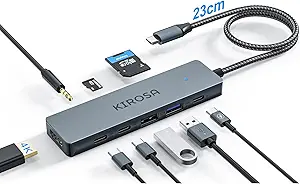
Expand Your MacBook's Ports with a 7-Port USB-C Hub That Works
When you’re juggling a USB flash drive, external SSD, keyboard, and mouse, the single USB-C port on your MacBook Air or iPad Pro quickly becomes a bottleneck. A 7-port aluminum hub like this one promises to solve that, but not all hubs deliver stable data transfer or reliable power delivery. Here’s what you need to know before adding one to your setup.
Key Considerations Before Buying
- Check the hub’s data transfer speed: Look for USB 3.0 or higher support (5 Gbps or more) to ensure fast file transfers with your PSSD or U flash drive, not just charging capability.
- Consider the physical build and heat dissipation: An aluminum chassis helps with cooling during heavy use, but ensure the hub has adequate spacing between ports to avoid blocking adjacent connectors on your laptop.
- Verify compatibility with your devices: While this hub is marketed for Thunderbolt, MacBook Pro/Air, iPad, and iMac, confirm it supports your specific operating system version and any peripherals like external keyboards that may require extra power.
What Our Analysts Recommend
Quality USB-C hubs typically feature a sturdy aluminum or metal body for durability and thermal management, alongside clearly labeled port speeds (e.g., USB 3.0 vs. USB 2.0). Also look for hubs with independent power management to prevent one device from draining another, and check for user-reported issues about intermittent disconnections.
USB Hubs Market Context
Market Overview
The USB-C hub market has exploded as laptops shed ports in favor of slim designs, with 7-port hubs balancing expandability and portability. Many models now target creative professionals and remote workers who need to connect multiple peripherals without carrying a full docking station.
Common Issues
Common problems include inconsistent data transfer speeds across ports, hubs running hot during extended use, and compatibility hiccups with certain USB-C cables or older Thunderbolt 3 devices. Some users also report hubs failing after a few months due to cheap internal components.
Quality Indicators
High-quality hubs often use certified USB-IF controllers, offer individual port LEDs for activity status, and include a warranty of at least one year. Verified positive reviews that mention specific use cases—like connecting a keyboard and mouse simultaneously—are stronger signals than vague praise.
Review Authenticity Insights
Grade B Interpretation
With a Grade B and an estimated 10% fake review rate, this hub’s review pool is mostly trustworthy but has a small cluster of potentially inflated ratings. The authentic 4.40 adjusted rating suggests real users are generally satisfied, though the 4.67 raw score may be slightly overblown by those few suspicious reviews.
Trust Recommendation
You can rely on the vast majority of verified purchase reviews here, but focus on detailed feedback—especially from users who mention specific devices like a MacBook Pro M1 or iPad Air. Ignore reviews that use generic language without product-specific details, as these are likely the fakes.
Tips for Reading Reviews
For USB hubs, prioritize reviews that discuss data transfer speeds with external SSDs or reliability over months of use. Look for comments about heat buildup or port spacing, as these are real-world pain points that casual reviewers often overlook.
Expert Perspective
This 7-port aluminum USB-C hub appears to be a solid performer for everyday expansion needs, backed by a strong majority of genuine positive reviews. The 4.40 adjusted rating indicates good reliability, though the 10% fake rate is a minor red flag that warrants cautious reading of top reviews. Its compatibility with MacBook Pro/Air and iPad makes it a convenient choice for Apple users, but the lack of Thunderbolt 4 or power delivery passthrough means it’s not a full docking station replacement.
Purchase Considerations
Consider whether you need the full 7 ports—if you only connect a mouse and flash drive, a smaller hub might be more portable. Also, check if the hub supports your peripherals’ power needs, especially for bus-powered external drives that may draw more current than some ports can supply.
Comparing Alternatives
Shoppers should compare this hub with models that include USB-C PD charging or HDMI output if those features are critical for your workflow.