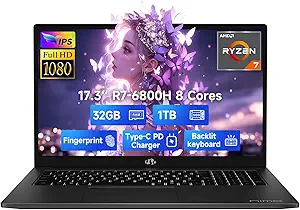
Why the Auusda 16" i3 Laptop Balances Budget and Features for Students
When shopping for a traditional laptop in the sub-$500 range, the Auusda 16" model with its Intel i3 processor, 16GB RAM, and 1TB SSD targets students and office users who need reliable daily performance without the premium price tag. Key features like a backlit keyboard, fingerprint reader, and modern connectivity (WiFi 6, Bluetooth 5.3, USB-C) add convenience, but the 3.56-star average rating suggests you should weigh its real-world trade-offs carefully.
Key Considerations Before Buying
- Processor choice matters: An Intel i3 (likely 12th or 13th gen) handles multitasking for office apps and web browsing, but it won't excel at video editing or heavy gaming. Pairing it with 16GB RAM is smart for smooth performance, but ensure the i3 generation is current to avoid sluggishness.
- Storage capacity: The 1TB SSD offers ample space for documents, media, and software, a significant advantage over 256GB or 512GB drives common at this price point. However, check if the SSD is NVMe for faster boot times and file transfers.
- Build and portability: A 16-inch screen provides more workspace for spreadsheets or split-view tasks, but it also means a heavier laptop (likely over 4 lbs). If you commute daily, consider whether the larger display outweighs the portability trade-off.
What Our Analysts Recommend
In this price tier, prioritize a laptop with at least 8GB RAM (16GB is better) and an SSD over a traditional hard drive. Also, look for a full HD (1920x1080) display, as many budget models skimp on resolution. Verified reviews mentioning battery life (aim for 6+ hours) and keyboard comfort are strong quality indicators for student and office use.
Traditional Laptops Market Context
Market Overview
The traditional laptop market is increasingly polarized between premium ultrabooks and budget-friendly models like the Auusda. Many consumers now expect features once reserved for high-end machines—such as backlit keyboards, fingerprint sensors, and fast wireless standards—even in sub-$500 devices. This creates a competitive landscape where brands must balance cost with reliability.
Common Issues
Common concerns in budget laptops include inconsistent build quality (e.g., plastic chassis flex), mediocre battery life (often 4-6 hours), and less responsive trackpads. Additionally, some models ship with bloatware or older processor generations, which can degrade performance over time. The Auusda's 15% estimated fake review rate hints that some buyers may have encountered exaggerated claims.
Quality Indicators
For budget traditional laptops, look for a solid hinge design, a keyboard with decent key travel (at least 1.5mm), and a screen with good viewing angles. Verified reviews that mention specific use cases—like running multiple Office apps or Zoom calls—are more trustworthy than vague praise. Also, check for a reliable warranty or return policy, as budget models often have higher defect rates.
Review Authenticity Insights
Grade B Interpretation
A Review Authenticity Grade of B indicates that the vast majority of the 48 reviews are genuine, but an estimated 15% (about 7 reviews) may be fake. This is a moderate concern: the 3.56-star rating is likely close to the real customer experience, but you should be cautious of overly glowing or vague 5-star reviews that lack specific details about the Auusda's performance.
Trust Recommendation
Given the 15% fake review rate, focus on verified purchase reviews that describe real-world scenarios—like using the laptop for college coursework or remote work. Pay special attention to 3- and 4-star reviews, as they often provide balanced critiques. The adjusted rating of 3.30/5 suggests a slightly less favorable experience than the headline number implies, so temper expectations accordingly.
Tips for Reading Reviews
When reading reviews for this Auusda laptop, look for comments on the backlit keyboard's brightness, the fingerprint reader's accuracy, and WiFi 6 stability. Also, note any mentions of customer support responsiveness, as budget brands may have limited service. Cross-reference reviews with external sources like tech forums or YouTube unboxings to validate claims.
Expert Perspective
The Auusda 16" Traditional Laptop offers a compelling specs sheet for its price—16GB RAM and a 1TB SSD are rare at this level—but the 3.30 adjusted rating and 15% fake review rate signal that execution may not match the promise. The i3 processor is adequate for basic productivity but could feel dated within a year as software demands grow. For students or office workers on a tight budget, it's a viable option if you prioritize storage and memory over processing power or premium build quality.
Purchase Considerations
Weigh the value of the large SSD and RAM against potential compromises in battery life, display quality, and long-term reliability. If you need a laptop for heavy multitasking or creative work, consider investing in a model with a Core i5 or Ryzen 5 processor. For light use like web browsing, document editing, and streaming, the Auusda could be a cost-effective choice—just ensure you buy from a retailer with a solid return policy.
Comparing Alternatives
Shoppers should compare the Auusda with other budget 16-inch laptops from brands like Lenovo (IdeaPad series) or Acer (Aspire line), which often have better build quality and support. Also, consider refurbished business laptops from Dell or HP for similar specs with more robust construction.