Choosing a Multi-Device Ergonomic Mouse That Actually Fits Your Hand
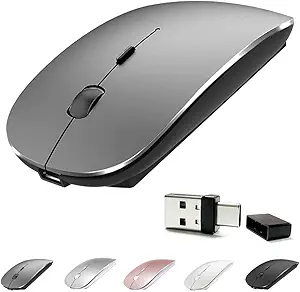
The Philips Ergonomic Wireless Mouse targets a specific kind of buyer: someone who juggles multiple devices, wants quiet clicks, and needs right-handed comfort with side-scroll convenience. Before buying, understand how its multi-device Bluetooth and USB-A/C connectivity, 5-level DPI, and rechargeable design compare to your daily workflow.
Key Considerations Before Buying
- Connectivity flexibility matters: this mouse pairs via Bluetooth and includes both USB-A and USB-C receivers or cables, so it works across laptops, Macs, and PCs without dongle hunting. Confirm your primary devices support Bluetooth or have the right port.
- Ergonomic shape is not one-size-fits-all: the right-handed contour and side scroll are designed for medium-to-large hands, so small-handed users may find it bulky. Check the dimensions against your current mouse.
- Silent clicks and side scroll are productivity features, not gaming specs: the 5-level DPI adjustment tops out at everyday sensitivity, not high-speed gaming. If you need ultra-low latency, look elsewhere.
What Our Analysts Recommend
Prioritize build quality and battery life: a rechargeable mouse should hold charge for weeks, not days, and the buttons should feel consistent after months of use. Look for reviews that mention long-term durability, Bluetooth pairing stability, and whether the side scroll works across apps. A good ergonomic mouse also has a natural wrist angle and doesn't require a firm grip to stay in place.
Mice Market Context
Market Overview
The wireless mouse market is saturated with budget options, but multi-device ergonomic models with USB-C and silent clicks occupy a premium niche. Philips leverages its brand trust in peripherals, though it competes with Logitech and Microsoft in this space. Rechargeable batteries and cross-platform compatibility are now expected at this price point.
Common Issues
Common complaints in this category include Bluetooth dropouts when switching between devices, scroll wheels that become noisy or unresponsive, and ergonomic shapes that cause wrist strain for some users. Rechargeable mice often suffer from degraded battery capacity after a year, and USB-C ports can loosen over time.
Quality Indicators
A quality ergonomic mouse has a solid, non-creaky shell, smooth-gliding feet, and buttons that don't wobble. Check for a stable Bluetooth connection with minimal lag, and a battery that lasts at least a month per charge. Side scroll should be programmable or at least work smoothly in browsers and spreadsheets.
Review Authenticity Insights
Grade B Interpretation
A Grade B authenticity rating with an estimated 15% fake reviews means most reviews are genuine, but you should still be cautious. The adjusted rating of 4.10 versus the raw 4.44 suggests that suspicious reviews may be inflating the score slightly. This is common for mid-tier electronics with a strong brand name.
Trust Recommendation
Trust the detailed reviews that mention specific use cases, hand size, and long-term experience. Ignore generic praise and check the 3-star reviews for balanced pros and cons. Since 15% may be fake, look for patterns like repeated phrases or reviewers with only one review.
Tips for Reading Reviews
For this mouse, focus on reviews that discuss Bluetooth switching between devices, battery life after months of use, and comfort during long work sessions. Sort by 'Recent' to see if quality has changed over time. Pay attention to complaints about the side scroll or click noise, as these are common pain points.
Expert Perspective
The Philips Ergonomic Wireless Mouse is a solid choice for right-handed professionals who need a quiet, multi-device mouse with side scroll and rechargeable convenience. Its 4.10 adjusted rating reflects generally positive experiences, though the 15% fake review estimate means you should weigh genuine critiques. The USB-A/C flexibility and 5-level DPI make it versatile for office and home setups. However, it's not for gamers or left-handed users.
Purchase Considerations
Weigh the ergonomic fit for your hand size and whether you value silent clicks over tactile feedback. Consider if you need true multi-device switching (e.g., between a work laptop and personal Mac) and if the rechargeable battery is a plus over disposable AAs. If you have small hands or need high-precision gaming, this may not be ideal.
Comparing Alternatives
Before buying, compare with similar ergonomic multi-device mice from Logitech and Microsoft, especially for hand size and software customization. Read side-by-side reviews to see which fits your grip style and connectivity needs best.