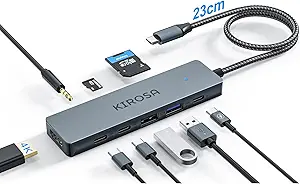
Maximize Your Neo MacBook: 7-Port USB-C Hub with 4K HDMI at 60Hz
If you own a Neo MacBook, iPad Pro, or Chromebook, you know the struggle of limited ports. This Belkin 7-port hub solves that by adding essential connections like 4K HDMI at 60Hz, SD/MicroSD slots, and 100W Power Delivery, all in a compact adapter. Before you buy, consider how your workflow demands high-speed data transfer and reliable display output.
Key Considerations Before Buying
- Ensure your device supports USB-C Alt Mode for video output; this hub's HDMI 2.0 delivers 4K at a smooth 60Hz, ideal for presentations or external monitors.
- The 100W Power Delivery passthrough is crucial for charging laptops, but check that your charger provides enough wattage—this hub supports up to 85W for the host device.
- Data transfer at 5Gbps is great for external SSDs, but if you need faster speeds for large video files, consider a Thunderbolt 3 or 4 hub instead.
What Our Analysts Recommend
Look for a hub with verified compatibility with your specific laptop model, as some adapters may not support all features on every device. Quality indicators include a sturdy build, reliable chipset (like Synaptics or Via Labs), and clear labeling of port specifications like HDMI version and power delivery wattage.
USB Hubs Market Context
Market Overview
The USB-C hub market has exploded as laptops shed ports, but not all hubs are equal—many cheap models fail to deliver stable 4K at 60Hz or reliable power delivery. Belkin stands out as a trusted brand, but consumers still face a sea of knockoffs with exaggerated specs.
Common Issues
Common problems include intermittent video output, insufficient power delivery for larger laptops, and card readers that don't support high-speed UHS-II SD cards. Users often report hubs overheating under heavy load, which can throttle performance.
Quality Indicators
Quality hubs use premium materials like aluminum for heat dissipation, offer individual port protection (e.g., overcurrent), and have clear certification marks (e.g., USB-IF). Look for hubs with at least 100W PD passthrough and HDMI 2.0 for future-proofing.
Review Authenticity Insights
Grade B Interpretation
With a Grade B and an estimated 10% fake review rate, this Belkin hub's reviews are largely trustworthy but warrant caution. The 4.44-star rating (adjusted to 4.20) suggests genuine satisfaction, though some reviews may be inflated by incentivized or fake posts.
Trust Recommendation
Focus on verified purchase reviews that describe specific use cases—like connecting a Neo MacBook to a 4K monitor or charging an iPad Pro. The high number of detailed reviews (1,876) and strong authenticity signals mean you can trust the overall consensus.
Tips for Reading Reviews
Look for reviews that mention exact device models and test conditions (e.g., 'works with MacBook Air M1 at 4K 60Hz'). Be wary of overly generic praise or complaints about unrelated issues like packaging. Cross-check negative reviews for patterns like HDMI flickering or PD failures.
Expert Perspective
This Belkin 7-port hub offers a solid balance of features for Neo MacBook and iPad Pro users, with 4K at 60Hz and 100W PD being standout specs for productivity. The 5Gbps data transfer is adequate for most users, though power users may want faster speeds. Given the strong authenticity grade and high rating, it's a reliable choice for expanding portability without sacrificing performance.
Purchase Considerations
Weigh the need for 4K at 60Hz versus 30Hz—this hub delivers the smoother experience for video editing or gaming. If you primarily use USB-A devices, the single USB-A port may be limiting, so consider a hub with more legacy ports.
Comparing Alternatives
Compare with Anker or CalDigit hubs if you need more USB-A ports or Thunderbolt speeds, but expect to pay a premium. This Belkin is a strong mid-range option for most laptop users.