
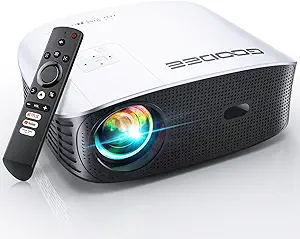
![[10,000+ Licensed Apps/Live TV/3500ANSI/65W DoIby Audio] Smart 4K-Projector with WiFi and Bluetooth, Goiaey Outdoor Projector with 360°Stand, HDR10+, Auto Focus, Auto Keystone, Short Throw Proyector](https://m.media-amazon.com/images/I/71BMgIXY5LL._AC_SL1200_.jpg)
Smart 4K Projectors: Balancing Brightness, App Ecosystems, and Setup Convenience
The Goiaey projector positions itself as an all-in-one entertainment hub with its 10,000+ licensed apps and 3500 ANSI lumens. Buyers should understand that 'smart' features like auto-focus and keystone correction are now standard, but their implementation varies significantly. This model's inclusion of a 360° stand and short-throw capability specifically targets flexible, space-conscious setups.
Key Considerations Before Buying
- The advertised 3500 ANSI lumens is a critical spec for overcoming ambient light, but real-world performance depends on the projector's native contrast and HDR10+ processing, which can vary.
- A 'licensed' app store with 10,000+ apps suggests a robust Android TV or similar OS, but check for pre-installed bloatware and the ease of accessing mainstream services like Netflix and Disney+.
- The integrated 65W Dolby Audio system and 360° stand promise an all-in-one solution, but audiophiles may still prefer external speakers, and the stand's stability with the projector's weight is a practical concern.
What Our Analysts Recommend
For smart projectors, prioritize reviews that detail the user interface speed, app loading times, and wireless casting reliability. With auto-correction features, seek feedback on accuracy—does the auto-keystone create a perfectly rectangular image, or does it require manual tweaking? Genuine reviews often mention specific content they've watched to judge the 4K HDR picture quality.
Video Projectors Market Context
Market Overview
The sub-$1000 smart projector market is fiercely competitive, with brands often emphasizing ANSI lumen ratings and smart features over pure image fidelity. Products like this Goiaey model compete by bundling accessories (like the stand) and promoting 'hands-off' setup technologies to appeal to non-enthusiasts.
Common Issues
Common pitfalls include inflated brightness claims, poor native contrast that washes out HDR content, and smart OSes that are underpowered, leading to laggy menus. Wi-Fi connectivity for streaming can also be inconsistent in projectors that prioritize compact form factors over antenna strength.
Quality Indicators
Look for consistent user reports on fan noise levels during movie playback and the accuracy of the auto-focus over time. A quality short-throw lens will project a large image from a short distance without severe distortion at the edges. Detailed discussions of the color accuracy out of the box are a strong positive signal.
Review Authenticity Insights
Grade B Interpretation
A 'B' grade with an 11% estimated fake review rate indicates a generally trustworthy review pool with a minor presence of potentially incentivized feedback. The high adjusted rating of 4.60/5 from authentic reviews suggests strong real-world satisfaction, but shoppers should remain slightly cautious of overly vague 5-star praise.
Trust Recommendation
Focus on the 4- and 3-star reviews for this product, as they are most likely to detail specific trade-offs, such as the performance of the built-in speakers versus the picture quality. The high authentic rating suggests the core feature set—brightness, smart OS, auto-setup—likely delivers as advertised for most users.
Tips for Reading Reviews
For this projector, prioritize reviews that mention using it in specific scenarios: outdoors at dusk, in a living room with lights on, or for gaming. Authentic reviews often note quirks, like the time it takes for the auto-focus to engage or which specific apps work flawlessly.
Expert Perspective
The Goiaey projector's specifications paint it as a compelling value-centric bundle, particularly for users seeking a simplified, all-inclusive setup. The 3500 ANSI lumens, if accurate, is a standout brightness for its class, aimed at defeating ambient light. The combination of a licensed app ecosystem, Dolby Audio, and the included 360° stand reduces initial accessory costs. However, the expert-adjusted rating of 4.60, while excellent, hints that a small subset of users may encounter issues typical of the category, such as software glitches or less-than-perfect auto-correction.
Purchase Considerations
Weigh the convenience of the bundled stand and automated setup against the potential need for a premium projection screen to fully realize the 4K HDR10+ benefits. This model is best for buyers who value plug-and-play simplicity and a bright image for mixed-use environments over absolute, reference-grade cinematic image quality.
Comparing Alternatives
Shoppers should compare the real-world brightness and app performance against established brands like BenQ's smart projector line or Anker's Nebula models, which may offer different trade-offs in OS refinement and lens quality.

![CLOKOWE Mini Projector with WiFi and Bluetooth - [Built-in Apps] Smart Portable Projector with 180° Rotation, Auto Keystone, Support 1080P, Compatible with HDMI/USB/TV Stick/Smartphone/Laptop](https://m.media-amazon.com/images/I/71aHwv3EZ0L.__AC_SX300_SY300_QL70_FMwebp_.jpg)


